

私的AI研究会 > Tesseract3
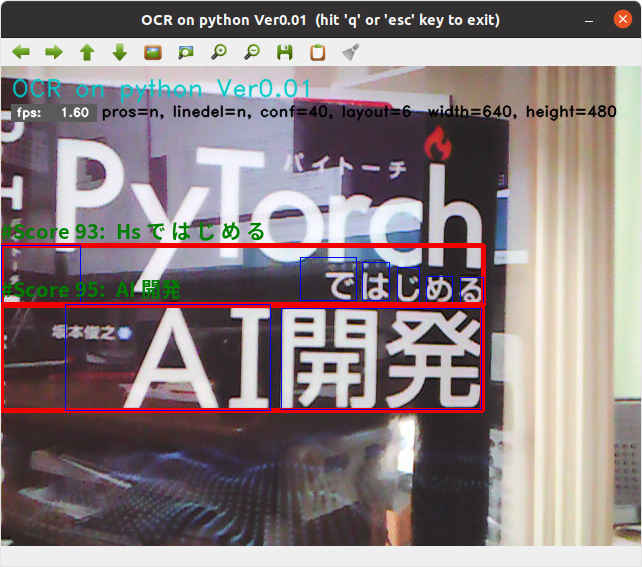
実用的な AI開発に向けて、文字認識エンジン「Tesseract」(テッセラクト)を使用した「OCR アプリケーション」を開発する。
今回開発した OCR テストプログラム「ocrtest4.py」 を拡張する。
| コマンドオプション | デフォールト設定 | 意味 |
| -h, --help | ヘルプ表示 | |
| -i, --image | test1.png | 入力画像ファイル |
| -l, --language | jpn | 言語 |
| -c, --confidence | 40 | 有効とする信頼性スコア値 |
| -p, --process | n | 前処理(グレイスケール変換/2値化)フラグ (y/n) |
| -d, --linedel | n | 前処理(罫線消去)フラグ (y/b/n) b=バックグラウンド実行 |
| --layout | 6 | tesseractレイアウト(0-13) |
| --maxsize | 0 | 処理画像の最大ピクセル(0=リサイズしない) |
| --log | n | ログ出力フラグ (y/s/n) s=詳細ログ出力 |
| -t, --title | y | タイトル表示 (y/n) |
| -s, --speed | y | スピード計測表示 (y/n) |
| -o, --out | non | 処理結果を出力する場合のファイルパス |
(py37) $ python3 tryocr.py -h

--- OCR on python Ver0.01 ---
 OpenCV version 4.5.2

usage: tryocr.py [-h] [-i IMAGE_FILE] [-l LANGUAGE] [-c CONFIDENCE]
                 [-p PROCESS] [-d LINEDEL] [--layout LAYOUT]
                 [--maxsize MAXSIZE] [--log LOG] [-t TITLE] [-s SPEED]
                 [-o IMAGE_OUT]

optional arguments:
  -h, --help            show this help message and exit
  -i IMAGE_FILE, --image IMAGE_FILE
                        Absolute path to image file or cam for camera stream.
                        Default value is 'test1.png'
  -l LANGUAGE, --language LANGUAGE
                        Language. Default value is 'jpn'
  -c CONFIDENCE, --confidence CONFIDENCE
                        Confidence Level Default value is 40
  -p PROCESS, --prosess PROCESS
                        Preprocessing flag.(y/n) Default value is 'n'
  -d LINEDEL, --linedel LINEDEL
                        Line delete flag.(y/b/n) Default value is 'n'
  --layout LAYOUT       Tesseract layout Default value is 6
  --maxsize MAXSIZE     Image max size (free=0). Default value is 0
  --log LOG             Log output flag.(y/s/n) Default value is 'n'
  -t TITLE, --title TITLE
                        Program title flag.(y/n) Default value is 'y'
  -s SPEED, --speed SPEED
                        Speed display flag.(y/n) Default value is 'y'
  -o IMAGE_OUT, --out IMAGE_OUT
                        Processed image file path. Default value is 'non'
# -*- coding: utf-8 -*-
##------------------------------------------
## OCR on python Ver0.01
##   with tesseract & PyOCR
##
##               2021.11.14 Masahiro Izutsu
##------------------------------------------
## tryocr.py

# Color Escape Code
GREEN = '\033[1;32m'
RED = '\033[1;31m'
NOCOLOR = '\033[0m'
YELLOW = '\033[1;33m'

# 定数定義
WINDOW_MAX = 1280         # 最大表示サイズ
LINE_WORD_BOX_COLOR = (0, 0, 240)
WORD_BOX_COLOR = (255, 0, 0)
CONTENTS_COLOR = (0, 128, 0)
from os.path import expanduser
DEF_INPUT_FILE = expanduser('test1.png')

# import処理
from PIL import Image
import sys

import pyocr
import pyocr.builders
import cv2
import argparse
import mylib
import myfunction
import numpy as np
import mylib_gui

# タイトル・バージョン情報
title = 'OCR on python Ver0.01'
print(GREEN)
print('--- {} ---'.format(title))
print(' OpenCV version {} '.format(cv2.__version__))
print(NOCOLOR)

# Parses arguments for the application
def parse_args():
    parser = argparse.ArgumentParser()
    parser.add_argument('-i', '--image', metavar = 'IMAGE_FILE', type = str, default = DEF_INPUT_FILE,
            help = 'Absolute path to image file or cam for camera stream. Default value is \'' + DEF_INPUT_FILE + '\'')
    parser.add_argument('-l', '--language', metavar = 'LANGUAGE',
            default = 'jpn',
            help = 'Language. Default value is \'jpn\'')
    parser.add_argument('-c', '--confidence', metavar = 'CONFIDENCE',
            default = 40,
            help = 'Confidence Level Default value is 40')
    parser.add_argument('-p', '--prosess', metavar = 'PROCESS',
            default = 'n',
            help = 'Preprocessing flag.(y/n) Default value is \'n\'')
    parser.add_argument('-d', '--linedel', metavar = 'LINEDEL',
            default = 'n',
            help = 'Line delete flag.(y/b/n) Default value is \'n\'')
    parser.add_argument('--layout', metavar = 'LAYOUT',
            default = 6,
            help = 'Tesseract layout Default value is 6')
    parser.add_argument('--maxsize', metavar = 'MAXSIZE',
            default = 0,
            help = 'Image max size (free=0). Default value is 0')
    parser.add_argument('--log', metavar = 'LOG',
            default = 'n',
            help = 'Log output flag.(y/s/n) Default value is \'n\'')
    parser.add_argument('-t', '--title', metavar = 'TITLE',
            default = 'y',
            help = 'Program title flag.(y/n) Default value is \'y\'')
    parser.add_argument('-s', '--speed', metavar = 'SPEED',
            default = 'y',
            help = 'Speed display flag.(y/n) Default value is \'y\'')
    parser.add_argument('-o', '--out', metavar = 'IMAGE_OUT',
            default = 'non',
            help = 'Processed image file path. Default value is \'non\'')
    return parser

# モデル基本情報の表示
def display_info(image, lang, prosess, linedel, conf, layout, maxsize, log, titleflg, speedflg, outpath):
    print(YELLOW + title + ': Starting application...' + NOCOLOR)
    print('   - ' + YELLOW + 'Image File   : ' + NOCOLOR, image)
    print('   - ' + YELLOW + 'Language     : ' + NOCOLOR, lang)
    print('   - ' + YELLOW + 'Preprocessing: ' + NOCOLOR, prosess)
    print('   - ' + YELLOW + 'Line delete  : ' + NOCOLOR, linedel)
    print('   - ' + YELLOW + 'Confidence   : ' + NOCOLOR, conf)
    print('   - ' + YELLOW + 'Layout       : ' + NOCOLOR, layout)
    print('   - ' + YELLOW + 'Max size     : ' + NOCOLOR, maxsize)
    print('   - ' + YELLOW + 'Log frag     : ' + NOCOLOR, log)
    print('   - ' + YELLOW + 'Program Title: ' + NOCOLOR, titleflg)
    print('   - ' + YELLOW + 'Speed flag   : ' + NOCOLOR, speedflg)
    print('   - ' + YELLOW + 'Processed out: ' + NOCOLOR, outpath)

# 画像の種類を判別する
#   戻り値: 'jeg''png'... 画像ファイル
#           'None'        画像ファイル以外 (動画ファイル)
#           'NotFound'    ファイルが存在しない
import imghdr
def is_pict(filename):
    try:
        imgtype = imghdr.what(filename)
    except FileNotFoundError as e:
        imgtype = 'NotFound'
    return str(imgtype)

# 画像の前処理
def img_preproces(img):
    # グレイスケール演算
    im_gray = 0.299 * img[:,:,2] + 0.587 * img[:,:,1] + 0.114 * img[:,:,0]
    im_gray8 = np.uint8(im_gray)
    # 大津アルゴリズムでは thresh, maxvalは無視されてしきい値は自動で設定される
    ret, im_gray8 = cv2.threshold(im_gray8, thresh=0, maxval=255, type=cv2.THRESH_BINARY + cv2.THRESH_OTSU)
    # すべてのチャンネル
    img[:,:,0] = im_gray8
    img[:,:,1] = im_gray8
    img[:,:,2] = im_gray8
    return img

# 罫線消去
def delete_line(img):
    # 自動パラメータの計算
    h, w = img.shape[:2]
    thr = 100
    lln = int(w/18)
    if lln < 44:
        lln = 44
    gap = int(w/1000) + 4
    print('\nThreshhold={}, MinLineLength={}, MaxLineGap={},  width={}, height={}'.format(thr, lln, gap, w, h))

    imgw = img.copy()
    # グレースケール
    gray = cv2.cvtColor(imgw, cv2.COLOR_BGR2GRAY)

    # 2値化
    ret, gray = cv2.threshold(gray, thresh=0, maxval=255, type=cv2.THRESH_BINARY + cv2.THRESH_OTSU)

    ## 反転 ネガポジ変換
    gray = cv2.bitwise_not(gray)
    lines = cv2.HoughLinesP(gray, rho=1, theta=np.pi/360, threshold=thr, minLineLength=lln, maxLineGap=gap)

    if lines is not None:
        for line in lines:
            x1, y1, x2, y2 = line[0]

            # 線を消す(白で線を引く)
            imgw = cv2.line(imgw, (x1,y1), (x2,y2), (255,255,255), 3)
    return imgw

# ** main関数 **
def main():
    # 日本語フォント指定
    fontPIL = 'NotoSansCJK-Bold.ttc'

    # Argument parsing and parameter setting
    ARGS = parse_args().parse_args()
    input_stream = ARGS.image
    lang = ARGS.language
    titleflg = ARGS.title
    speedflg = ARGS.speed
    linedel = ARGS.linedel
    conf = int(ARGS.confidence)
    layout = int(ARGS.layout)
    maxsize = int(ARGS.maxsize)
    logflg = ARGS.log
    prosess = ARGS.prosess
    if ARGS.image.lower() == "cam" or ARGS.image.lower() == "camera":
        input_stream = 0
        isstream = True
    else:
        filetype = is_pict(input_stream)
        isstream = filetype == 'None'
        if (filetype == 'NotFound'):
            print(RED + "\ninput file Not found." + NOCOLOR)
            quit()
    outpath = ARGS.out

    # 情報表示
    display_info(input_stream, lang, prosess, linedel, conf, layout, maxsize, logflg, titleflg, speedflg, outpath)

    # OCR
    tools = pyocr.get_available_tools()
    if len(tools) == 0:
        print(RED + "\nOCR tool Not found." + NOCOLOR)
        quit()
    tool = tools[0]

    # 入力準備
    if (isstream):
        # カメラ
        cap = cv2.VideoCapture(input_stream)
        ret, frame = cap.read()
        if ret == False:
            print(RED + "\nUnable to video camera." + NOCOLOR)
            quit()
        loopflg = cap.isOpened()
    else:
        # 画像ファイル読み込み
        frame = cv2.imread(input_stream)
        if frame is None:
            print(RED + "\nUnable to read the input." + NOCOLOR)
            quit()

        if maxsize > 300:
            # アスペクト比を固定してリサイズ
            img_h, img_w = frame.shape[:2]
            if (img_w > img_h):
                if (img_w > maxsize):
                    height = round(img_h * (maxsize / img_w))
                    frame = cv2.resize(frame, dsize = (maxsize, height))
            else:
                if (img_h > maxsize):
                    width =  round(img_w * (maxsize / img_h))
                    frame = cv2.resize(frame, dsize = (width, maxsize))
        loopflg = True   # 1回ループ

    # メッセージ作成
    h, w = frame.shape[:2]
    st_pram = 'pros={}, linedel={}, conf={}, layout={}  width={}, height={}'.format(prosess, linedel, conf, layout, w, h)

    # 処理結果の記録 step1
    if (outpath != 'non'):
        if (isstream):
            fps = int(cap.get(cv2.CAP_PROP_FPS))
            out_w = int(cap.get(cv2.CAP_PROP_FRAME_WIDTH))
            out_h = int(cap.get(cv2.CAP_PROP_FRAME_HEIGHT))
            fourcc = cv2.VideoWriter_fourcc('m', 'p', '4', 'v')
            outvideo = cv2.VideoWriter(outpath, fourcc, fps, (out_w, out_h))

    # 計測値初期化
    fpsWithTick = mylib.fpsWithTick()
    frame_count = 0
    fps_total = 0
    fpsWithTick.get()                       # fps計測開始

    # メインループ
    while (loopflg):
        if frame is None:
            print(RED + "\nUnable to read the input." + NOCOLOR)
            quit()


        # 画像の前処理
        if (prosess == 'y'):        # モノクロ・2値化 フォアグラウンド処理
            frame = img_preproces(frame)

        if (linedel == 'y'):         # 罫線除去 フォアグラウンド処理
            frame = delete_line(frame)
            frame_pl = cv2.cvtColor(frame, cv2.COLOR_RGB2BGR)
        elif (linedel == 'b'):   # 罫線除去 バックグラウンド処理
            frame_pl = delete_line(frame)
            frame_pl = cv2.cvtColor(frame_pl, cv2.COLOR_RGB2BGR)
        else:                       # 罫線除去なし
            frame_pl = cv2.cvtColor(frame, cv2.COLOR_RGB2BGR)

        # PILのイメージにする
        img = Image.fromarray(frame_pl)

        # 文字認識処理
        line_and_word_boxes = tool.image_to_string(img, lang=lang, builder=pyocr.builders.LineBoxBuilder(tesseract_layout=layout))

        for lw_box in line_and_word_boxes:
            content = lw_box.content
            position = lw_box.position
            box = []
            txt = []
            n = 0
            for lw_box in lw_box.word_boxes:
                txt.append(lw_box.content)
                box.append(lw_box.position)
                n = n+1
            confidence = lw_box.confidence

            if confidence > conf and len(content) > 0:
                xmin = position[0][0]
                ymin = position[0][1]
                xmax = position[1][0]
                ymax = position[1][1]
                cv2.rectangle(frame, (xmin, ymin), (xmax, ymax), color=LINE_WORD_BOX_COLOR, thickness=3)
                for nm in range(n):
                    cv2.rectangle(frame, (box[nm][0][0], box[nm][0][1]), (box[nm][1][0], box[nm][1][1]), color=WORD_BOX_COLOR, thickness=1)
                st_score = '#Score{:3}:  '.format(confidence) + content
                myfunction.cv2_putText(img = frame,
                               text = st_score,
                               org = (xmin, ymin - 4),
                               fontFace = fontPIL,
                               fontScale = 20,
                               color = CONTENTS_COLOR,
                               mode = 0)

                if (logflg == 'y') or (logflg == 's'):
                    print('\ncontents: ', content)
                    print('position: ', position)
                    print('confidence: ', confidence)

                    if (logflg == 's'):
                        for nm in range(n):
                            print('  {: <8}'.format(txt[nm]), ' ', box[nm])

        # FPSを計算する
        fps = fpsWithTick.get()
        st_fps = 'fps: {:>6.2f}'.format(fps)
        if (speedflg == 'y'):
            cv2.rectangle(frame, (10, 38), (95, 55), (90, 90, 90), -1)
            cv2.putText(frame, st_fps, (15, 50), cv2.FONT_HERSHEY_DUPLEX, fontScale=0.4, color=(255, 255, 255), lineType=cv2.LINE_AA)

        # タイトル描画
        if (titleflg == 'y'):
            cv2.putText(frame, title, (10, 30), cv2.FONT_HERSHEY_DUPLEX, fontScale=0.8, color=(200, 200, 0), lineType=cv2.LINE_AA)
        cv2.putText(frame, st_pram, (100, 50), cv2.FONT_HERSHEY_DUPLEX, fontScale=0.5, color=(0, 0, 0), lineType=cv2.LINE_AA)

        # 画像表示
        window_name = title + "  (hit 'q' or 'esc' key to exit)"
        cv2.namedWindow(window_name, cv2.WINDOW_AUTOSIZE | cv2.WINDOW_GUI_NORMAL)
        cv2.imshow(window_name, frame)

        # 処理結果の記録 step2
        if (outpath != 'non'):
            if (isstream):
                outvideo.write(frame)
            else:
                cv2.imwrite(outpath, frame)

        # 何らかのキーが押されたら終了
        breakflg = False
        while(True):
            key = cv2.waitKey(1)
            if key == 27 or key == 113:                          # 'esc' or 'q'
                breakflg = True
                break
            if (isstream):
                break
            if not mylib_gui._is_visible(window_name):           # 'Close' button
                break

        if ((breakflg == False) and isstream):
            # 次のフレームを読み出す
            ret, frame = cap.read()
            if ret == False:
                break
            loopflg = cap.isOpened()
        else:
            loopflg = False

    # 終了処理
    if (isstream):
        cap.release()

        # 処理結果の記録 step3
        if (outpath != 'non'):
            if (isstream):
                outvideo.release()

    cv2.destroyAllWindows()

    print('\nFPS average: {:>10.2f}'.format(fpsWithTick.get_average()))
    print('\n Finished.')

# main関数エントリーポイント(実行開始)
if __name__ == "__main__":
    sys.exit(main())
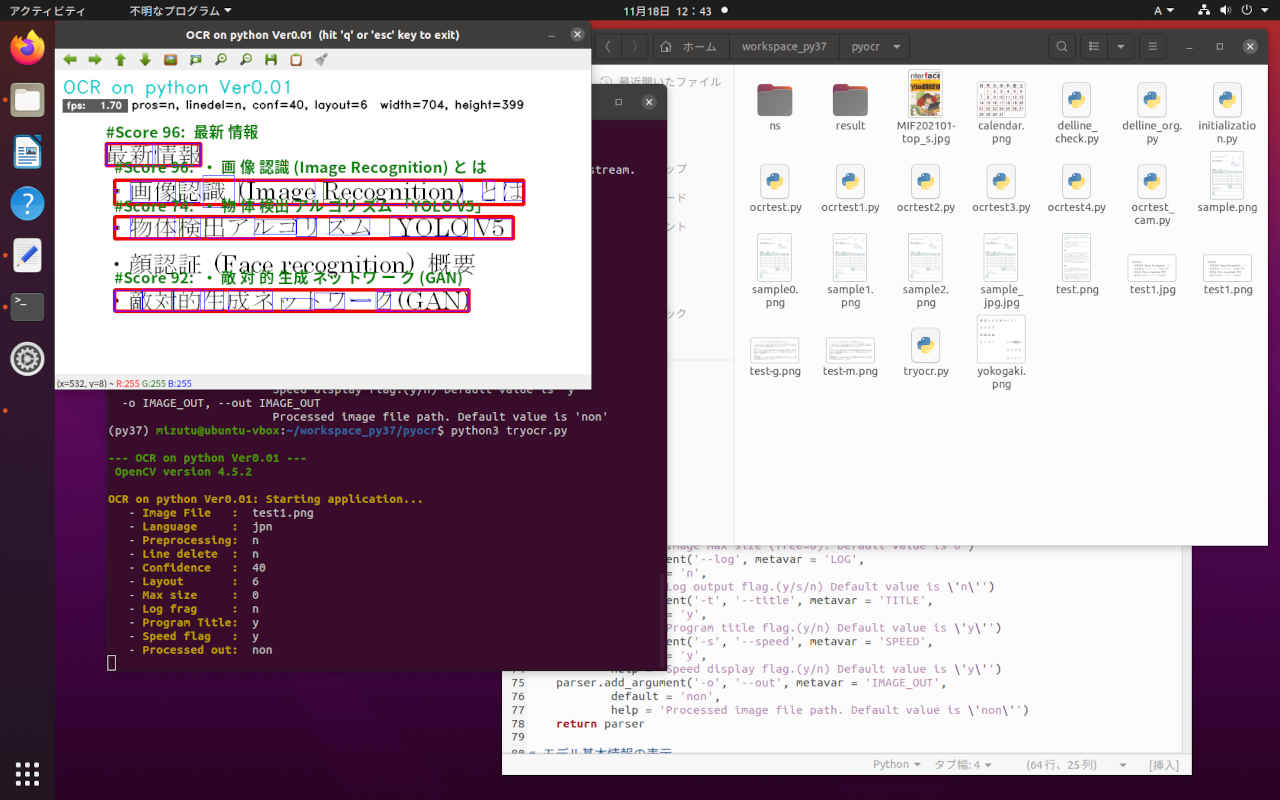
(py37) cd ~/workspace_py37/pyocr/
(py37) $ python3 tryocr.py

--- OCR on python Ver0.01 ---
 OpenCV version 4.5.2

OCR on python Ver0.01: Starting application...
   - Image File   :  test1.png
   - Language     :  jpn
   - Preprocessing:  n
   - Line delete  :  n
   - Confidence   :  40
   - Layout       :  6
   - Max size     :  0
   - Log frag     :  n
   - Program Title:  y
   - Speed flag   :  y
   - Processed out:  non

FPS average:       1.70

 Finished.
次のステップとして「帳票」画像からそれぞれの項目を切り出して OCRに入力し結果をラベリングするアプリケーションを作成する。
前段階としてのユーザーインターフェイスと GUIを検討する。
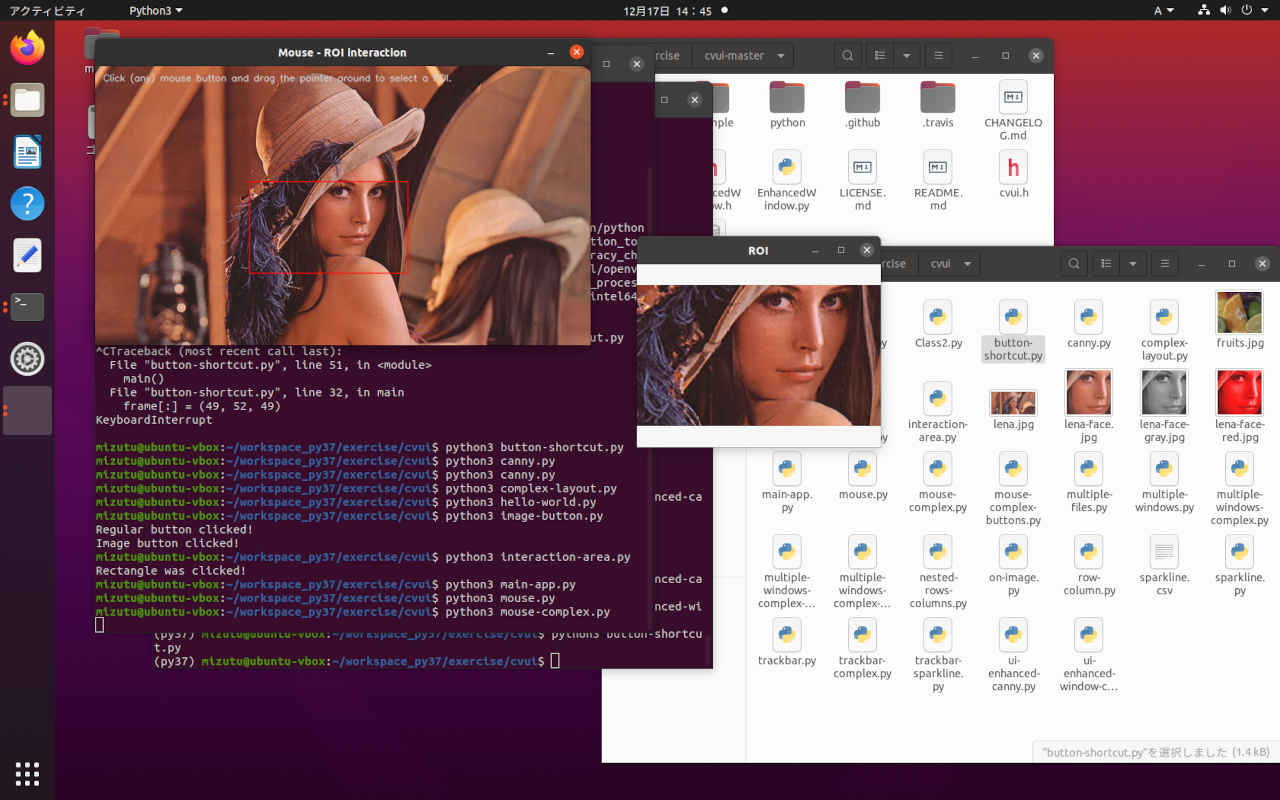
(py37) $ mkdir ~/workspace_py37/tryocr/
(py37) $ cd  ~/workspace_py37/tryocr/
(py37) $ cp ~/workspace_py37/exercise/cvui/mouse-complex.py mouse-complex1.py
# -*- coding: utf-8 -*-
##------------------------------------------
## cvui demo Programe (mouse-complex.py)
##
##               2021.12.19 Masahiro Izutsu
##------------------------------------------
## mouse-complex1.py
#
# This is application uses the mouse API to dynamically create a ROI
# for image visualization.
#
# Copyright (c) 2018 Fernando Bevilacqua <dovyski@gmail.com>
# Licensed under the MIT license.
#

import numpy as np
import cv2
import cvui
import mylib_gui

WINDOW_NAME = 'Original Image'
ROI_WINDOW  = 'Cut-out area'

def main():
    lena = cv2.imread('lena.jpg')
    frame = np.zeros(lena.shape, np.uint8)
    anchor = cvui.Point()
    roi = cvui.Rect(0, 0, 0, 0)
    working = False
    pos1 = 0
    pos2 = 0
    frame_h, frame_w = frame.shape[:2]

    # Init cvui and tell it to create a OpenCV window, i.e. cv.namedWindow(WINDOW_NAME).
    cv2.namedWindow(WINDOW_NAME, flags=cv2.WINDOW_AUTOSIZE | cv2.WINDOW_GUI_NORMAL)
    cvui.init(WINDOW_NAME)

    while (True):
        # Fill the frame with Lena's image
        frame[:] = lena[:]

        # Show the coordinates of the mouse pointer on the screen
        cvui.text(frame, 10, 10, 'Click (any) mouse button and drag the pointer around to select a ROI.')

        # マウス・イベントの照会 cvui.mouse(cvui.DOWN)
        # cvui.DOWN: マウスボタンが押された
        # cvui.UP: マウスボタンを離した
        # cvui.CLICK: マウスボタンのクリック.
        # cvui.IS_DOWN: マウスボタンのドラッグ
        if cvui.mouse(cvui.LEFT_BUTTON, cvui.DOWN):
            # マウスポインタにアンカーを配置
            anchor.x = cvui.mouse().x
            anchor.y = cvui.mouse().y

            # 作業中の通知(作業中はウインドウの更新しない)
            working = True

        if cvui.mouse(cvui.LEFT_BUTTON, cvui.IS_DOWN):
            # 領域を設定
            width = cvui.mouse().x - anchor.x
            height = cvui.mouse().y - anchor.y

            roi.x = anchor.x + width if width < 0 else anchor.x
            roi.y = anchor.y + height if height < 0 else anchor.y
            roi.width = abs(width)
            roi.height = abs(height)

            # 座標とサイズを表示
            cvui.printf(frame, roi.x + 5, roi.y + 5, 0.3, 0xff0000, '(%d,%d)', roi.x, roi.y)
            cvui.printf(frame, cvui.mouse().x + 5, cvui.mouse().y + 5, 0.3, 0xff0000, 'w:%d, h:%d', roi.width, roi.height)

        if cvui.mouse(cvui.UP):
            # 領域指定作業の終了
            working = False

        # 領域内を確認
        lenaRows, lenaCols, lenaChannels = lena.shape
        roi.x = 0 if roi.x < 0 else roi.x
        roi.y = 0 if roi.y < 0 else roi.y
        roi.width = roi.width + lena.cols - (roi.x + roi.width) if roi.x + roi.width > lenaCols else roi.width
        roi.height = roi.height + lena.rows - (roi.y + roi.height) if roi.y + roi.height > lenaRows else roi.height

        # 設定領域をレンダリング
        cvui.rect(frame, roi.x, roi.y, roi.width, roi.height, 0xff0000)

        # ウインドウの更新
        cvui.update()

        # 画面の表示
        cv2.imshow(WINDOW_NAME, frame)
        if pos1 < 10:
            cv2.moveWindow(WINDOW_NAME, 0, 0)
            pos1 = pos1 + 1
        else:
            pos1 = 10

        # 設定領域の表示
        if roi.area() > 0 and working == False:
            lenaRoi = lena[roi.y : roi.y + roi.height, roi.x : roi.x + roi.width]
            cv2.namedWindow(ROI_WINDOW, flags=cv2.WINDOW_AUTOSIZE | cv2.WINDOW_GUI_NORMAL)
            cv2.imshow(ROI_WINDOW, lenaRoi)
            if pos2 < 10:
                cv2.moveWindow(ROI_WINDOW, frame_w + 80, 0)
                pos2 = pos2 + 1
            else:
                pos2 = 10

        key = cv2.waitKey(20)
        if key == 27 or key == 113:
            break;

        if not mylib_gui._is_visible(WINDOW_NAME):
            break

    cv2.destroyAllWindows()

    print('\n Finished.')

if __name__ == '__main__':
    main()
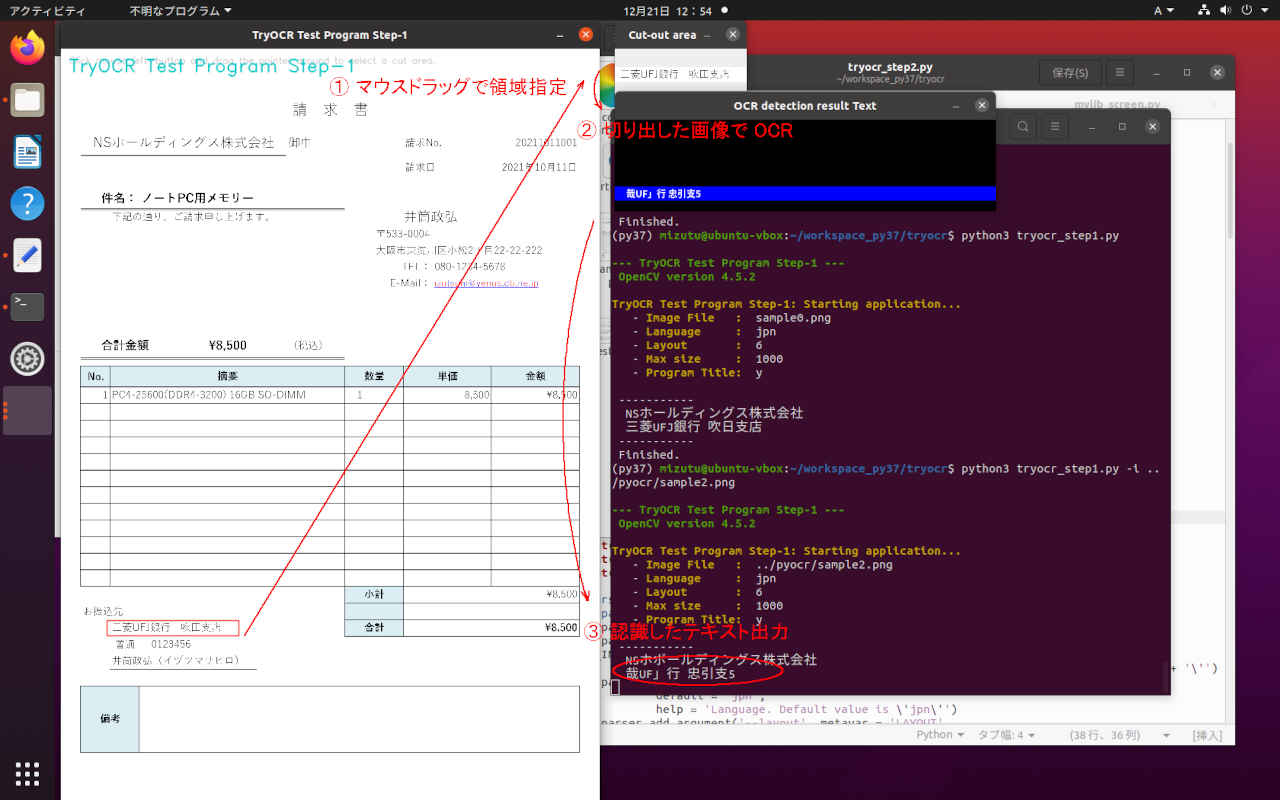
(py37) $ cd ~/workspace_py37/tryocr
(py37) $ python3 tryocr_step1.py

--- TryOCR Test Program Step-1 ---
 OpenCV version 4.5.2

TryOCR Test Program Step-1: Starting application...
   - Image File   :  sample0.png
   - Language     :  jpn
   - Layout       :  6
   - Max size     :  1000
   - Program Title:  y

 -----------
  NSホールディングス株式会社
  三菱UFJ銀行 吹晶支店
 -----------
 Finished.
# -*- coding: utf-8 -*-
##------------------------------------------
## TryOCR Test Programe Step-1
##   with tesseract & PyOCR & cvui
##
##               2021.12.19 Masahiro Izutsu
##------------------------------------------
## tryocr_step1.py

# Color Escape Code
GREEN = '\033[1;32m'
RED = '\033[1;31m'
NOCOLOR = '\033[0m'
YELLOW = '\033[1;33m'

# 定数定義
LINE_WORD_BOX_COLOR = (0, 0, 240)
WORD_BOX_COLOR = (255, 0, 0)
CONTENTS_COLOR = (0, 128, 0)
from os.path import expanduser
DEF_INPUT_FILE = expanduser('sample0.png')

# import処理
from PIL import Image
import sys

import pyocr
import pyocr.builders
import cv2
import cvui
import argparse
import myfunction
import numpy as np
import mylib_gui
import mylib_pros

# タイトル・バージョン情報
title = 'TryOCR Test Program Step-1'
print(GREEN)
print('--- {} ---'.format(title))
print(' OpenCV version {} '.format(cv2.__version__))
print(NOCOLOR)

# Parses arguments for the application
def parse_args():
    parser = argparse.ArgumentParser()
    parser.add_argument('-i', '--image', metavar = 'IMAGE_FILE', type = str, default = DEF_INPUT_FILE,
            help = 'Absolute path to image file. Default value is \'' + DEF_INPUT_FILE + '\'')
    parser.add_argument('-l', '--language', metavar = 'LANGUAGE',
            default = 'jpn',
            help = 'Language. Default value is \'jpn\'')
    parser.add_argument('--layout', metavar = 'LAYOUT',
            default = 6,
            help = 'Tesseract layout Default value is 6')
    parser.add_argument('--maxsize', metavar = 'MAXSIZE',
            default = 1000,
            help = 'Image max size (free=0). Default value is 1000')
    parser.add_argument('-t', '--title', metavar = 'TITLE',
            default = 'y',
            help = 'Program title flag.(y/n) Default value is \'y\'')
    return parser

# モデル基本情報の表示
def display_info(image, lang, layout, maxsize, titleflg):
    print(YELLOW + title + ': Starting application...' + NOCOLOR)
    print('   - ' + YELLOW + 'Image File   : ' + NOCOLOR, image)
    print('   - ' + YELLOW + 'Language     : ' + NOCOLOR, lang)
    print('   - ' + YELLOW + 'Layout       : ' + NOCOLOR, layout)
    print('   - ' + YELLOW + 'Max size     : ' + NOCOLOR, maxsize)
    print('   - ' + YELLOW + 'Program Title: ' + NOCOLOR, titleflg)

def frame_resize(image, maxsize):
    if maxsize > 300:
        # アスペクト比を固定してリサイズ
        img_h, img_w = image.shape[:2]
        if (img_w > img_h):
            if (img_w > maxsize):
                height = round(img_h * (maxsize / img_w))
                image = cv2.resize(image, dsize = (maxsize, height))
        else:
            if (img_h > maxsize):
                width =  round(img_w * (maxsize / img_h))
                image = cv2.resize(image, dsize = (width, maxsize))
    return image

WINDOW_NAME = title
ROI_WINDOW  = 'Cut-out area'
ROI_POPUP   = 'OCR detection result Text'

# ** main関数 **
def main():
    # 日本語フォント指定
    fontPIL = 'NotoSansCJK-Bold.ttc'

    # Argument parsing and parameter setting
    ARGS = parse_args().parse_args()
    input_stream = ARGS.image
    lang = ARGS.language
    layout = int(ARGS.layout)
    maxsize = int(ARGS.maxsize)
    titleflg = ARGS.title

    # 情報表示
    display_info(input_stream, lang, layout, maxsize, titleflg)

    # OCR
    tools = pyocr.get_available_tools()
    if len(tools) == 0:
        print(RED + "\nOCR tool Not found." + NOCOLOR)
        quit()
    tool = tools[0]

    # OpenCV でイメージを読む
    lena_frame = cv2.imread(input_stream)
    if lena_frame is None:
        print(RED + "\nUnable to read the input." + NOCOLOR)
        quit()

    lena_frame = mylib_pros.frame_resize(lena_frame, maxsize)

    frame = np.zeros(lena_frame.shape, np.uint8)
    popup_frame = np.zeros((120, 500, 3), np.uint8)
    anchor = cvui.Point()
    roi = cvui.Rect(0, 0, 0, 0)
    working = False
    frame_h, frame_w = frame.shape[:2]
    outf = False
    print('\n -----------')

    # Init cvui and tell it to create a OpenCV window, i.e. cv.namedWindow(WINDOW_NAME).
    cv2.namedWindow(WINDOW_NAME, flags=cv2.WINDOW_AUTOSIZE | cv2.WINDOW_GUI_NORMAL)
    cvui.init(WINDOW_NAME)

    while (True):
        # Fill the frame with Lena's image
        frame[:] = lena_frame[:]

        # Show the coordinates of the mouse pointer on the screen
        cvui.text(frame, 10, 10, 'Click mouse left-button and drag the pointer around to select a cut area.')

        # マウス・イベント
        if cvui.mouse(cvui.LEFT_BUTTON, cvui.DOWN):
            # マウスポインタにアンカーを配置
            anchor.x = cvui.mouse().x
            anchor.y = cvui.mouse().y

            # 作業中の通知(作業中はウインドウの更新しない)
            working = True

        if cvui.mouse(cvui.LEFT_BUTTON, cvui.IS_DOWN):
            # 領域を設定
            width = cvui.mouse().x - anchor.x
            height = cvui.mouse().y - anchor.y

            roi.x = anchor.x + width if width < 0 else anchor.x
            roi.y = anchor.y + height if height < 0 else anchor.y
            roi.width = abs(width)
            roi.height = abs(height)

            # 座標とサイズを表示
            cvui.printf(frame, roi.x + 5, roi.y + 5, 0.3, 0xff0000, '(%d,%d)', roi.x, roi.y)
            cvui.printf(frame, cvui.mouse().x + 5, cvui.mouse().y + 5, 0.3, 0xff0000, 'w:%d, h:%d', roi.width, roi.height)

        if cvui.mouse(cvui.UP):
            # 領域指定作業の終了
            working = False
            outf = True

        # 領域内を確認
        lenaRows, lenaCols, lenaChannels = lena_frame.shape
        roi.x = 0 if roi.x < 0 else roi.x
        roi.y = 0 if roi.y < 0 else roi.y
        roi.width = roi.width + lena_frame.cols - (roi.x + roi.width) if roi.x + roi.width > lenaCols else roi.width
        roi.height = roi.height + lena_frame.rows - (roi.y + roi.height) if roi.y + roi.height > lenaRows else roi.height

        # 設定領域をレンダリング
        cvui.rect(frame, roi.x, roi.y, roi.width, roi.height, 0xff0000)

        # タイトル描画
        if (titleflg == 'y'):
            cv2.putText(frame, title, (10, 30), cv2.FONT_HERSHEY_DUPLEX, fontScale=0.8, color=(200, 200, 0), lineType=cv2.LINE_AA)

        # ウインドウの更新
        cvui.update()

        # 画面の表示
        cv2.imshow(WINDOW_NAME, frame)
        cv2.moveWindow(WINDOW_NAME, 80, 0)

        # 設定領域の表示
        if roi.area() > 0 and working == False:
            lenaRoi = lena_frame[roi.y : roi.y + roi.height, roi.x : roi.x + roi.width]
            cv2.namedWindow(ROI_WINDOW, flags=cv2.WINDOW_AUTOSIZE | cv2.WINDOW_GUI_NORMAL)
            cv2.imshow(ROI_WINDOW, lenaRoi)
            cv2.moveWindow(ROI_WINDOW, frame_w + 100, 0)
            lenaRoi_h, lenaRoi_w = lenaRoi.shape[:2]

            # 切り出した領域を OCR
            # PILのイメージにする
            lenaRoi1 = cv2.cvtColor(lenaRoi, cv2.COLOR_RGB2BGR)
            imgRoi = Image.fromarray(lenaRoi1)

            # txt is a Python string
            txt = tool.image_to_string(imgRoi, lang=lang,
                    builder=pyocr.builders.TextBuilder(tesseract_layout=layout))
            # テキストの描画
            popup_frame[:,:,:] = 0
            cv2.rectangle(popup_frame, (0, 88), (500, 105), (255,0,0), -1)
            myfunction.cv2_putText(img = popup_frame,
                               text = txt,
                               org = (15, 104),
                               fontFace = fontPIL,
                               fontScale = 12,
                               color = (255,255,255),
                               mode = 0)
            cv2.namedWindow(ROI_POPUP, flags=cv2.WINDOW_AUTOSIZE | cv2.WINDOW_GUI_NORMAL)
            cv2.imshow(ROI_POPUP, popup_frame)
            cv2.moveWindow(ROI_POPUP, frame_w + 100, lenaRoi_h + 100)
            if outf:
                print(' ', txt)
                outf = False

        key = cv2.waitKey(1)
        if key == 27 or key == 113:                     # 'esc' or 'q'
            break
        if not mylib_gui._is_visible(title):            # 'Close' button
            break

    cv2.destroyAllWindows()

    print(' -----------\n Finished.')

# main関数エントリーポイント(実行開始)
if __name__ == "__main__":
    sys.exit(main())
# -*- coding: utf-8 -*-
##------------------------------------------
##   My Library process with OpenCV
##
##               2021.12.19 Masahiro Izutsu
##------------------------------------------
## mylib_pros.py

import cv2

# アスペクト比を固定して画像をリサイズ
def frame_resize(image, maxsize):
    if maxsize > 300:
        img_h, img_w = image.shape[:2]
        if (img_w > img_h):
            if (img_w > maxsize):
                height = round(img_h * (maxsize / img_w))
                image = cv2.resize(image, dsize = (maxsize, height))
        else:
            if (img_h > maxsize):
                width =  round(img_w * (maxsize / img_h))
                image = cv2.resize(image, dsize = (width, maxsize))
    return image
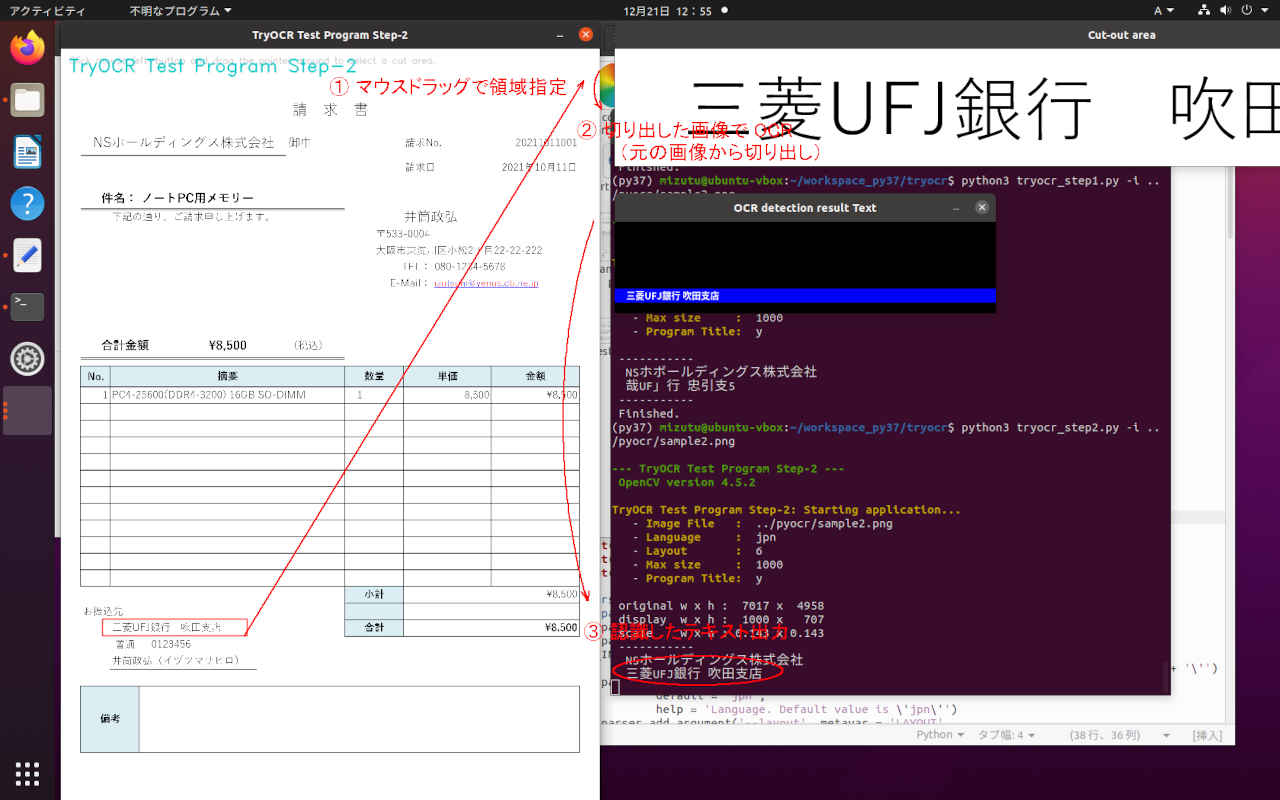
(py37) $ cd ~/workspace_py37/tryocr
(py37) $ python3 tryocr_step2.py -i ../pyocr/sample2.png

--- TryOCR Test Program Step-2 ---
 OpenCV version 4.5.2

TryOCR Test Program Step-2: Starting application...
   - Image File   :  ../pyocr/sample2.png
   - Language     :  jpn
   - Layout       :  6
   - Max size     :  1000
   - Program Title:  y

 original w x h :  7017 x  4958
 display  w x h :  1000 x   707
 scale    w x h : 0.143 x 0.143
 -----------
  NSホールディングス株式会社
 <area> (252, 772) - (2027, 947)
  三菱UFJ銀行 吹田支店
 <area> (421, 5249) - (1550, 5403)
 -----------
 Finished.
# -*- coding: utf-8 -*-
##------------------------------------------
## TryOCR Test Programe Step-2
##   with tesseract & PyOCR & cvui
##
##               2021.12.19 Masahiro Izutsu
##------------------------------------------
## tryocr_step2.py

# Color Escape Code
GREEN = '\033[1;32m'
RED = '\033[1;31m'
NOCOLOR = '\033[0m'
YELLOW = '\033[1;33m'

# 定数定義
LINE_WORD_BOX_COLOR = (0, 0, 240)
WORD_BOX_COLOR = (255, 0, 0)
CONTENTS_COLOR = (0, 128, 0)
from os.path import expanduser
DEF_INPUT_FILE = expanduser('sample0.png')

# import処理
from PIL import Image
import sys

import pyocr
import pyocr.builders
import cv2
import cvui
import argparse
import myfunction
import numpy as np
import mylib_gui
import mylib_frame

# タイトル・バージョン情報
title = 'TryOCR Test Program Step-2'
print(GREEN)
print('--- {} ---'.format(title))
print(' OpenCV version {} '.format(cv2.__version__))
print(NOCOLOR)

# Parses arguments for the application
def parse_args():
    parser = argparse.ArgumentParser()
    parser.add_argument('-i', '--image', metavar = 'IMAGE_FILE', type = str, default = DEF_INPUT_FILE,
            help = 'Absolute path to image file. Default value is \'' + DEF_INPUT_FILE + '\'')
    parser.add_argument('-l', '--language', metavar = 'LANGUAGE',
            default = 'jpn',
            help = 'Language. Default value is \'jpn\'')
    parser.add_argument('--layout', metavar = 'LAYOUT',
            default = 6,
            help = 'Tesseract layout Default value is 6')
    parser.add_argument('--maxsize', metavar = 'MAXSIZE',
            default = 1000,
            help = 'Image max size (free=0). Default value is 1000')
    parser.add_argument('-t', '--title', metavar = 'TITLE',
            default = 'y',
            help = 'Program title flag.(y/n) Default value is \'y\'')
    return parser

# モデル基本情報の表示
def display_info(image, lang, layout, maxsize, titleflg):
    print(YELLOW + title + ': Starting application...' + NOCOLOR)
    print('   - ' + YELLOW + 'Image File   : ' + NOCOLOR, image)
    print('   - ' + YELLOW + 'Language     : ' + NOCOLOR, lang)
    print('   - ' + YELLOW + 'Layout       : ' + NOCOLOR, layout)
    print('   - ' + YELLOW + 'Max size     : ' + NOCOLOR, maxsize)
    print('   - ' + YELLOW + 'Program Title: ' + NOCOLOR, titleflg)

def frame_resize(image, maxsize):
    if maxsize > 300:
        # アスペクト比を固定してリサイズ
        img_h, img_w = image.shape[:2]
        if (img_w > img_h):
            if (img_w > maxsize):
                height = round(img_h * (maxsize / img_w))
                image = cv2.resize(image, dsize = (maxsize, height))
        else:
            if (img_h > maxsize):
                width =  round(img_w * (maxsize / img_h))
                image = cv2.resize(image, dsize = (width, maxsize))
    return image

WINDOW_NAME = title
ROI_WINDOW  = 'Cut-out area'
ROI_POPUP   = 'OCR detection result Text'

# ** main関数 **
def main():
    # 日本語フォント指定
    fontPIL = 'NotoSansCJK-Bold.ttc'

    # Argument parsing and parameter setting
    ARGS = parse_args().parse_args()
    input_stream = ARGS.image
    lang = ARGS.language
    layout = int(ARGS.layout)
    maxsize = int(ARGS.maxsize)
    titleflg = ARGS.title

    # 情報表示
    display_info(input_stream, lang, layout, maxsize, titleflg)

    # OCR
    tools = pyocr.get_available_tools()
    if len(tools) == 0:
        print(RED + "\nOCR tool Not found." + NOCOLOR)
        quit()
    tool = tools[0]

    # OpenCV でイメージを読む
    lena_frame_org = cv2.imread(input_stream)
    if lena_frame_org is None:
        print(RED + "\nUnable to read the input." + NOCOLOR)
        quit()

    # mylib_frame ライブラリ
    imgfr = mylib_frame.ImageFrame(lena_frame_org)       # 初期化
    imgfr.set_screen_size(1680, 1050)

    lena_frame = imgfr.frame_resize(maxsize)

    frame = np.zeros(lena_frame.shape, np.uint8)
    popup_frame = np.zeros((120, 500, 3), np.uint8)
    anchor = cvui.Point()
    roi = cvui.Rect(0, 0, 0, 0)
    working = False
    frame_h, frame_w = frame.shape[:2]
    outf = False

    org_h, org_w = imgfr.get_original_size()
    scale_h, scale_w = imgfr.get_scale()
    print('\n original w x h : {:=5} x {:=5}'.format(org_h, org_w))
    print(' display  w x h : {:=5} x {:=5}'.format(frame_h, frame_w))
    print(' scale    w x h : {:.3f} x {:.3f}'.format(scale_h, scale_w))
    print(' -----------')

    # Init cvui and tell it to create a OpenCV window, i.e. cv.namedWindow(WINDOW_NAME).
    cv2.namedWindow(WINDOW_NAME, flags=cv2.WINDOW_AUTOSIZE | cv2.WINDOW_GUI_NORMAL)
    cvui.init(WINDOW_NAME)

    while (True):
        # Fill the frame with Lena's image
        frame[:] = lena_frame[:]

        # Show the coordinates of the mouse pointer on the screen
        cvui.text(frame, 10, 10, 'Click mouse left-button and drag the pointer around to select a cut area.')

        # マウス・イベント
        if cvui.mouse(cvui.LEFT_BUTTON, cvui.DOWN):
            # マウスポインタにアンカーを配置
            anchor.x = cvui.mouse().x
            anchor.y = cvui.mouse().y

            # 作業中の通知(作業中はウインドウの更新しない)
            working = True

        if cvui.mouse(cvui.LEFT_BUTTON, cvui.IS_DOWN):
            # 領域を設定
            width = cvui.mouse().x - anchor.x
            height = cvui.mouse().y - anchor.y

            roi.x = anchor.x + width if width < 0 else anchor.x
            roi.y = anchor.y + height if height < 0 else anchor.y
            roi.width = abs(width)
            roi.height = abs(height)

            # 座標とサイズを表示
            cvui.printf(frame, roi.x + 5, roi.y + 5, 0.3, 0xff0000, '(%d,%d)', roi.x, roi.y)
            cvui.printf(frame, cvui.mouse().x + 5, cvui.mouse().y + 5, 0.3, 0xff0000, 'w:%d, h:%d', roi.width, roi.height)

        if cvui.mouse(cvui.UP):
            # 領域指定作業の終了
            working = False
            outf = True

        # 領域内を確認
        lenaRows, lenaCols, lenaChannels = lena_frame.shape
        roi.x = 0 if roi.x < 0 else roi.x
        roi.y = 0 if roi.y < 0 else roi.y
        roi.width = roi.width + lena_frame.cols - (roi.x + roi.width) if roi.x + roi.width > lenaCols else roi.width
        roi.height = roi.height + lena_frame.rows - (roi.y + roi.height) if roi.y + roi.height > lenaRows else roi.height

        # 設定領域をレンダリング
        cvui.rect(frame, roi.x, roi.y, roi.width, roi.height, 0xff0000)

        # タイトル描画
        if (titleflg == 'y'):
            cv2.putText(frame, title, (10, 30), cv2.FONT_HERSHEY_DUPLEX, fontScale=0.8, color=(200, 200, 0), lineType=cv2.LINE_AA)

        # ウインドウの更新
        cvui.update()

        # 画面の表示
        cv2.imshow(WINDOW_NAME, frame)
        cv2.moveWindow(WINDOW_NAME, 80, 0)

        # 得られた表示座標から元画像の位置を計算して画像を切り出す
        if roi.area() > 50 and working == False:
            x0, y0 = imgfr.get_res2org_xy(roi.x, roi.y)
            x1, y1 = imgfr.get_res2org_xy(roi.x + roi.width, roi.y + roi.height)
            lenaRoi = lena_frame_org[y0 : y1, x0 : x1]
            cv2.namedWindow(ROI_WINDOW, flags=cv2.WINDOW_AUTOSIZE | cv2.WINDOW_GUI_NORMAL)
            cv2.imshow(ROI_WINDOW, lenaRoi)
            cv2.moveWindow(ROI_WINDOW, frame_w + 100, 0)
            lenaRoi_h, lenaRoi_w = lenaRoi.shape[:2]

            # 切り出した領域を OCR
            # PILのイメージにする
            lenaRoi1 = cv2.cvtColor(lenaRoi, cv2.COLOR_RGB2BGR)
            imgRoi = Image.fromarray(lenaRoi1)

            # txt is a Python string
            txt = tool.image_to_string(imgRoi, lang=lang,
                    builder=pyocr.builders.TextBuilder(tesseract_layout=layout))

            # テキストの描画
            if len(txt)>0:
                popup_frame[:,:,:] = 0
                cv2.rectangle(popup_frame, (0, 88), (500, 105), (255,0,0), -1)
                myfunction.cv2_putText(img = popup_frame,
                               text = txt,
                               org = (15, 104),
                               fontFace = fontPIL,
                               fontScale = 12,
                               color = (255,255,255),
                               mode = 0)
                cv2.namedWindow(ROI_POPUP, flags=cv2.WINDOW_AUTOSIZE | cv2.WINDOW_GUI_NORMAL)
                cv2.imshow(ROI_POPUP, popup_frame)
                cv2.moveWindow(ROI_POPUP, frame_w + 100, lenaRoi_h + 100)
                if outf:
                    print(' ', txt)
                    print(' <area> ({}, {}) - ({}, {})'.format(x0, y0, x1, y1))
                    outf = False

        key = cv2.waitKey(1)
        if key == 27 or key == 113:                     # 'esc' or 'q'
            break
        if not mylib_gui._is_visible(title):            # 'Close' button
            break

    cv2.destroyAllWindows()

    print(' -----------\n Finished.')

# main関数エントリーポイント(実行開始)
if __name__ == "__main__":
    sys.exit(main())
# -*- coding: utf-8 -*-
##------------------------------------------
##   My Library image frame with OpenCV
##
##               2021.12.20 Masahiro Izutsu
##------------------------------------------
## mylib_frame.py

import cv2
import numpy as np

class ImageFrame:
    max_min = 300       # 画像をリサイズする最小ピクセル数
    frame_org = None    # 元画像イメージ
    frame_res = None    # リサイズされた画像イメージ
    org_h = 0           # 元画像の高さ
    org_w = 0           #     幅
    res_h = 0           # リサイズ画像の高さ
    res_w = 0           #        幅
    scale_h = 0.0       # リサイズ画像の比率 高さ
    scale_w = 0.0       #           幅
    screen_h = 0        # 表示ウインドウの最大高さ
    screen_w = 0        #           幅

    def __init__(self, img, max_min = 300):
        self.frame_org = img
        self.max_min = max_min
        self.org_h, self.org_w = img.shape[:2]

    def set_screen_size(self, height, width):
        self.screen_h = height
        self.screen_w = width

    # アスペクト比を固定して画像をリサイズ
    #  boxl: 大きさ (-1=画面最大, 0=そのまま, max_min> boxlに収まるサイズ
    #  zoomf: 指定より小さい画像の拡大フラグ
    def frame_resize(self, boxl = 0, zoomf = False):
        if self.frame_org is not None:
            if boxl == -1:
                maxsize = self.screen_h if self.screen_h < self.screen_w else self.screen_w
            else:
                maxsize = boxl

            if maxsize > self.max_min:
                if self.org_w > self.org_h: # 横長(landscape)
                    if self.org_w > maxsize:
                        self.res_h = round(self.org_h * (maxsize / self.org_w))
                        self.res_w = maxsize
                    elif zoomf:             #  指定より小さい画像を拡大する
                        self.res_h = round(self.org_h * (maxsize / self.org_w))
                        self.res_w = maxsize
                    else:                   #  指定より小さい画像のまま
                        self.res_h = self.org_h
                        self.res_w = self.org_w
                else:                       # 縦長(portrait)
                    if self.org_h > maxsize:
                        self.res_h = maxsize
                        self.res_w =  round(self.org_w * (maxsize / self.org_h))
                    elif zoomf:             #  指定より小さい画像を拡大する
                        self.res_h = maxsize
                        self.res_w =  round(self.org_w * (maxsize / self.org_h))
                    else:                   #  指定より小さい画像のまま
                        self.res_h = self.org_h
                        self.res_w = self.org_w

                self.frame_res = cv2.resize(self.frame_org, dsize = (self.res_w, self.res_h))

            else:
                self.frame_res = self.frame_org.copy()

            self.res_h, self.res_w = self.frame_res.shape[:2]
            self.scale_h = self.res_h / self.org_h
            self.scale_w = self.res_w / self.org_w

        return self.frame_res

    def get_screen_size(self):
        return self.screen_h, self.screen_w

    def get_scale(self):
        return self.scale_h, self.scale_w

    def get_original_size(self):
        return self.org_h, self.org_w

    def get_resize_size(self):
        return self.res_h, self.res_w

    def get_res2org_xy(self, rx, ry):
        if self.scale_h > 0 and self.scale_w > 0:
            ox = round(rx / self.scale_w)
            oy = round(ry / self.scale_h)
        else:
            ox = 0
            oy = 0
        return ox, oy

    def get_org2res_xy(self, ox, oy):
        if self.scale_h > 0 and self.scale_w > 0:
            rx = round(ox * self.scale_w)
            ry = round(oy * self.scale_h)
        else:
            rx = 0
            ry = 0
        return rx, ry

# テストルーチン
if __name__ == "__main__":
    window_name = 'ImageFrame class'
#    image = np.zeros((2000, 4000, 3), np.uint8)
#    image = np.zeros((2000, 1200, 3), np.uint8)
#    image = np.zeros((1500, 1000, 3), np.uint8)
#    image = np.zeros((1000, 1500, 3), np.uint8)
    image = np.zeros((500, 1000, 3), np.uint8)
#    image = np.zeros((1000, 500, 3), np.uint8)
    imgfr = ImageFrame(image)               # 初期化
    imgfr.set_screen_size(1680, 1050)

    image_res = imgfr.frame_resize(-1, True)
    cv2.namedWindow(window_name, flags=cv2.WINDOW_AUTOSIZE | cv2.WINDOW_GUI_NORMAL)
    cv2.imshow(window_name, image_res)

    screen_h, screen_w = imgfr.get_screen_size()
    print('screen_h; ', screen_h, '  screen_w: ', screen_w)

    scale_h, scale_w = imgfr.get_scale()
    print('scale_h; ', scale_h, '  scale_w: ', scale_w)

    org_h, org_w = imgfr.get_original_size()
    print('org_h; ', org_h, '  org_w: ', org_w)

    res_h, res_w = imgfr.get_resize_size()
    print('res_h; ', res_h, '  res_w: ', res_w)

    ox, oy = imgfr.get_res2org_xy(400, 500)
    print('ox: ', ox, '  oy: ', oy)

    rx, ry = imgfr.get_org2res_xy(500, 500)
    print('rx: ', rx, '  ry: ', ry)

    while(True):
        key = cv2.waitKey(1)
        if key == 27 or key == 113:         # 'esc' or 'q'
            break

    cv2.destroyAllWindows()
文字認識エンジンのための画像処理 で作成した処理プログラムをパッケージ化してアプリケーションに組み込みできるようにする。
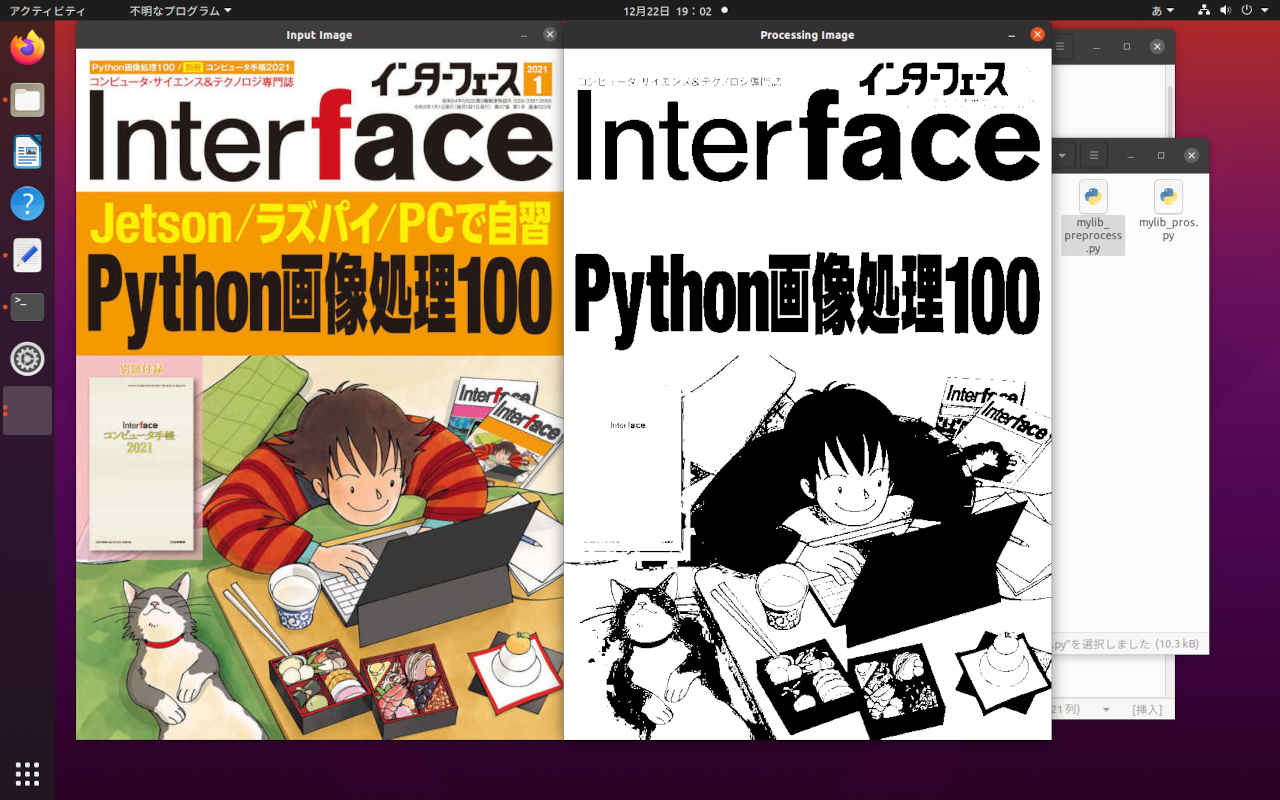
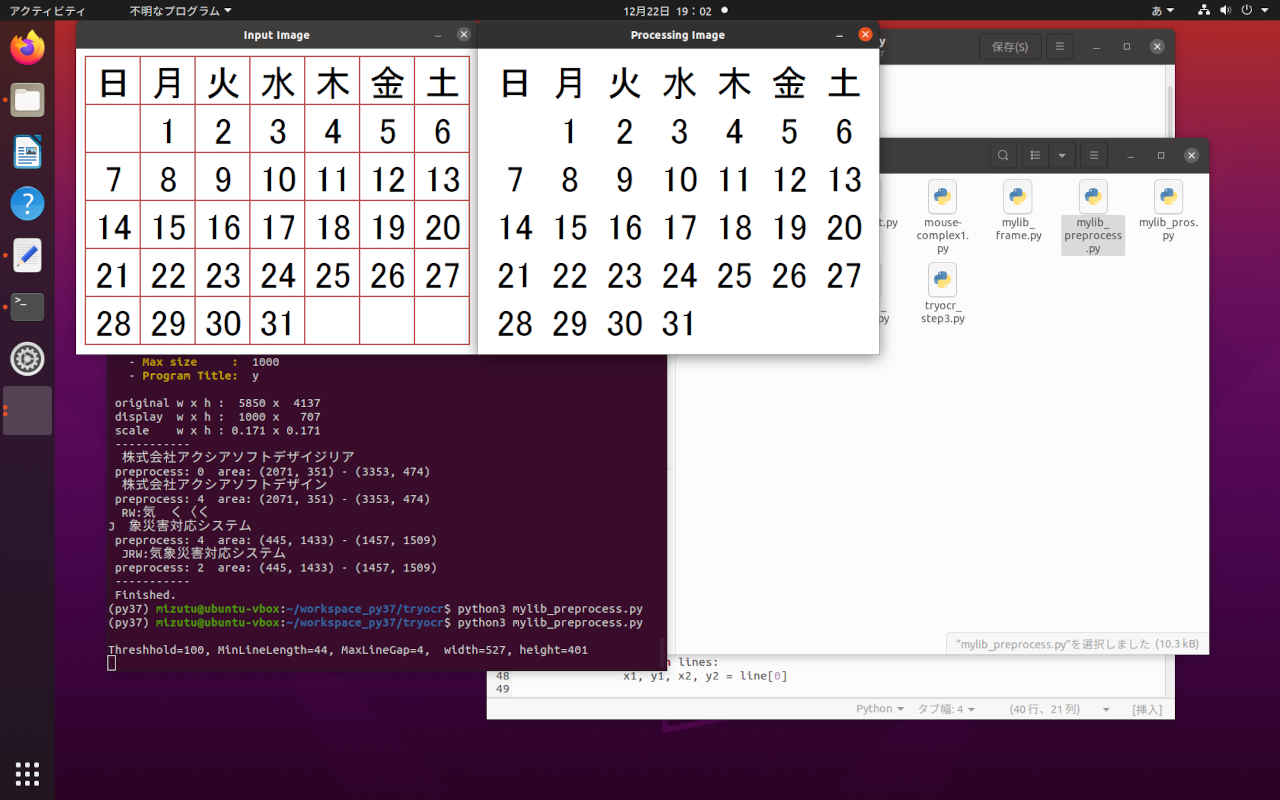
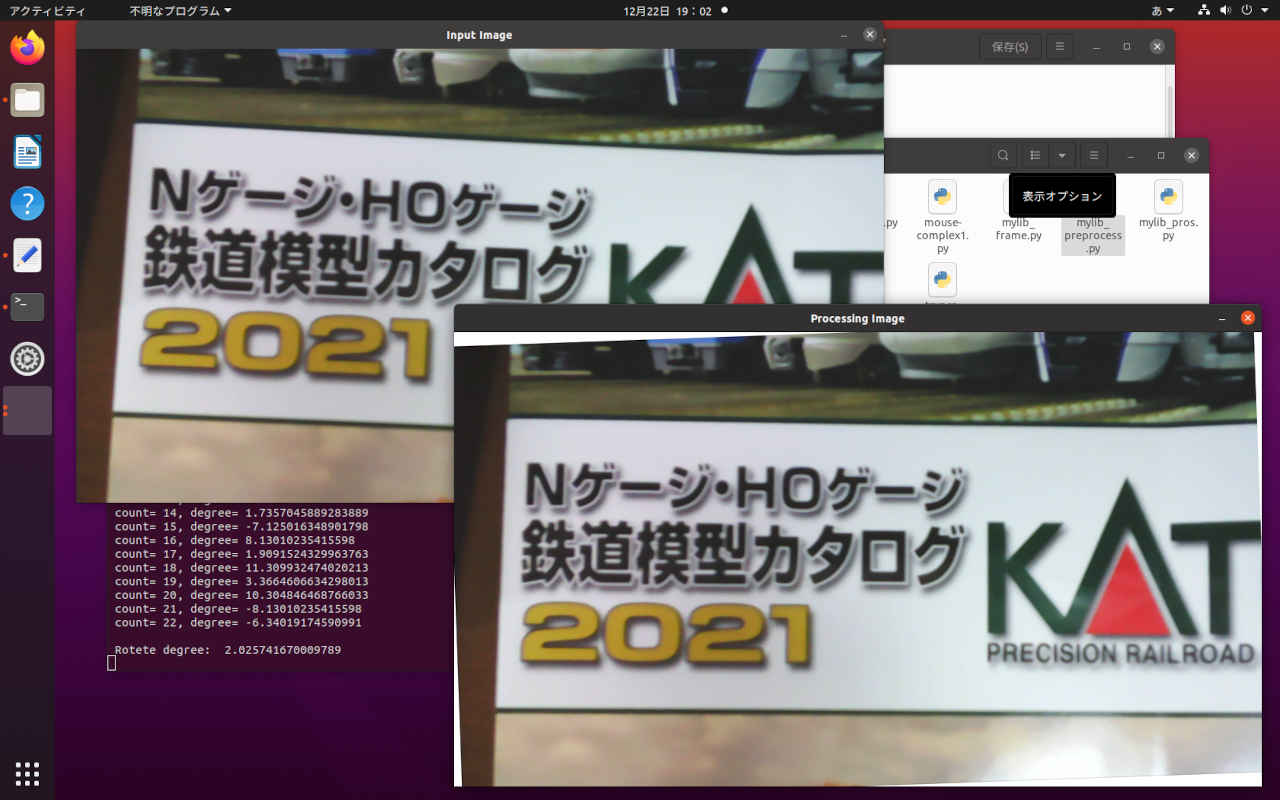
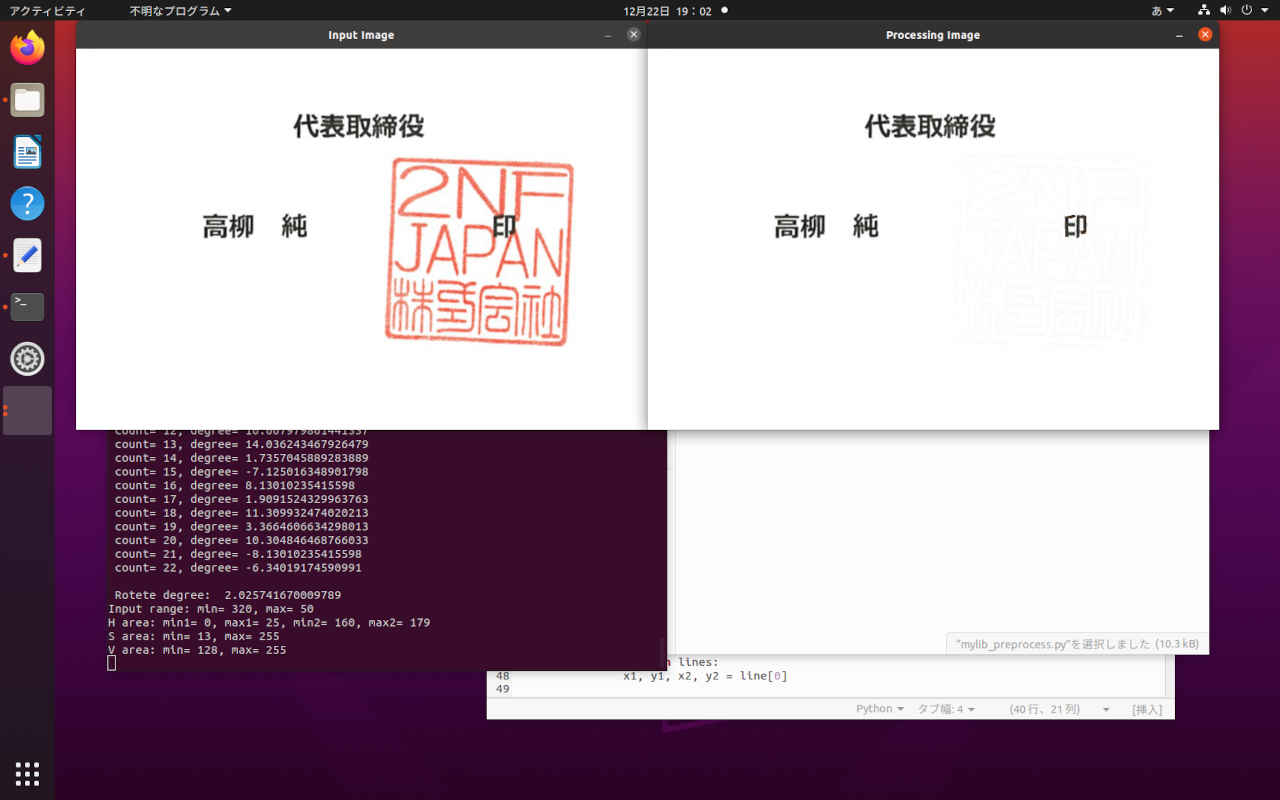
(py37) $ cd ~/workspace_py37/tryocr
(py37) $ python3 mylib_preprocess.py

 Threshhold=100, MinLineLength=44, MaxLineGap=4,  width=527, height=401

 Threshhold=100, MinLineLength=58, MaxLineGap=5,  width=1060, height=596

 -20° 〜 +20° Horizontal Line
 count= 0, degree= 2.0454084888872277
 count= 1, degree= 1.5481576989779677
 count= 2, degree= 3.1798301198642345
 count= 3, degree= -6.34019174590991
 count= 4, degree= 1.5481576989779677
 count= 5, degree= 4.763641690726178
 count= 6, degree= 11.309932474020213
 count= 7, degree= 9.462322208025617
 count= 8, degree= -11.309932474020213
 count= 9, degree= -11.309932474020213
 count= 10, degree= -15.945395900922854
 count= 11, degree= 18.43494882292201
 count= 12, degree= 10.007979801441337
 count= 13, degree= 14.036243467926479
 count= 14, degree= 1.7357045889283889
 count= 15, degree= -7.125016348901798
 count= 16, degree= 8.13010235415598
 count= 17, degree= 1.9091524329963763
 count= 18, degree= 11.309932474020213
 count= 19, degree= 3.3664606634298013
 count= 20, degree= 10.304846468766033
 count= 21, degree= -8.13010235415598
 count= 22, degree= -6.34019174590991

 Rotete degree:  2.025741670009789

 Input range: min= 320, max= 50
 H area: min1= 0, max1= 25, min2= 160, max2= 179
 S area: min= 13, max= 255
 V area: min= 128, max= 255
# -*- coding: utf-8 -*-
##------------------------------------------
##   My Library image preprocessing with OpenCV
##
##               2021.12.20 Masahiro Izutsu
##------------------------------------------
## mylib_preprocess.py

import cv2
import numpy as np
import math

class ImagePreprocess:
    logf = False

    def __init__(self, flg = False):
        self.logf = flg

    ## カラー原画 → グレイスケール → 白黒 2値画像
    def img_binarization(self, img):
        imgw = img.copy()
        # グレイスケール演算
        im_gray = 0.299 * img[:,:,2] + 0.587 * img[:,:,1] + 0.114 * img[:,:,0]
        im_gray8 = np.uint8(im_gray)
        # 大津アルゴリズムでは thresh, maxvalは無視されてしきい値は自動で設定される
        ret, im_gray8 = cv2.threshold(im_gray8, thresh=0, maxval=255, type=cv2.THRESH_BINARY + cv2.THRESH_OTSU)
        # すべてのチャンネル
        imgw[:,:,0] = im_gray8
        imgw[:,:,1] = im_gray8
        imgw[:,:,2] = im_gray8
        return imgw

    ## 罫線消去
    def delete_line(self, img):
        imgw = img.copy()
        # グレースケール
        gray = cv2.cvtColor(imgw, cv2.COLOR_BGR2GRAY)
        # 2値化
        ret, gray = cv2.threshold(gray, thresh=0, maxval=255, type=cv2.THRESH_BINARY + cv2.THRESH_OTSU)
        ## 反転 ネガポジ変換
        gray = cv2.bitwise_not(gray)
        # ハフライン検出自動パラメータの計算
        thr, lln, gap = self.get_autohoughLine(img)
        lines = cv2.HoughLinesP(gray, rho=1, theta=np.pi/360, threshold=thr, minLineLength=lln, maxLineGap=gap)

        if lines is not None:
            for line in lines:
                x1, y1, x2, y2 = line[0]

                # 線を消す(白で線を引く)
                imgw = cv2.line(imgw, (x1,y1), (x2,y2), (255,255,255), 3)
        return imgw

    ## 画像の回転(OpenCV)
    def rotate_img(self, img, angle, boder = (255, 255, 255)):
        # 画像サイズ(横, 縦)から中心座標を求める
        size = tuple([img.shape[1], img.shape[0]])
        center = tuple([size[0] // 2, size[1] // 2])
        # 回転の変換行列を求める(画像の中心, 回転角度, 拡大率)
        mat = cv2.getRotationMatrix2D(center, angle, scale=1.0)
        # アフィン変換(画像, 変換行列, 出力サイズ, 補完アルゴリズム)
        rot_img = cv2.warpAffine(img, mat, size, flags=cv2.INTER_CUBIC, borderMode=cv2.BORDER_CONSTANT, borderValue=boder)
        return rot_img


    # 色の検出 (HSV)
    #  入力: mode 変換モード(0= 指定領域, 1= 指定外領域, 2= 指定領域を白に
    #        hmin,hmax H領域 (0 - 359°)
    #        smin,smax S領域 (0 - 100%)
    #        vmin,vmax V領域 (0 - 100%)
    def detect_color(self, img, hmin, hmax, smin, smax, vmin, vmax, mode):
        hmin1, hmax1, hmin2, hmax2 = self.calc_hue_area(hmin, hmax)
        # 0-100% >> 0-255
        smin = int(round(smin * 255 / 100))
        smax = int(round(smax * 255 / 100))
        vmin = int(round(vmin * 255 / 100))
        vmax = int(round(vmax * 255 / 100))
        if self.logf:
            print('\n Input range: min= {}, max= {}'.format(hmin, hmax))
            print(' H area: min1= {}, max1= {}, min2= {}, max2= {}'.format(hmin1, hmax1, hmin2, hmax2))
            print(' S area: min= {}, max= {}'.format(smin, smax))
            print(' V area: min= {}, max= {}'.format(vmin, vmax))

        # HSV色空間に変換
        hsv = cv2.cvtColor(img, cv2.COLOR_BGR2HSV)

        # HSVの値域 1
        hsv_min = np.array([hmin1,smin,vmin])
        hsv_max = np.array([hmax1,smax,vmax])
        mask = cv2.inRange(hsv, hsv_min, hsv_max)

        # HSVの値域 2
        if hmin2 < 180 and hmax2 < 180:
            hsv_min = np.array([hmin2,smin,vmin])
            hsv_max = np.array([hmax2,smax,vmax])
            mask2 = cv2.inRange(hsv, hsv_min, hsv_max)
            mask = mask + mask2

        # mask 領域のマスク (255:指定、0:指定以外)
        # mask_inv 領域のマスク反転 (0:指定、255:指定以外)
        mask_inv = cv2.bitwise_not(mask)

        if mode == 0:
            msk = mask
        else:
            msk = mask_inv

        # マスキング処理
        masked_img = cv2.bitwise_and(img, img, mask=msk)

        if mode == 2:
            # 特定の色を別の色に置換する
            before_color = [0, 0, 0]
            after_color = [255, 255, 255]
            masked_img[np.where((masked_img == before_color).all(axis=2))] = after_color

        return mask, masked_img

    ## イメージ処理の実行
    ##  入力: process_mode
    ##          1= カラー原画 → グレイスケール → 白黒 2値画像
    ##          2= 罫線消去
    ##          3= 画像の傾き補正
    ##          4= 印影除去
    def image_processing_execution(self, img, process_mode):
        img1 = None
        if process_mode == 0:
            # no operation
            img1 = img
        if process_mode == 1:
            # カラー原画 → グレイスケール → 白黒 2値画像
            img1 = self.img_binarization(img)
        elif process_mode == 2:
            # 罫線消去
            img1 = self.delete_line(img)
        elif process_mode == 3:
            # 画像の傾き補正
            thr, lln, gap = self.get_autohoughLine(img)
            arg = self.get_degree(img, thr, lln, gap)
            img1 = self.rotate_img(img, arg)
            if self.logf:
                print('\n Rotete degree: ', arg)
        elif process_mode == 4:
            # 印影除去
            mask, img1 = self.detect_color(img, 320, 50, 5, 100, 50, 100, 2)

        return img1

##---------------
    ### ハフライン検出のための自動パラメータの計算 (画像サイズの違いによる)
    ###  戻り値: threshhold, minLineLength, maxLineGap
    def get_autohoughLine(self, img, logf = True):
        h, w = img.shape[:2]
        thr = 100
        lln = int(w/18)
        if lln < 44:
            lln = 44
        gap = int(w/1000) + 4
        if self.logf:
            print('\n Threshhold={}, MinLineLength={}, MaxLineGap={},  width={}, height={}'.format(thr, lln, gap, w, h))
        return thr, lln, gap

    ### 二点間の距離を求める
    ###  戻り値: distance
    def get_distance(self, x1, y1, x2, y2):
        d = math.sqrt((x2 - x1) ** 2 + (y2 - y1) ** 2)
        return d

    ### 画像の傾き検出
    ###  戻り値: degree (水平からの傾き角度/座標系の違いからこの値が補正すべき角度になる)
    def get_degree(self, img, thr, lln, gap):
        l_img = img.copy()
        img0 = img.copy()

        gray_image = cv2.cvtColor(l_img, cv2.COLOR_BGR2GRAY)
        edges = cv2.Canny(gray_image,50,150,apertureSize = 3)
        lines = cv2.HoughLinesP(edges, 1, np.pi/180, thr, lln, gap)

        if self.logf:
            print('\n -20° 〜 +20° Horizontal Line')

        sum_arg = 0;
        count = 0;
        for line in lines:
            for x1,y1,x2,y2 in line:
                # 直線を描画する。
                cv2.line(img0, (x1, y1), (x2, y2), (0, 0, 255), 2)

                arg = math.degrees(math.atan2((y2-y1), (x2-x1)))
                HORIZONTAL = 0
                DIFF = 20 # 許容誤差 -> -20 - +20 を本来の水平線と考える
                #arg != 0を条件に追加し、傾きの平均を0に寄りにくくした。
                if arg != 0 and arg > HORIZONTAL - DIFF and arg < HORIZONTAL + DIFF :
                    if self.logf:
                        print(' count= {}, degree= {}'.format(count, arg))
                    sum_arg += arg;
                    count += 1

        # 処理結果
        if count == 0:
            return HORIZONTAL
        else:
            return (sum_arg / count);

    ### 角度領域の計算
    ###  入力: 0 〜 360
    ###  戻り値: 0 〜 179 OpenCV領域 min,max=180 エラー
    def calc_hue_area(self, hmin, hmax):
        h_min1 = 360
        h_max1 = 360
        h_min2 = 360
        h_max2 = 360
        if hmin >= 0 and hmin <=360 and hmax >= 0 and hmax <= 360:
            if hmin < hmax:
                h_min1 = hmin
                h_max1 = hmax
            else:
                h_min1 = 0
                h_max1 = hmax
                h_min2 = hmin
                h_max2 = 360

        # OpenCV の範囲に変換
        h_min1 = int(h_min1/2)
        h_max1 = int(h_max1/2)
        h_min2 = int(h_min2/2)
        h_max2 = int(h_max2/2)
        if h_max2 > h_min2 and h_max2 ==180:
            h_max2 = 179

        return h_min1, h_max1, h_min2, h_max2

##---------------
# テストルーチン
# キー入力
#   1:      カラー原画 → グレイスケール → 白黒 2値画像
#   2:      罫線消去
#   3:      画像の傾き補正
#   4:      印影除去
#   q, Esc: 終了

def main(testmode):
    window_name = 'Input Image'
    window_name1 = 'Processing Image'
    testfile = ['None','MIF202101-top_s.jpg','calendar.png', 'tilt_sample.png', 'stamp2.png']
    img1 = None
    imgpros = ImagePreprocess(True)                 # 初期化

    img = cv2.imread('images/' + testfile[testmode])
    if img is None:
        print(' Unable to read the input.')
        quit()

    cv2.namedWindow(window_name, flags=cv2.WINDOW_AUTOSIZE | cv2.WINDOW_GUI_NORMAL)
    cv2.imshow(window_name, img)
    cv2.moveWindow(window_name, 100, 0)

    img1 = imgpros.image_processing_execution(img, testmode)
    if img1 is not None:
        cv2.namedWindow(window_name1, flags=cv2.WINDOW_AUTOSIZE | cv2.WINDOW_GUI_NORMAL)
        cv2.imshow(window_name1, img1)
        cv2.moveWindow(window_name1, 100 + img.shape[1], 0)

    while(True):
        key = cv2.waitKey(1)
        if key == 27 or key == 113:                 # 'esc' or 'q'
            break
        elif key >= ord('1') and key <= ord('4'):   # テストモード変更
            key = key - ord('0')
            break

    cv2.destroyAllWindows()
    return key

if __name__ == "__main__":
    loopf = True
    mode = 1

    while loopf:
        mode = main(mode)
        if mode == 27 or mode == 113:
            loopf = False
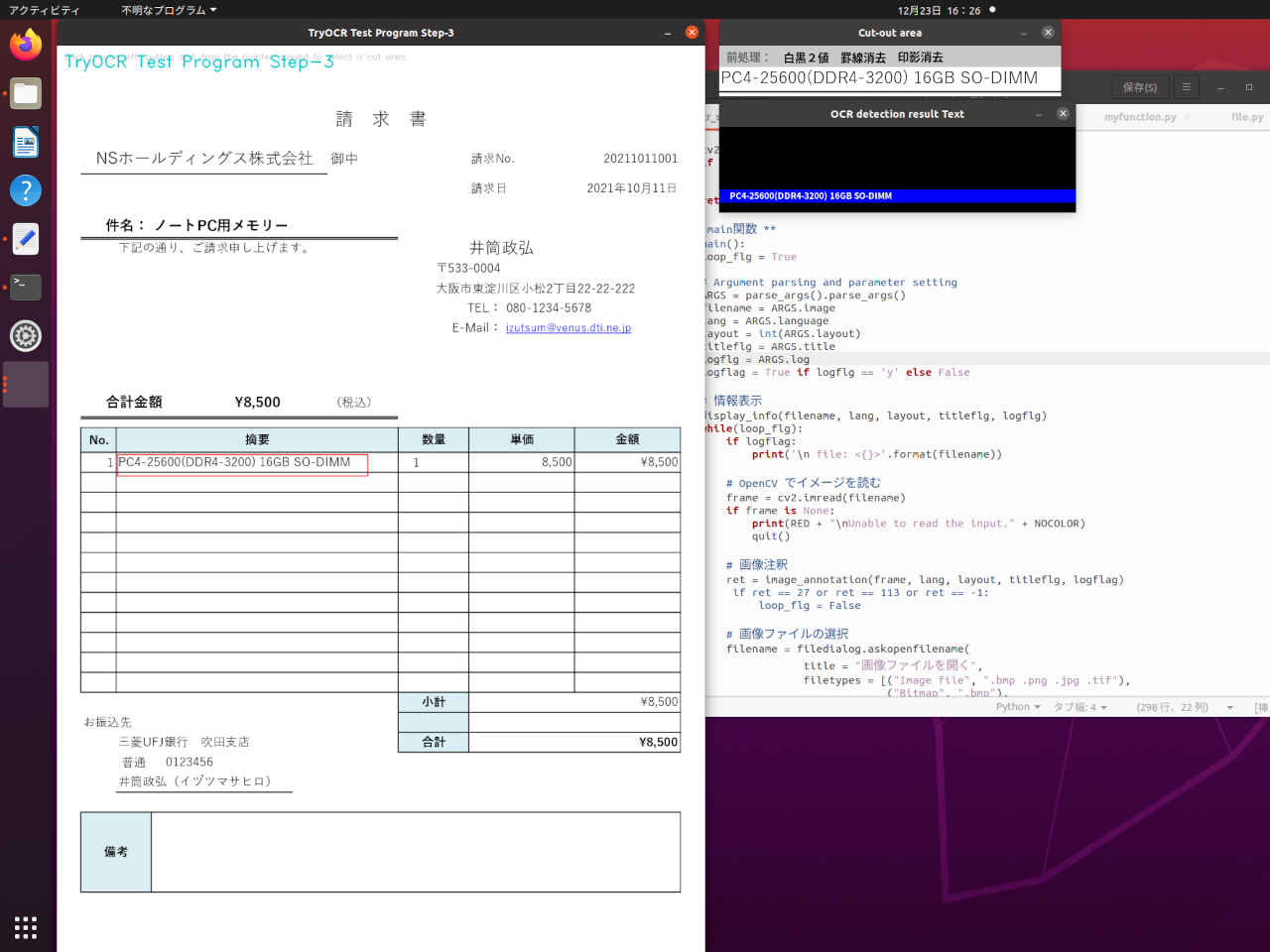
| キー | 機能 |
| 0 | 前処理設定のクリア(前処理なし) |
| 1 | 白黒2値 |
| 2 | 罫線消去 |
| 3 | 罫線消去,白黒2値 |
| 4 | 印影消去 |
| 5 | 印影消去,白黒2値 |
| 6 | 印影消去,罫線消去 |
| 7 | 印影消去,罫線消去,白黒2値 |
| q,Esc | この画像を終了して別の画像の選択 |
(py37) $ cd ~/workspace_py37/tryocr
(py37) $ python3 tryocr_step3.py

--- TryOCR Test Program Step-3 ---
 OpenCV version 4.5.2

TryOCR Test Program Step-3: Starting application...
   - Image File   :  images/sample0.png
   - Language     :  jpn
   - Layout       :  6
   - Program Title:  y
   - Log flag     :  y

 file: <images/sample0.png>
 Screen size: width x height = 2560 x 1335 (pixels)

 original w x h :  1754 x  1240
 display  w x h :  1285 x   908
 scale    w x h : 0.733 x 0.732
 -----------
  NSホールディングス株式会社
 preprocess: 0  area: (72, 188) - (497, 240)
  合計金額                    \8,500
 preprocess: 0  area: (85, 665) - (485, 703)
  PC4-25600(DDR4-3200) 16GB SO-DIMM
 preprocess: 0  area: (115, 782) - (594, 823)
 -----------


 Finished.
# -*- coding: utf-8 -*-
##------------------------------------------
## TryOCR Test Programe Step-3
##   with tesseract & PyOCR & cvui
##
##               2021.12.19 Masahiro Izutsu
##------------------------------------------
## tryocr_step3.py

## 前処理: '白黒2値', '罫線消去', '印影消去'

# Color Escape Code
GREEN = '\033[1;32m'
RED = '\033[1;31m'
NOCOLOR = '\033[0m'
YELLOW = '\033[1;33m'

# 定数定義
LINE_WORD_BOX_COLOR = (0, 0, 240)
WORD_BOX_COLOR = (255, 0, 0)
CONTENTS_COLOR = (0, 128, 0)
from os.path import expanduser
DEF_INPUT_FILE = expanduser('images/sample0.png')

# import処理
from PIL import Image
import sys

import pyocr
import pyocr.builders
import cv2
import cvui
import argparse
import myfunction
import numpy as np
import mylib_gui
import mylib_frame
import mylib_preprocess
import mylib_screen
from tkinter import filedialog

# タイトル・バージョン情報
title = 'TryOCR Test Program Step-3'
print(GREEN)
print('--- {} ---'.format(title))
print(' OpenCV version {} '.format(cv2.__version__))
print(NOCOLOR)

# Parses arguments for the application
def parse_args():
    parser = argparse.ArgumentParser()
    parser.add_argument('-i', '--image', metavar = 'IMAGE_FILE', type = str, default = DEF_INPUT_FILE,
            help = 'Absolute path to image file. Default value is \'' + DEF_INPUT_FILE + '\'')
    parser.add_argument('-l', '--language', metavar = 'LANGUAGE',
            default = 'jpn',
            help = 'Language. Default value is \'jpn\'')
    parser.add_argument('--layout', metavar = 'LAYOUT',
            default = 6,
            help = 'Tesseract layout Default value is 6')
    parser.add_argument('-t', '--title', metavar = 'TITLE',
            default = 'y',
            help = 'Program title flag.(y/n) Default value is \'y\'')
    parser.add_argument('--log', metavar = 'LOG',
            default = 'y',
            help = 'Log flag.(y/n) Default value is \'y\'')
    return parser

# モデル基本情報の表示
def display_info(image, lang, layout, titleflg, logflg):
    print(YELLOW + title + ': Starting application...' + NOCOLOR)
    print('   - ' + YELLOW + 'Image File   : ' + NOCOLOR, image)
    print('   - ' + YELLOW + 'Language     : ' + NOCOLOR, lang)
    print('   - ' + YELLOW + 'Layout       : ' + NOCOLOR, layout)
    print('   - ' + YELLOW + 'Program Title: ' + NOCOLOR, titleflg)
    print('   - ' + YELLOW + 'Log flag     : ' + NOCOLOR, logflg)

# 画像注釈
def image_annotation(lena_frame_org, lang='jpn', layout=6, titleflg=False, logflag=False):
    WINDOW_NAME = title
    ROI_WINDOW  = 'Cut-out area'
    ROI_POPUP   = 'OCR detection result Text'

    preprocess_mode = 0x0
    wlock1 = 0
    wlock2 = 0
    wlock3 = 0

    # 日本語フォント指定
    fontPIL = 'NotoSansCJK-Bold.ttc'

    # ディスプレイ解像度を得る
    monitor_height, monitor_width = mylib_screen.get_display_size(logflag)
    maxsize = monitor_height - 50

    # 画像の前処理
    imgpros = mylib_preprocess.ImagePreprocess(False)    # 初期化

    # OCR
    tools = pyocr.get_available_tools()
    if len(tools) == 0:
        print(RED + "\nOCR tool Not found." + NOCOLOR)
        quit()
    tool = tools[0]

    # mylib_frame ライブラリ
    imgfr = mylib_frame.ImageFrame(lena_frame_org)       # 初期化
    imgfr.set_screen_size(monitor_width, monitor_height)

    lena_frame = imgfr.frame_resize(maxsize)

    frame = np.zeros(lena_frame.shape, np.uint8)
    popup_frame = np.zeros((120, 500, 3), np.uint8)
    anchor = cvui.Point()
    roi = cvui.Rect(0, 0, 0, 0)
    working = False
    frame_h, frame_w = frame.shape[:2]
    outf = False

    org_h, org_w = imgfr.get_original_size()
    scale_h, scale_w = imgfr.get_scale()
    if logflag:
        print('\n original w x h : {:=5} x {:=5}'.format(org_h, org_w))
        print(' display  w x h : {:=5} x {:=5}'.format(frame_h, frame_w))
        print(' scale    w x h : {:.3f} x {:.3f}'.format(scale_h, scale_w))
        print(' -----------')

    # Init cvui and tell it to create a OpenCV window, i.e. cv.namedWindow(WINDOW_NAME).
    cv2.namedWindow(WINDOW_NAME, flags=cv2.WINDOW_AUTOSIZE | cv2.WINDOW_GUI_NORMAL)
    cvui.init(WINDOW_NAME)

    while (True):
        # Fill the frame with Lena's image
        frame[:] = lena_frame[:]

        # Show the coordinates of the mouse pointer on the screen
        cvui.text(frame, 10, 10, 'Click mouse left-button and drag the pointer around to select a cut area.')

        # マウス・イベント
        if cvui.mouse(cvui.LEFT_BUTTON, cvui.DOWN):
            # マウスポインタにアンカーを配置
            anchor.x = cvui.mouse().x
            anchor.y = cvui.mouse().y

            # 作業中の通知(作業中はウインドウの更新しない)
            working = True

        if cvui.mouse(cvui.LEFT_BUTTON, cvui.IS_DOWN):
            # 領域を設定
            width = cvui.mouse().x - anchor.x
            height = cvui.mouse().y - anchor.y

            roi.x = anchor.x + width if width < 0 else anchor.x
            roi.y = anchor.y + height if height < 0 else anchor.y
            roi.width = abs(width)
            roi.height = abs(height)

            # 座標とサイズを表示
            cvui.printf(frame, roi.x + 5, roi.y + 5, 0.3, 0xff0000, '(%d,%d)', roi.x, roi.y)
            cvui.printf(frame, cvui.mouse().x + 5, cvui.mouse().y + 5, 0.3, 0xff0000, 'w:%d, h:%d', roi.width, roi.height)

        if cvui.mouse(cvui.UP):
            # 領域指定作業の終了
            working = False
            outf = True
            wlock1 = 0
            wlock2 = 0
            wlock3 = 0

        # 領域内を確認
        lenaRows, lenaCols, lenaChannels = lena_frame.shape
        roi.x = 0 if roi.x < 0 else roi.x
        roi.y = 0 if roi.y < 0 else roi.y
        roi.width = roi.width + lena_frame.cols - (roi.x + roi.width) if roi.x + roi.width > lenaCols else roi.width
        roi.height = roi.height + lena_frame.rows - (roi.y + roi.height) if roi.y + roi.height > lenaRows else roi.height

        # 設定領域をレンダリング
        cvui.rect(frame, roi.x, roi.y, roi.width, roi.height, 0xff0000)

        # タイトル描画
        if (titleflg == 'y'):
            cv2.putText(frame, title, (10, 30), cv2.FONT_HERSHEY_DUPLEX, fontScale=0.8, color=(200, 200, 0), lineType=cv2.LINE_AA)

        # ウインドウの更新
        cvui.update()

        # 画面の表示
        cv2.imshow(WINDOW_NAME, frame)
        if wlock1 < 10:
            cv2.moveWindow(WINDOW_NAME, 80, 0)
            wlock1 = wlock1 + 1
        else:
            wlock1 = 10

        # 得られた表示座標から元画像の位置を計算して画像を切り出す
        if roi.area() > 50 and working == False:
            x0, y0 = imgfr.get_res2org_xy(roi.x, roi.y)
            x1, y1 = imgfr.get_res2org_xy(roi.x + roi.width, roi.y + roi.height)
            lenaRoi = lena_frame_org[y0 : y1, x0 : x1]

            # 前処理
            prs_color = [(0,0,0), (0,0,0), (0,0,0)]
            if preprocess_mode & 0x4 != 0:
                lenaRoi = imgpros.image_processing_execution(lenaRoi, 4)
                prs_color[2] = (0,0,255)
            if preprocess_mode & 0x2 != 0:
                lenaRoi = imgpros.image_processing_execution(lenaRoi, 2)
                prs_color[1] = (0,0,255)
            if preprocess_mode & 0x1 != 0:
                lenaRoi = imgpros.image_processing_execution(lenaRoi, 1)
                prs_color[0] = (0,0,255)

            # OCR入力画像表示
            lenaRoi_h, lenaRoi_w = lenaRoi.shape[:2]
            img_Roi = np.zeros((lenaRoi_h + 30, lenaRoi_w, 3), np.uint8)
            img_Roi[:,:,:] = 200
            img_Roi[30:lenaRoi_h + 30,:] = lenaRoi

            ## 前処理モード表示 (サイズ2段階,エリアがないときは表示しない)
            if lenaRoi_w > 320:
                fs = 16
                xs = 80
            else:
                fs = 10
                xs = 50
            if xs*3 < lenaRoi_w:
                myfunction.cv2_putText(img_Roi, '前処理:', (10,4), fontPIL, fs, (100,100,100), 1)
                myfunction.cv2_putText(img_Roi, '白黒2値', (10+xs,4), fontPIL, fs, prs_color[0], 1)
                myfunction.cv2_putText(img_Roi, '罫線消去', (10+xs*2,4), fontPIL, fs, prs_color[1], 1)
                myfunction.cv2_putText(img_Roi, '印影消去', (10+xs*3,4), fontPIL, fs, prs_color[2], 1)
            ##

            cv2.namedWindow(ROI_WINDOW, flags=cv2.WINDOW_AUTOSIZE | cv2.WINDOW_GUI_NORMAL)
            cv2.imshow(ROI_WINDOW, img_Roi)
            if wlock2 < 10:
                cv2.moveWindow(ROI_WINDOW, frame_w + 100, 0)
                wlock2 = wlock2 + 1
            else:
                wlock2 = 10

            # 切り出した領域を OCR
            # PILのイメージにする
            lenaRoi1 = cv2.cvtColor(lenaRoi, cv2.COLOR_RGB2BGR)
            imgRoi = Image.fromarray(lenaRoi1)

            # txt is a Python string
            txt = tool.image_to_string(imgRoi, lang=lang,
                    builder=pyocr.builders.TextBuilder(tesseract_layout=layout))

            # テキストの描画
            if len(txt)>0:
                popup_frame[:,:,:] = 0
                cv2.rectangle(popup_frame, (0, 88), (500, 105), (255,0,0), -1)
                myfunction.cv2_putText(img = popup_frame,
                               text = txt,
                               org = (15, 104),
                               fontFace = fontPIL,
                               fontScale = 12,
                               color = (255,255,255),
                               mode = 0)
                cv2.namedWindow(ROI_POPUP, flags=cv2.WINDOW_AUTOSIZE | cv2.WINDOW_GUI_NORMAL)
                cv2.imshow(ROI_POPUP, popup_frame)
                if wlock3 < 10:
                    cv2.moveWindow(ROI_POPUP, frame_w + 100, lenaRoi_h + 100)
                    wlock3 = wlock3 + 1
                else:
                    wlock3 = 10
                if outf and logflag:
                    print(' ', txt)
                    print(' preprocess: {}  area: ({}, {}) - ({}, {})'.format(preprocess_mode, x0, y0, x1, y1))
                    outf = False

        key = cv2.waitKey(1)
        if key == 27 or key == 113:                     # 'esc' or 'q'
            break
        elif key >= ord('0') and key <= ord('7'):       # 前処理モード変更
            preprocess_mode = key - ord('0')
            outf = True

        if not mylib_gui._is_visible(title):            # 'Close' button
            break

    cv2.destroyAllWindows()
    if logflag:
        print(' -----------\n')

    return key

# ** main関数 **
def main():
    loop_flg = True

    # Argument parsing and parameter setting
    ARGS = parse_args().parse_args()
    filename = ARGS.image
    lang = ARGS.language
    layout = int(ARGS.layout)
    titleflg = ARGS.title
    logflg = ARGS.log
    logflag = True if logflg == 'y' else False

    # 情報表示
    display_info(filename, lang, layout, titleflg, logflg)
    while(loop_flg):
        if logflag:
            print('\n file: <{}>'.format(filename))

        # OpenCV でイメージを読む
        frame = cv2.imread(filename)
        if frame is None:
            print(RED + "\nUnable to read the input." + NOCOLOR)
            quit()

        # 画像注釈
        ret = image_annotation(frame, lang, layout, titleflg, logflag)
#        if ret == 27 or ret == 113 or ret == -1:
#            loop_flg = False

        # 画像ファイルの選択
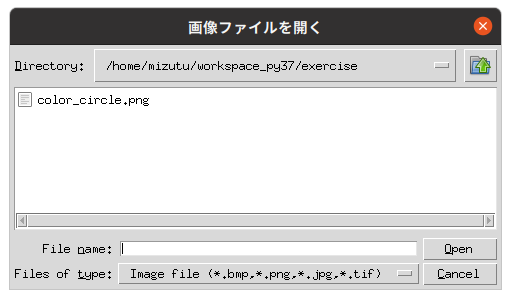
        filename = filedialog.askopenfilename(
                    title = "画像ファイルを開く",
                    filetypes = [("Image file", ".bmp .png .jpg .tif"),
                                 ("Bitmap", ".bmp"),
                                 ("PNG", ".png"),
                                 ("JPEG", ".jpg")],     # ファイルフィルタ
                    initialdir = "./"                   # 自分自身のディレクトリ
                    )
        if len(filename) == 0:
            break

    if logflag:
        print('\n Finished.')

# main関数エントリーポイント(実行開始)
if __name__ == "__main__":
    sys.exit(main())
→ 以降「OCR アプリケーション基礎編 2」へ続く
PukiWiki 1.5.4 © 2001-2022 PukiWiki Development Team. Powered by PHP 7.4.33. HTML convert time: 0.018 sec.