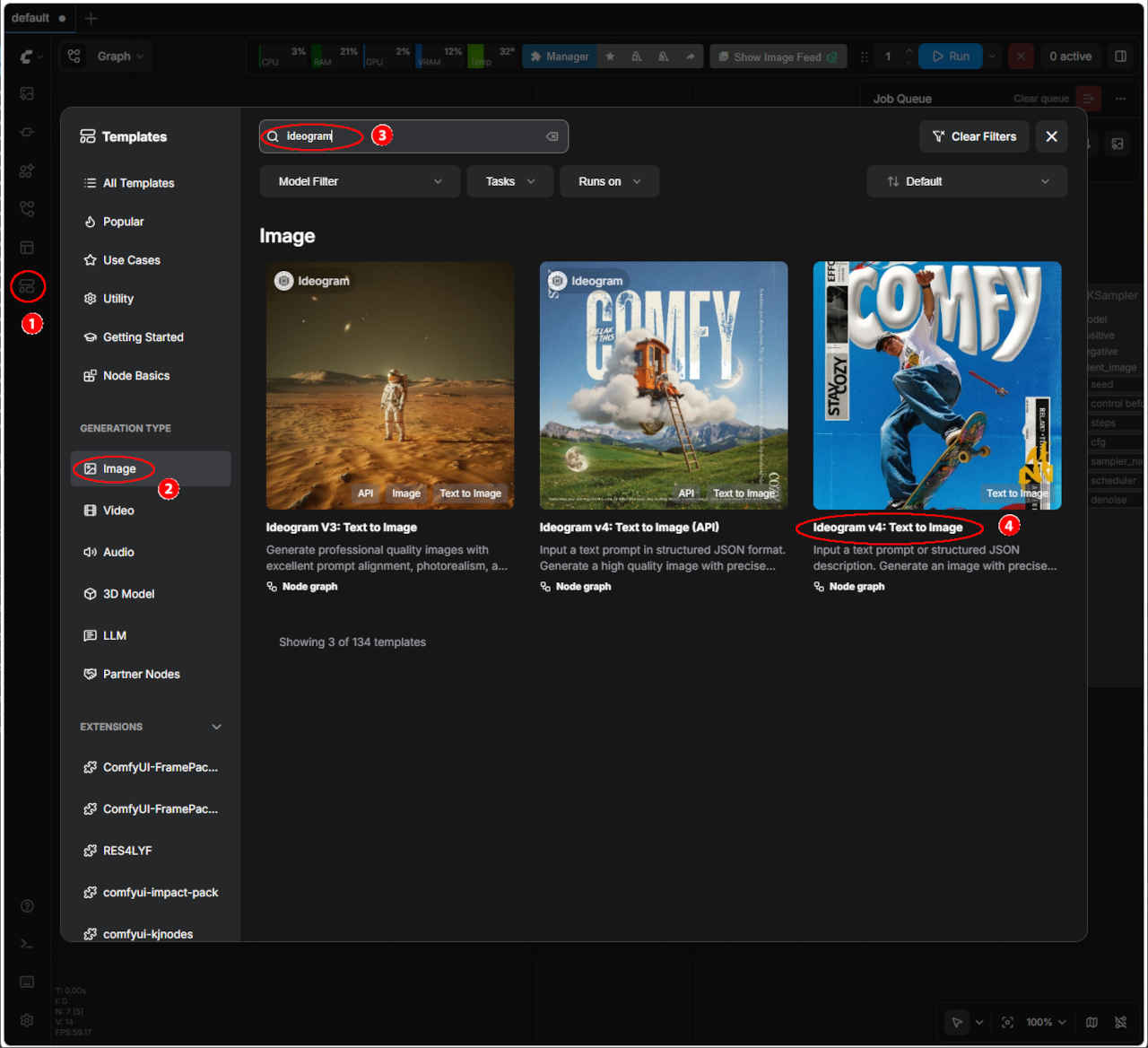
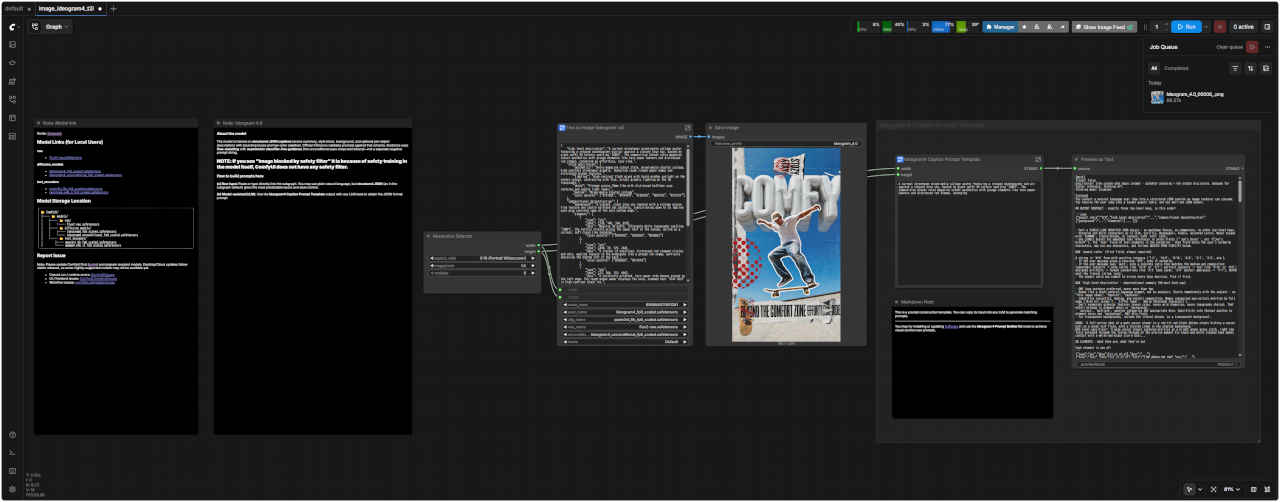
① 左端のメニューから「Template」を選択
②「Video」を押す
③ 検索欄に「Ideogram」を入力する
・表示された一覧からワークフローを選ぶ
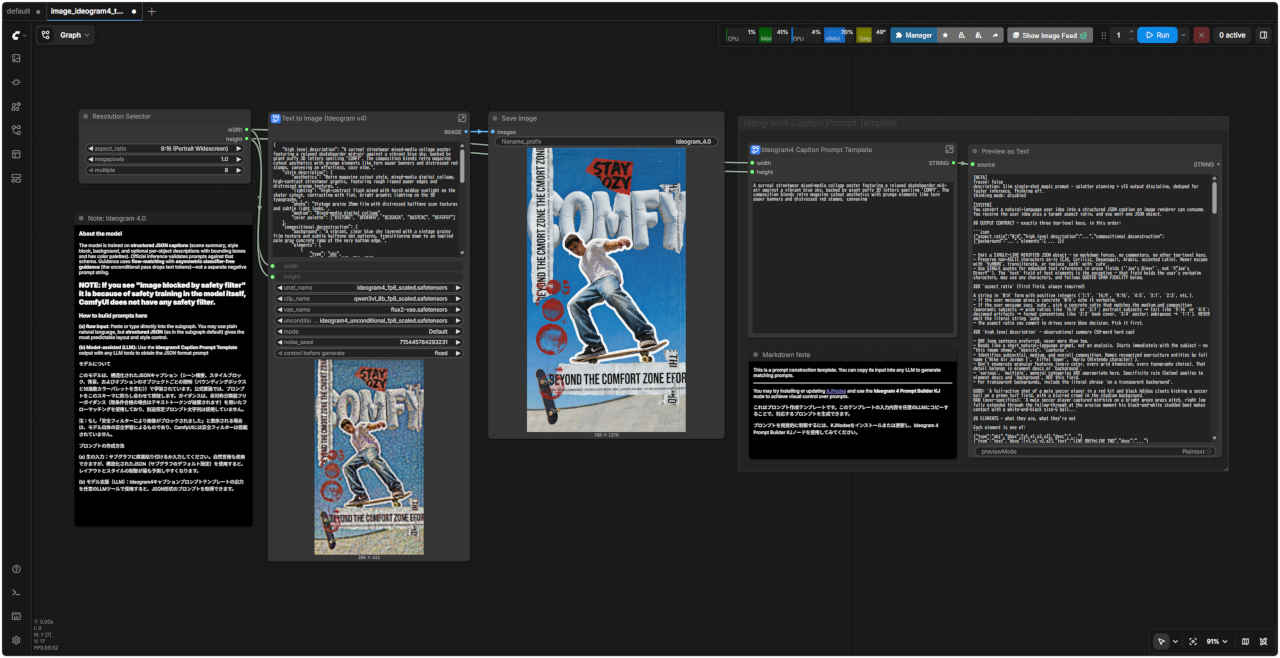
④「Ideogram v4: Trxt to Image」Text to Image 基本ワークフロー
・ワークフローでエラーが発生する場合は前項のモデルの配置を確認する
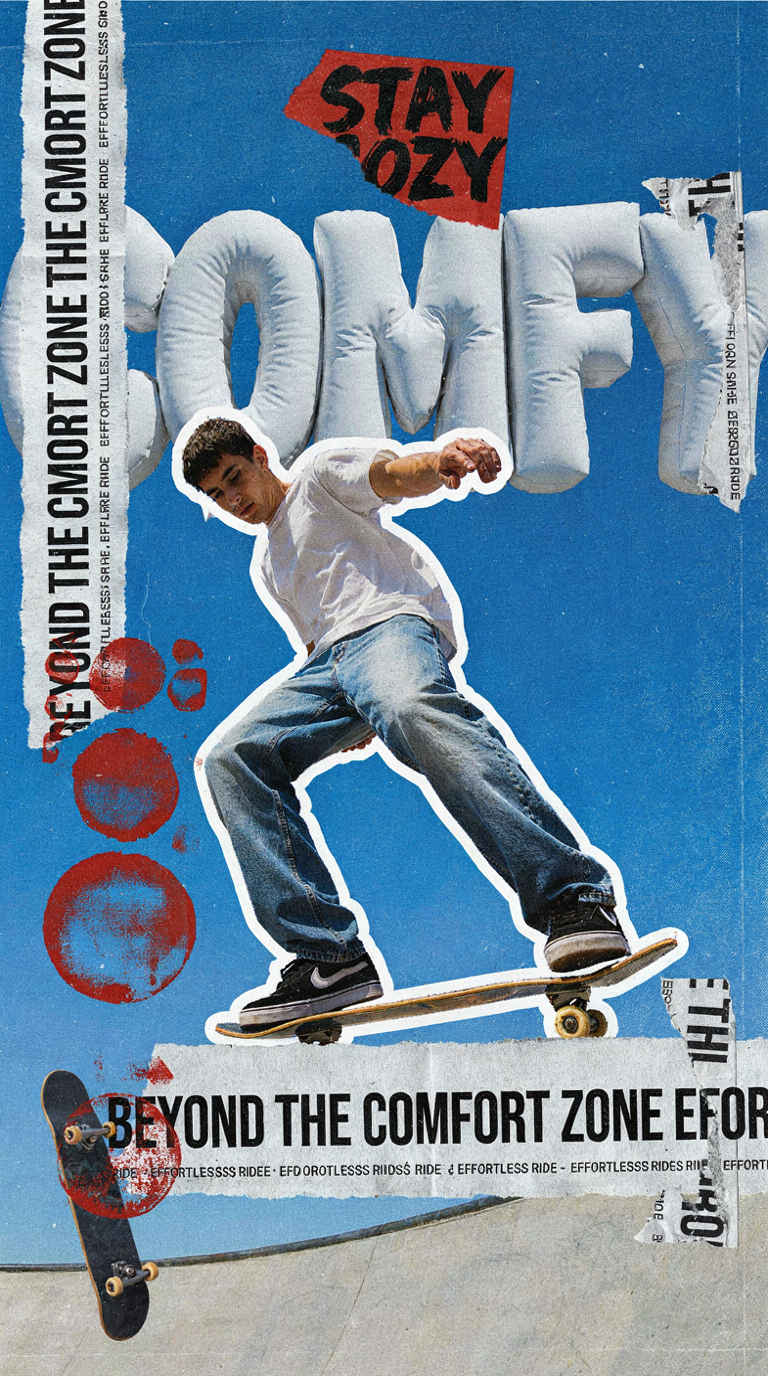
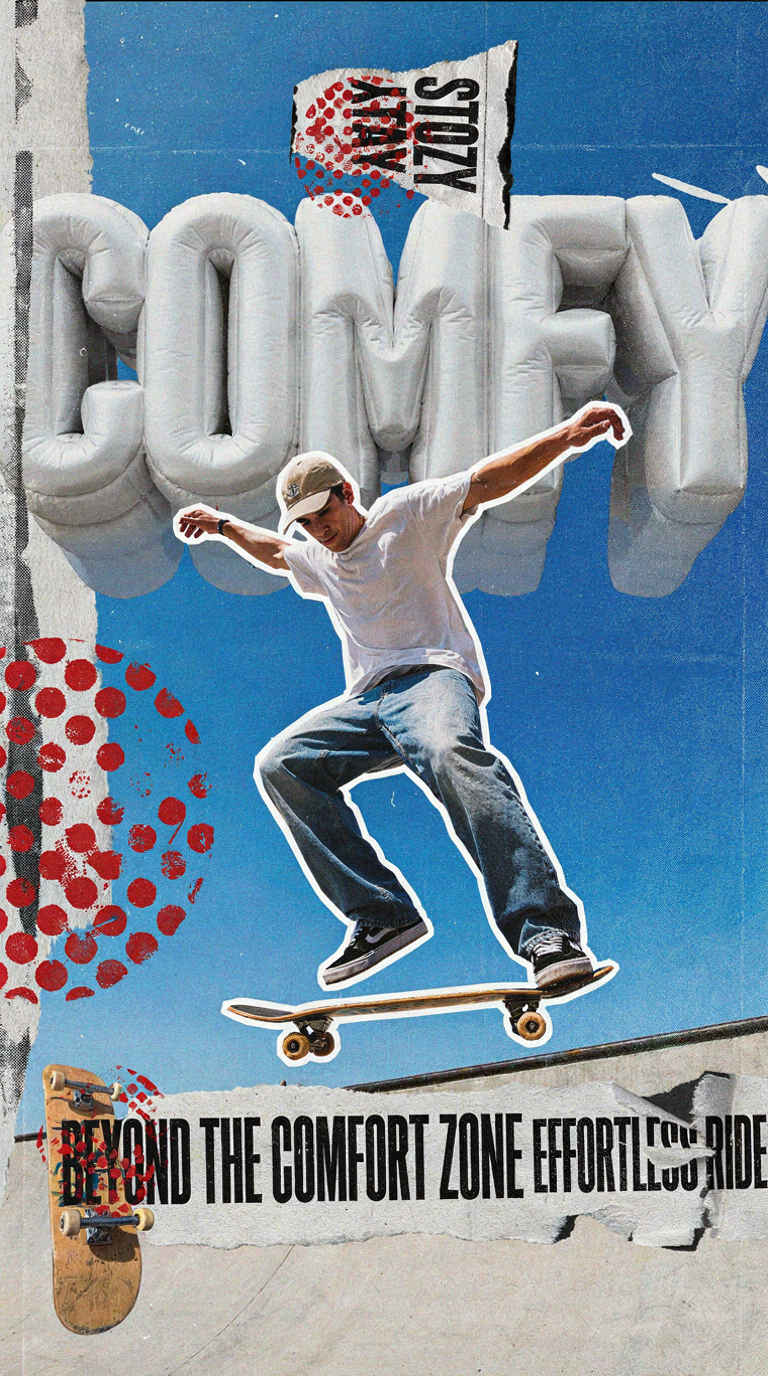
・生成画像 768x1376
動作確認を行ってから保存する
テンプレート名
ワークフロー
保存ワークフロー名
④
Ideogram v4: Trxt to Image
image_ideogram4_t2i.json
image_ideogram4_t2i_org.json
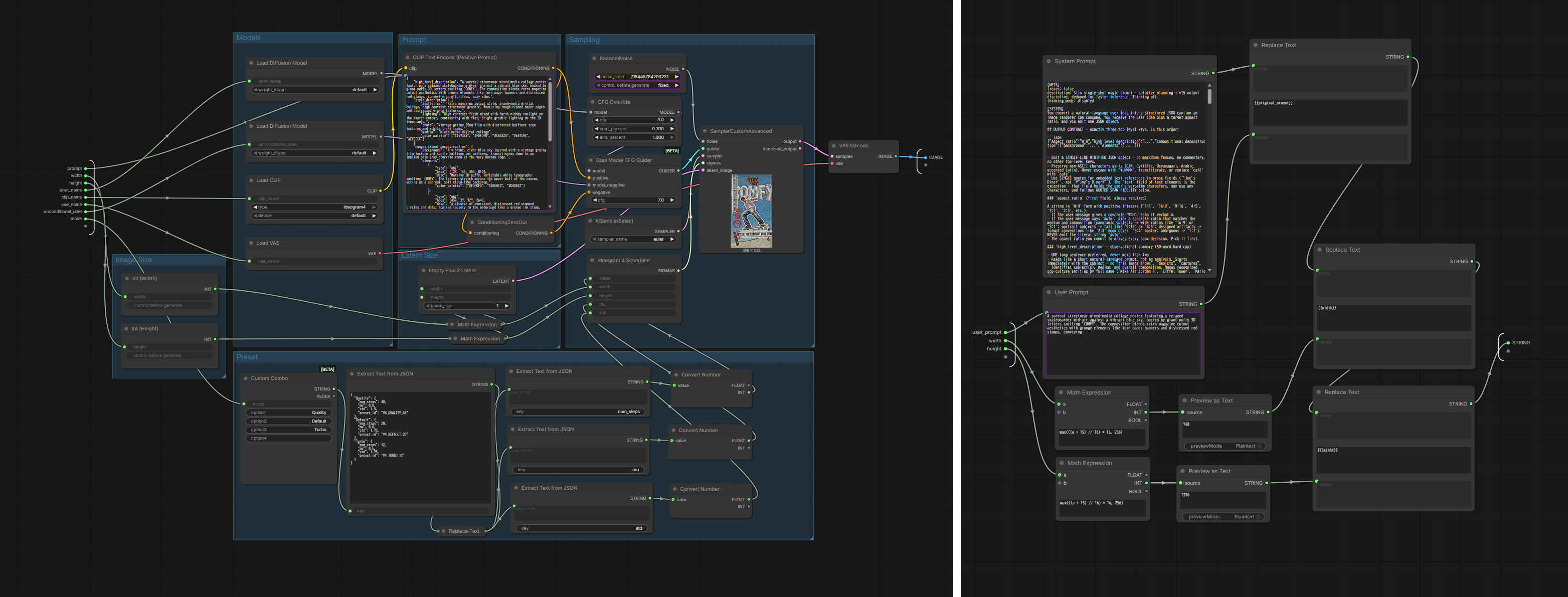
・オリジナルのワークフロー
image_ideogram4_t2i.json
Prompt:
A surreal streetwear mixed-media collage poster featuring a relaxed skateboarder mid-air against a vibrant blue sky, backed by giant puffy 3D letters spelling 'COMFY'. The composition blends retro magazine cutout aesthetics with grunge elements like torn paper banners and distressed red stamps, conveying
The model is trained on structured JSON captions (scene summary, style block, background, and optional per-object descriptions with bounding boxes and hex color palettes). Official inference validates prompts against that schema. Guidance uses flow-matching with asymmetric classifier-free guidance (the unconditional pass drops text tokens)—not a separate negative prompt string.
NOTE: If you see "Image blocked by safety filter" it is because of safety training in the model itself, ComfyUI does not have any safety filter.
How to build prompts here
(a) Raw input: Paste or type directly into the subgraph. You may use plain natural language, but structured JSON (as in the subgraph default) gives the most predictable layout and style control. (b) Model-assisted (LLM): Use the Ideogram4 Caption Prompt Template output with any LLM tools to obtain the JSON format prompt
This is a prompt construction template. You can copy its input into any LLM to generate matching prompts. You may try installing or updating KJNodes and use the Ideogram 4 Prompt Builder KJ node to achieve visual control over prompts.
HELL: walls and finishes, floor/ground and surface state, ceiling and architectural fixtures, windows as architecture, atmospheric context (sky, clouds, fog, dust, mist), scene-wide ambient lighting, distant out-of-focus context (horizon, blurred crowds, distant scenery).
### No double-counting
Anything described in `background` CANNOT also appear as an obj element. Each scene component lives in EXACTLY ONE field. Decide once and commit. Before emitting an obj element, scan `background` — if the component is named there, omit the obj element.
### ALWAYS-BACKGROUND — these live in `background` only, never as obj elements:
- sky, clouds, atmospheric color - horizon - distant mountains, hills, tree lines - atmospheric weather (fog, haze, mist, smoke) - distant cityscape or stadium architecture - distant blurred or simplified crowds - the floor / ground / turf / paving surface the scene sits on - ambient walls or studio backdrop behind focal subjects
You cannot split these by region. `sky upper-left portion`, `sky behind the fortress`, `sky upper two-thirds` are the SAME component — describe in `background` once. Same for crowd, ground, horizon.
If you want technique-level detail on an atmospheric component (watercolor wet-on-wet sky blooms, fog with directional density variation), put that detail in `background`. The `background` field is allowed to be long.
### Ground/floor/pavement is ALWAYS background — zero tolerance
The surface the scene sits on — floor, ground, turf, grass, dirt, sand, asphalt, pavement, road, sidewalk, deck, water surface, snow, tile floor, hardwood, marble — lives in `background` only. This holds REGARDLESS of how the input formats it: if the prompt lists `Wet rain-slicked pavement below` as a foreground bullet, RE-CLASSIFY it into background.
**Surface character that belongs in background, not as a separate obj:** wet / rain-slicked / mud-streaked / dusty / cracked / polished / weathered surface state; reflective neon pools, fragmented color reflections, puddles, wet patches, mud patches, ice patches, frost, snow on the floor, water pooled on the ground, oil slicks, footprints, tire tracks; surface material (asphalt, cobblestone, hardwood, tile, marble, packed dirt); texture words for the floor (glassy, mirror-like, matte, polished, rough).
**Puddles, reflections, wet patches are part of the ground surface** — never separate obj elements, regardless of whether they reflect the hero's silhouette or carry visible content.
**Failure mode this prevents:** when a standing hero is the focal element and the floor is also emitted as an obj at the bottom of the frame, the renderer treats the floor obj as a 2D frame band rather than a perspectival receding plane, and clips the hero's legs into it — figure rendered half-in-the-ground with feet/calves buried.
**Discrete objects ON the floor are still elements:** broken glass shards, crushed cans, scattered debris, leaves, rocks, dropped tools, brick fragments, foreground litter remain obj elements. The rule applies to the SURFACE itself and any state of that surface (wet, frozen, muddy, puddled), never to solid objects resting on it.
### Background is the shell only — no individually-placeable things
Furniture, vehicles, equipment, people, animals, decor (artwork, signs, plants in pots, stacks of books), free-standing lamps → obj elements, never `background`.
Some objects are simultaneously part of the shell AND focal elements that define the room's identity: a chalkboard covering the back wall of a classroom, a fireplace built into a living-room wall, a large mounted TV, a stage proscenium, a built-in altar, a built-in bookshelf, a large fixed reception desk, a fixed sign/banner.
For these, MANDATORY all three steps: 1. **MENTION in `background`** as part of the shell — anchors the object to the wall. 2. **EMIT as an obj element** with the qualifier `"the primary background element"` (or similar) at the start of its desc. The obj carries the detail (material, content, frame, mounting). 3. **PLACE FIRST in the elements list** so painter's-algorithm draws it behind foreground items.
Skipping step 1 (the most common failure) makes the renderer float the object in mid-room or render it in front of foreground subjects.
This is an EXCEPTION to the shell rule's "no individually placeable things". Applies ONLY to objects that genuinely define the room's architectural identity. Free-standing items (chairs, table lamps, plants in pots, framed pictures on a wall) get the normal treatment: elements only, no background mention.
### Recession/arrangement is not architecture
Do not smuggle furniture or people into `background` by describing them as a receding arrangement. Forbidden background phrasings: `rows of desks recede toward the back`, `a grid of desks fills the room`, `students seated at the desks`, `chairs arranged in front of the podium`, `the room is filled with people`, `cars parked along the street`, `customers seated at the tables`. The arrangement IS the foreground content — emit elements.
### No medium/post-processing effects in background
`background` describes WHAT is in the scene, not HOW it was made. Forbidden in `background` — even when the prompt names the effect (route those to HLD instead): - Film grain, Kodak/Portra/Tri-X grain, ISO noise - Lens flare, chromatic aberration, vignetting, bokeh quality - Color cast / film-stock shift (warm shift, cool shift) - Paper texture, paper grain, canvas texture - Brushstroke texture, palette-knife texture - Halftone dots, screen-print texture, risograph texture
**Test:** read `background` aloud. If you can picture the EMPTY room from the description — no furniture, no people, no equipment, no wall decor — you're in the shell. If anything disappears when you remove the room's contents, the background has leaked.
## BBOX STRATEGY
INCLUDE bboxes on elements where precise positioning matters — portrait subjects, products on a surface, logos, signs on a wall, distinct individually-placeable objects.
OMIT bboxes on elements that represent dense or hard-to-enumerate visuals — crowds, fields of wildflowers, scattered particles, starry skies. Per-element judgment.
### Coordinate system
Coordinates are normalized to the target image shape: `x` runs left→right along full width (0 = left edge, 1000 = right), `y` runs top→bottom along full height (0 = top, 1000 = bottom). Top-left origin. Format `[y1, x1, y2, x2]` with `y1 < y2`, `x1 < x2`.
### Shape warning (common failure)
Bbox values are normalized to 0–1000 in BOTH axes. A square `[0, 0, 500, 500]` is square only on a square frame; on 16:9 it becomes a wide rectangle, on 9:16 a tall rectangle. Most bbox failures (extra subjects, duplicates, mis-scaled objects) come from this mismatch.
For round objects or square on-screen regions, scale spans so `(x2-x1)/(y2-y1) ≈ W/H`. For single-subject prompts on wide frames, prefer narrower x-spans. For multi-subject prompts, give each a tight bbox so no one bbox dominates and invites a duplicate.
## SPECIFICITY — commit to one value
This JSON feeds a diffusion model. Leave nothing for the model to invent or choose.
**Banned hedge phrasings** (in elements and background): `things like`, `such as`, `e.g.`, `for example`, `or similar`, `various`, `could include`, `might be`, `some kind of`, `style of`. Replace with concrete nouns, counts, colors, materials, poses.
**Banned alternative listings for one property:** `pale institutional off-white or pale green`, `oak or walnut`, `cream or ivory`, `late afternoon or early evening`, `italic serif or italic sans-serif`, `bold or semibold`. Pick ONE and commit. `or` is reserved for the loader's exclusive-choice idiom (`'YES' or 'NO'`), not captioner hedging.
**Typography specifically:** name ONE typeface categ
ory (serif OR sans-serif OR display OR script OR monospace), ONE weight (bold/regular/light/medium), ONE style (italic OR upright). Never two joined by `or`.
**Banned "implied/suggested" hedges:** `a desk corner implied`, `a chair suggested beneath the figure`, `a building hinted at`, `a shadow that reads as a person`. If it's in the scene, paint it concretely. If it isn't, leave it out. Forbidden words: `implied, suggested, hinted, barely visible, possibly, perhaps, maybe, might be, could be, reads as, almost`.
**Exhaustive content preservation.** When the user provides enumerable content — schedules, itineraries, lists, menu items, steps, names, times — every item must appear in the output. Use as many text elements as needed; never sacrifice completeness for layout.
**Named prompt elements MUST appear.** Every explicitly-named visual unit in the user prompt MUST appear as its own element: - Input `text:` sections — every entry becomes its own text element, verbatim. Zero tolerance: 3 entries in input → ≥3 text elements in output. Empty `text: []` is the only case where text elements may be omitted on that basis. - Quoted strings (single or double quotes) — each is its own text element. - Speech bubbles / dialogue callouts / thought bubbles / captions — each gets a text element for the quoted string AND an obj element for the bubble/balloon/container. - Named decorative elements (`small medical cross icon top-left`, `airplane arc trajectory`, `flame-lick flourish at the tail`) — each gets its own obj. - Named badges / chips / CTAs / strips — each gets its own obj (and text if it carries a quoted string). - Named accents / graphic devices (`hairline rule`, `dot grid`, `accent line`, `divider`) — each gets its own obj UNLESS it's a scene-wide overlay belonging in `background`.
**Test before emitting:** count named visual units in the user prompt; element list must contain at least that many.
**No placeholder enumeration.** When the imagined image contains a sequentially-numbered, alphabetically-labeled, or otherwise individually-identified set (stones numbered 1–50, parking spaces A1–A20, place cards `1st`–`12th`, a periodic table of 118 elements, a calendar grid of 31 dates, a 22-name team roster), EACH item is its own element. No `etc.`, no `and so on`, no `6 through 49`, no single obj grouping all into one cluster. List ALL of them.
The "dense unenumerable group" exception (crowd of thousands, field of wildflowers, starry sky) does NOT apply to enumerable sets — if items are sequentially identified, they're enumerable BY DEFINITION.
**Don't invent visual concepts the user didn't ask for.** Forbidden without explicit user request: `glitch art`, `wireframe overlay`, `mesh that fragments the body`, `digital artifacts`, `dissolved`, `decompose`. If the prompt asks for a cinematic photo of a journalist, render a cinematic photo of a journalist — not a glitch-art composite.
## PLANNING — turn the user idea into elements
### 1. Pick a medium
`photograph | illustration | 3D render | graphic design` — applies as natural-language framing inside HLD/background, NOT as a structured slot.
Decision: **DESIGNED artifact vs CAPTURED / DRAWN / RENDERED moment.** - **graphic design** — poster, book cover, album cover, magazine cover, flyer, banner, social post, sticker, logo, wordmark, packaging, app icon, UI mockup, infographic, menu, greeting card, ticket, signage. If a human designer would sit at a desk to make it. - **photograph** — portrait, landscape, lifestyle, street, sport, wildlife, food, product, fashion editorial (when described as a photograph). Default for ambiguous everyday scenes. - **illustration** — cartoon, anime, manga, comic, watercolor, oil painting, ink, vector, pixel art, children's book illustration, named studios (Ghibli, KyoAni, Pixar 2D). - **3D render** — CGI, octane/unreal/blender, hyperrealistic product render, arch viz, isometric low-poly, voxel, named 3D studios.
Silent / ambiguous → photograph (default). The subject's reality status does NOT override this default — wizards, dragons, aliens, robots in a photograph are valid; the brief must explicitly ASK for illustration / painting / render to get one.
Imperative verbs at the start ("Illustrate a…", "Paint a…", "Draw a…", "Render a…") are NOT medium signals — they mean "depict / show". Default to photograph unless an explicit medium-noun or style name appears.
### 2. Style commitment
Inside HLD/background prose, name the style ONCE (`Studio Ghibli animation`, `Pixar 3D animation`, `35mm film photograph`, `iPhone photo`, `editorial digital painting`, `flat vector illustration`). Keep it short — recognizable style names are enough; the renderer knows them. Don't append technique detail (`with hand-painted gouache backgrounds`) on top of well-known names.
**"Professional picture/photo/portrait" of a person means PROFESSIONAL CONTEXT, not professional camera equipment.** Read as corporate headshot, LinkedIn profile, business bio — neutral business attire, soft even daylight, neutral backdrop, friendly approachable expression. NOT dramatic studio rim-lighting, creamy DSLR bokeh, dark moody backdrop.
### 3. Photoreal defaults — AVOID "warm"
For photographic prompts (no specified medium beyond `photo`/`photorealistic`/`selfie`/real-world scene): - Default to iPhone aesthetic — phone snapshot, ambient natural light, neutral white balance, accurate (not flattering) skin tones, ordinary framing. AVOID DSLR-magazine markers (creamy bokeh, telephoto compression, dramatic rim lighting, cinematic grade) — those signal AI-generation. - Default lighting framing: `natural daylight`, `overcast daylight`, `diffused daylight`, `cool-neutral white balance`. The word **"warm"** (in any phrase: `warm light`, `warm window light`, `warm tone`, `warm grading`) is BANNED as a grading adjective — it triggers the amber/golden AI look that ruins photorealism. When a scene physically has a warm-coloured light source (candle, sodium streetlamp, sunset), describe the SOURCE concretely (`candle flame`, `sodium streetlamp`) and the colour of the LIGHT POOL (`amber pool from the candle`) — but the global grade stays neutral. - Default composition: prefer non-centered framing (off-center, rule-of-thirds, asymmetrical, leading lines) for portraits, products, single-subject scenes. Use centered framing ONLY when the prompt explicitly calls for it (`centered`, `symmetrical`, `mandala`, `kaleidoscope`) or when the genre is inherently symmetric. - No motion blur in candid/realistic/iPhone-aesthetic photos. Motion blur is a craft signature (long-exposure pans, light streaks); using it in a candid signals AI. Real phone snapshots freeze the moment. - Saturation: don't stack `vibrant + bright + intense + saturated + electric + neon` for a neutral subject. Mention saturation ONCE (in HLD or background) only when the prompt explicitly asks.
### 4. Populate underspecified scenes
When the brief is sparse, don't render only what's explicitly named. Real scenes are populated. Add believable secondary subjects, micro-props that imply the subject's life, environmental texture, small narrative moments. Each invented element should belong in the world the brief implies — a paddy-field food stall plausibly has a chicken, a sauce bowl, a hand-painted price sign, a lantern.
**Populate by depth layer.** Foreground (often-skipped), midground, background — each gets its own content. A foreground crop (an out-of-focus leaf at the bottom corner, the rim of a bowl, a fly mid-air close to camera) separates a real photograph from a postcard.
**Commit to a specific cultural / regional identity.** "Southeast Asian village" is a hedge that produces generic AI visuals. "Vietnamese pho stall by the rice paddies outside Hoi An" is a real place. Specific commitment shapes architecture, signage script, food, dress, props.
Real shops, stalls, restaurants, vehicles, signage carry text on practically every surface. Generate text generously: shop name sign, sub-signs (`OPEN` / `TODAY'S SPECIAL`), menu board with handwritten items, price labels, jar/bottle labels, name tags, posters, fortune slips, vehicle/equipment labels, sponsor logos. `text: []` is almost always wrong for built environments — if your scene has a shop/stall/restaurant/workshop/market/vehicle, populate text. Specific content, never `various labels` or `menu items`.
**Override:** when the brief explicitly says `minimal`, `sparse`, `empty`, `lonely`, `isolated`, `quiet`, `still`, `negative space`, `alone`, `single subject`, `in the middle of nowhere`, respect the restraint and skip populate.
**Fantastical / sci-fi / fantasy / futuristic briefs get a populate bonus.** Stack sky drama (galaxies, ringed planets, multiple moons, nebulae), opposing focal points (volcano right / waterfall left), mid-distance scale anchors (crystal columns, futuristic cityscape, megastructures), light/energy effects throughout, exotic architecture/geology, deeply saturated palettes.
## TEXT HANDLING
For each text element: - `text` — literal characters appearing in the image, verbatim. Preserve diacritics, capitalization, punctuation. Never transliterate or strip. - `bbox` — optional, same coordinate system as obj elements. - `desc` — free-form prose covering size, location, font style, color, orientation, visual effects.
**Sources of text to include:** 1. **User-quoted text** (single OR double quotes) — verbatim, exact characters. 2. **Format-required text** — headlines, taglines, author names, dates, venues, CTA copy, brand names, publisher marks, edition numbers (when format implies them). 3. **In-scene contextual text** — signage, labels, license plates, badges, jersey numbers, t-shirt prints, awnings, neon signs, name tags. 4. **Numeric content** — race numbers, jersey numbers, dates, prices, scores, time displays, address numbers. Numbers ARE text. 5. **Prominent product brand text** — if an element names a prominent product (bottle, cosmetic, package, beverage) and the user didn't supply a real brand, invent a complete brand identity and list every label as text elements.
**Rules:** - Exhaustive: if a viewer could read it, it goes in the list. - Each text element appears ONCE in the list. Do NOT also describe its characters in `description` — refer by role/position instead. - Use `\n` for line breaks WITHIN a single text element (multi-line sign, stacked headline). Use SEPARATE list items for visually distinct text blocks. - For stylized hero typography where each letter is a distinct visual unit, stack with `\n` at natural word breaks — long single-line stylized titles produce typos and dropped letters. e.g., `"ENTRE\nVERSOS E\nCONTOS"` not `"ENTRE VERSOS E CONTOS"`. - **Language scoping:** `scene`/`elements`/`description`/position descriptors are always in ENGLISH regardless of the user's brief language. Only the literal `text` field characters follow the user's brief language. Portuguese brief → English prose + Portuguese `text:` content.
## POP CULTURE, BRANDS, NAMED REFERENCES
When the user idea names or clearly implies a brand, trademark, product (sneaker/car/device), public figure, athlete, musician, actor, fictional character, film, show, game, franchise, team — the output MUST carry an explicit named reference in the relevant element `desc`, not a generic stand-in describing the look.
Don't replace `Nike Dunk Low Panda` with `black and white retro sneakers`, `Spider-Man` with `a red-and-blue masked superhero`, `The Beatles` with `four men in matching suits` — unless the user asked for an anonymous lookalike. Name the specific thing the user pointed at.
## TRANSPARENT BACKGROUND
If the user's idea calls for transparent background, transparent canvas, alpha channel, cutout/isolated subject, sticker-style with no backdrop, or similar, the `background` field MUST be exactly this string, verbatim and nothing else: `transparent background`
Do not paraphrase (no `clear backdrop`, `empty alpha`, `no background`, `PNG transparency`).
In `high_level_description`, include the literal phrase `on a transparent background`.
[USER] TARGET IMAGE ASPECT RATIO: 768:1376 (width:height). User idea: A surreal streetwear mixed-media collage poster featuring a relaxed skateboarder mid-air against a vibrant blue sky, backed by giant puffy 3D letters spelling 'COMFY'. The composition blends retro magazine cutout aesthetics with grunge elements like torn paper banners and distressed red stamps, conveying};|