私的AI研究会 > ComfyUI9f
「ComfyUI」を使ってローカル環境でのAI画像生成を検証する
| 2026年7月発表されたテキスト、画像、動画、音声をひとつの文脈として同時に処理できる最新の汎用マルチモーダル動画生成AIモデルの検証 |
| このプロジェクトで作成するワークフローと関連データは下記にアップロードしている(更新されている場合は再度ダウンロードのこと) |
📂ComfyUI
  └─📂user
        └─📂default
              └─📂workflows        ← ワークフローの保存場所
                    :
                    ├─📂MiniMax       ← この章で作成するワークフロー
                    :
・解凍してできる「ComfyUI/」フォルダを「StabilityMatrix/Data/Packages/ComfyUI」へ上書きコピーする| ワークフロー | 機 能 | モデル | CPU | CPU | |||||
| RTX 4070 | RTX 4060 | RTX 4060L | RTX 3050 | GTX 1050 | i7-1260P | i7-1185G7 | |||
| 5601_minimax_h3_t2v | Text to Video 基本ワークフロー | INT8 ConvRot | 04:19.59 | 10:51.20 | × | 非対応 | |||
| 5602_minimax_h3_i2v | Image to Video 基本ワークフロー | 03:34.93 | 11:49.05 | × | |||||
| 5603_minimax_h3_i2v | Image to Video2 基本フロー | 03:42.03 | 12:43.39 | × | |||||
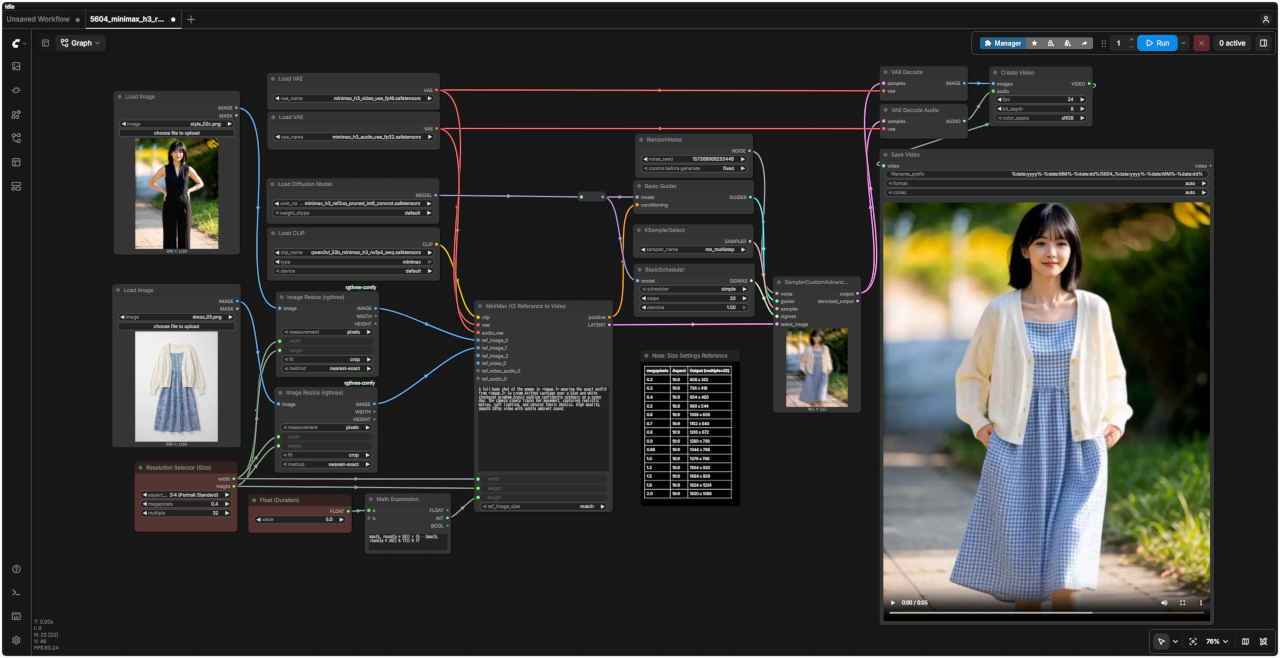
| 5604_minimax_h3_r2v | Reference to Video 基本フロー | 04:42.74 | 12:43.99 | × | |||||
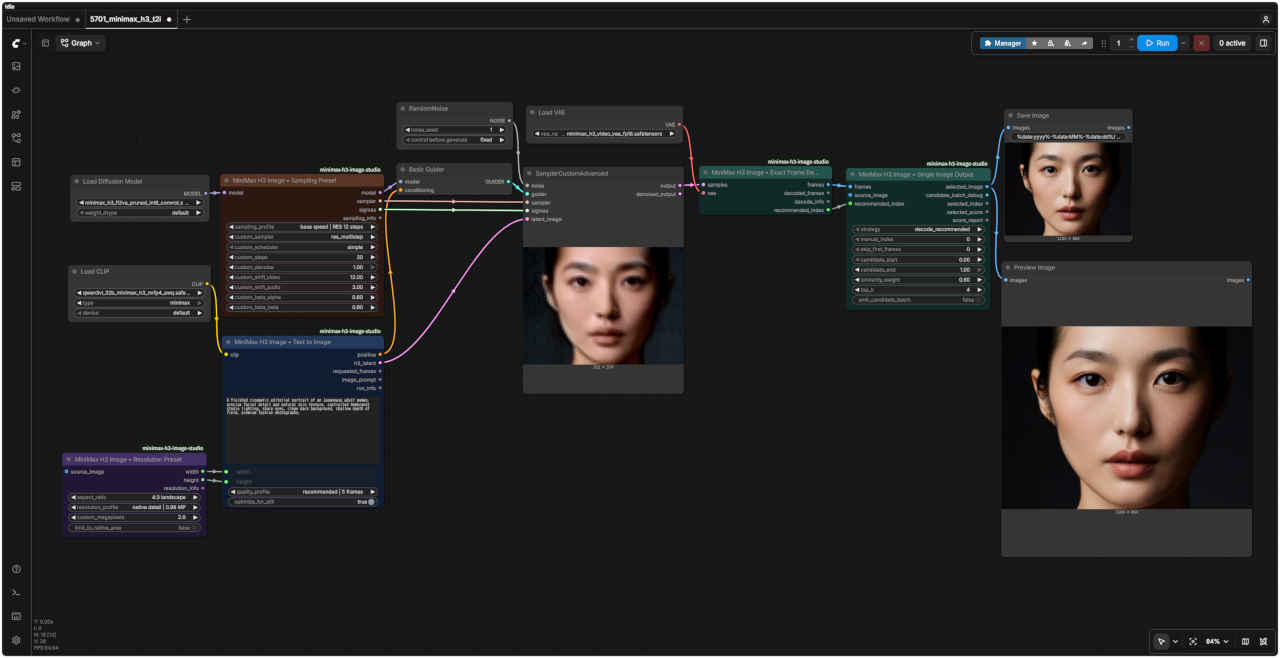
| 5701_minimax_h3_t2i | Text to Image 基本ワークフロー | 01:09.74 | 03:28.06 | 11:32.71 | |||||
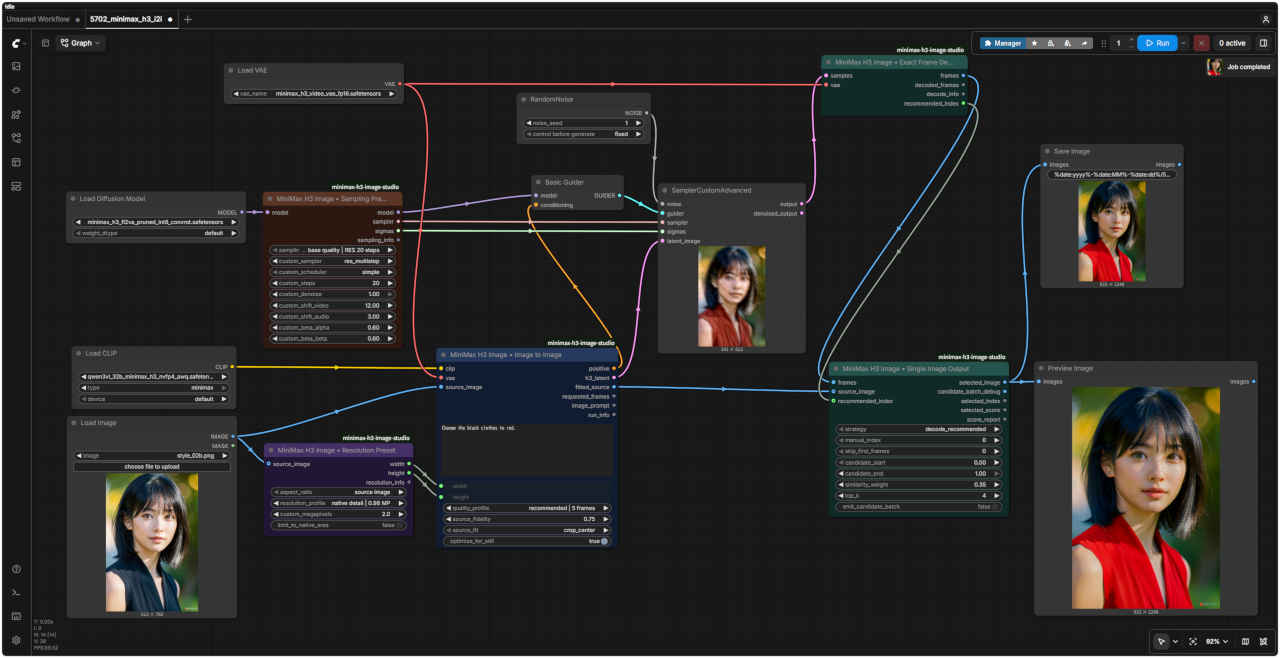
| 5702_minimax_h3_i2i | Image to Image 基本フロー | 00:33.92 | 02:34.53 | 37:11.18 | |||||
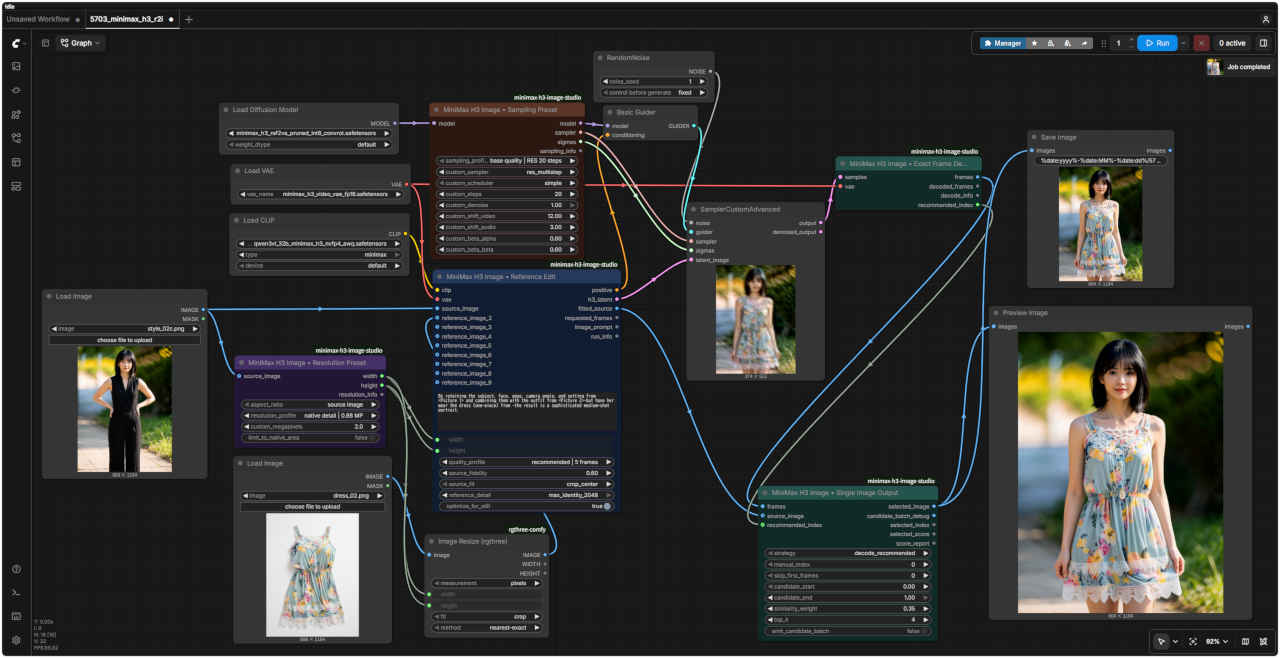
| 5703_minimax_h3_r2i | Reference to Video2 基本フロー | 01:26.31 | 04:01.92 | × | |||||
| 拡張ノード(検索名) | 拡張ノード URL | 主な機能 / 参照ページ | 特記事項 |
| rgthree | rgthree-comfy | ノードをスイッチで切り替える | すべてのノードに必須 |
| ComfyUI_Custom_Nodes_AlekPet | ComfyUI_Custom_Nodes_AlekPet | プロンプトを日本語入力する | |
| MiniMax H3 Image Studio | ComfyUI-MiniMax-H3-Image-Studio | MiniMax H3で画像を生成する | MiniMax H3 で静止画像を生成する場合 |
| モデル名 | ファイル名(.safetensors) | 配置先(/StabilityMatrix/Data/) | ダウンロード URL | サイズ | |
| diffusion_models | minimax_h3_fl2va_pruned_int8_convrot | Models/ | DiffusionModels/ | minimax_h3_fl2va_pruned_int8_convrot.safetensors | 19.5GB |
| minimax_h3_ref2va_pruned_int8_convrot | minimax_h3_ref2va_pruned_int8_convrot.safetensors | 19.5GB | |||
| text_encoders | qwen3vl_32b_minimax_h3_nvfp4_awq | TextEncoders/ | qwen3vl_32b_minimax_h3_nvfp4_awq.safetensors | 14.6GB | |
| vae | minimax_h3_video_vae_fp16 | VAE/ | minimax_h3_video_vae_fp16.safetensors | 4.8GB | |
| minimax_h3_audio_vae_fp32 | minimax_h3_audio_vae_fp32.safetensors | 0.6GB | |||
| フォルダ | ワークフロー名 (.json) | モデル | 機能 (参照ページ) | 特記事項(同じ機能のワークフロー .json) |
| MiniMax | 5601_minimax_h3_t2v | INT8 ConvRot | Text to Video 基本ワークフロー | (video_minimax_h3_t2v.json) |
| 5602_minimax_h3_i2v | Image to Video 基本ワークフロー | (video_minimax_h3_i2v.json) | ||
| 5603_minimax_h3_i2v | Image to Video2 基本ワークフロー | 5602 エンド:フレーム指定あり | ||
| 5604_minimax_h3_r2v | Reference to Video 基本ワークフロー | (video_minimax_h3_r2v.json) |
| フォルダ | ワークフロー名 (.json) | モデル | 機能 (参照ページ) | 特記事項(同じ機能のワークフロー .json) |
| MiniMax | 5701_minimax_h3_t2i | INT8 ConvRot | Text to Image 基本ワークフロー | 拡張ノード ComfyUI-MiniMax-H3-Image-Studio による |
| 5702_minimax_h3_i2i | Image to Image 基本ワークフロー | |||
| 5703_minimax_h3_r2i | Reference to Video2 基本ワークフロー |
| ComfyUI オフィシャルサイトで公開されているテンプレートの動作を確認する |
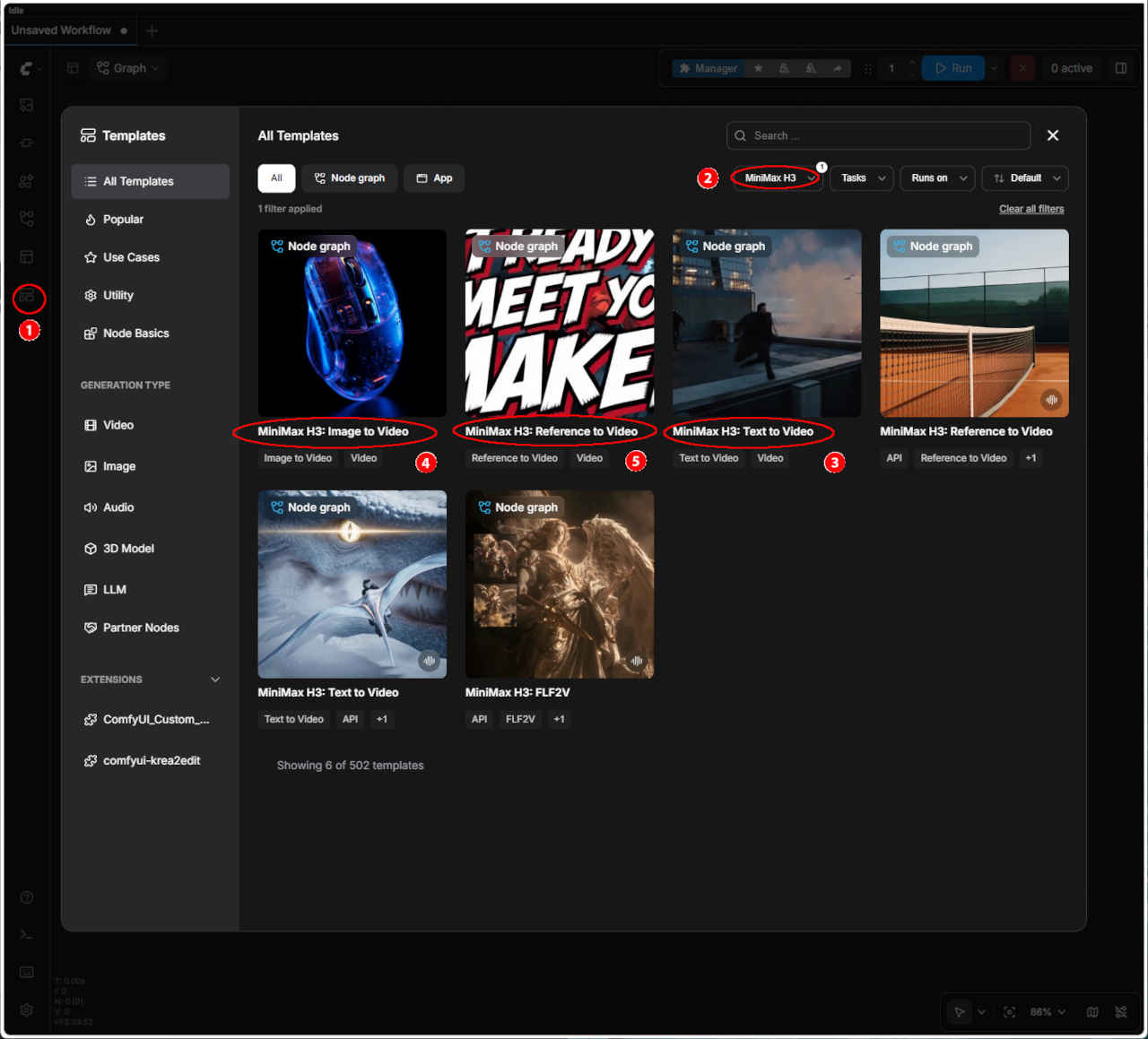 | ① 左端のメニューから「Template」を選択 ②「MiniMax H3」を選択する ・表示された一覧からワークフローを選ぶ ③「MiniMax H3: Text to Video」 ④「MiniMax H3: Image to Video」 ⑤「MiniMax H3: Reference to Video」 ・ワークフローでエラーが発生する場合はモデルの配置を確認する | |
| テンプレート名 | 保存ワークフロー名 | |
| ③ MiniMax H3: Text to Video | video_minimax_h3_t2v.json | |
| ④ MiniMax H3: Image to Video | video_minimax_h3_i2v.json | |
| ⑤ MiniMax H3: Reference to Video | video_minimax_h3_r2v.json | |
| プロンプト |
|
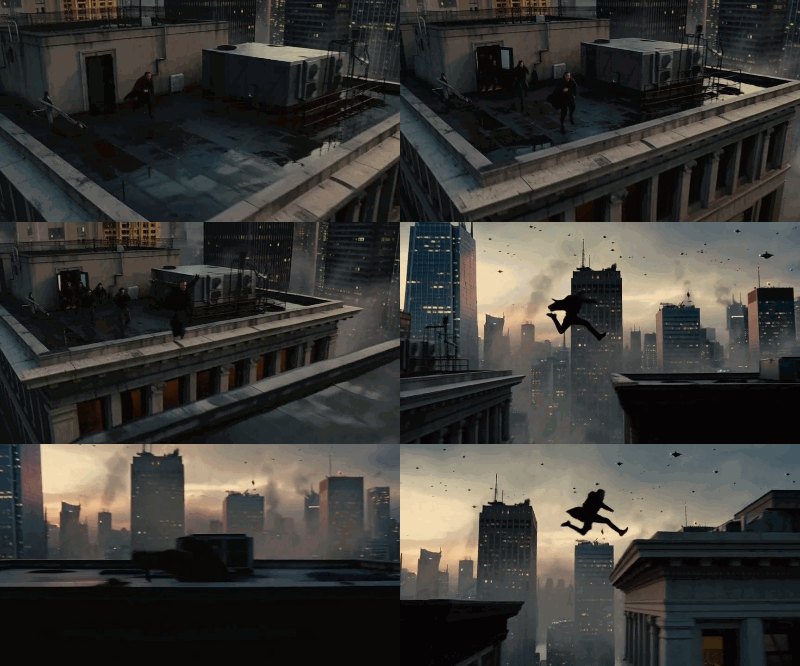
realistic live-action cinematic look, action movie trailer: practical film photography style, a post-rain dusk metropolis, anamorphic lens, shallow depth of field, film grain, city volumetric fog, flying-car traffic between the towers, restrained grading for a premium feel, powerful natural movement. Scene overview: at dusk on a cluster of skyscrapers, the protagonist is being chased, sprinting and leaping across rooftops, jumping from one building's roof to the next with pursuers closing in behind. This is the escape sequence of an action movie trailer: every leap is life-or-death, thrilling and fluid. Storyboard (each shot a separate scene, rapid cuts, all landing on the musical beats): [0s-1.5s] Shot 1: high side angle: the protagonist sprinting at the roof edge, pursuers appearing in the rooftop doorway behind him, wind catching his coat. [1s-2.5s] Shot 2: the protagonist leaps across the gap between buildings, body stretching mid-air, towers and flying-car light trails behind him, a slight slow-motion feel. [2.5s-4s] Shot 3: he lands, rolls and rises, low-angle shot, tower shadows and fog behind him, he keeps running. [4s-5s] Shot 4: freeze: the instant he hits the edge of the next roof and launches into the jump, silhouette, holding. Camera: each shot its own angle, cuts clean and hard, no dissolves, a slight frame jitter on the jumps. Audio: wind, rapid footsteps, city ambience, low score underneath, an accent hit on each leap, the score bursting at 4s, closing the last 1s. No text, subtitles, logos or watermarks of any kind, no animation or cartoon rendering, no overly-CG look, keep the live-action texture. |
| リアルな実写映画のようなルック、アクション映画の予告編風:フィルム撮影の質感を活かしたスタイル、雨上がりの夕暮れの都市、アナモルフィックレンズ、浅い被写界深度、フィルムグレイン、都市に漂うボリュメトリックフォグ、高層ビル間を行き交う空飛ぶ車、高級感を演出する抑制の効いたカラーグレーディング、力強く自然な動き。 シーンの概要:夕暮れ時の高層ビル群。追っ手が迫る中、主人公が屋上を全力疾走し、あるビルの屋上から別のビルへと飛び移りながら逃走するアクション映画の予告編の一場面。どのジャンプも命がけであり、スリリングかつ流麗な動きが展開される。 絵コンテ(各ショットは独立したシーン、素早いカット割り、すべて音楽のビートに合わせる): [0秒-1.5秒] ショット1:高い位置からのサイド・アングル。屋上の縁を全力疾走する主人公と、背後の屋上入り口に現れる追っ手。風にたなびくコート。 [1秒-2.5秒] ショット2:ビル間の隙間を飛び越える主人公。空中で体を伸ばす姿、背後に広がる高層ビル群と空飛ぶ車の光の軌跡。わずかにスローモーションの演出。 [2.5秒-4秒] ショット3:着地、回転(ロール)、そして立ち上がる動作。ローアングル。背後にはビルの影と霧。そのまま走り続ける。 [4秒-5秒] ショット4:フリーズ(静止画)。次の屋上の縁に到達し、ジャンプへと踏み切る瞬間。シルエット。静止状態で保持。 カメラワーク:各ショットでアングルを変え、ディゾルブ(溶暗・溶明)なしの鋭いカット割り。ジャンプ時にはわずかなフレームの揺れ(ジッター)を加える。 音声:風の音、素早い足音、都市の環境音、低音のBGM(スコア)。各ジャンプの瞬間にアクセントとなる音を入れ、4秒の時点でスコアが盛り上がり、最後の1秒で締めくくる。 テキスト、字幕、ロゴ、透かし(ウォーターマーク)は一切なし。アニメーションやカートゥーン調のレンダリング、過度なCG感も排除し、実写の質感を維持する。 |
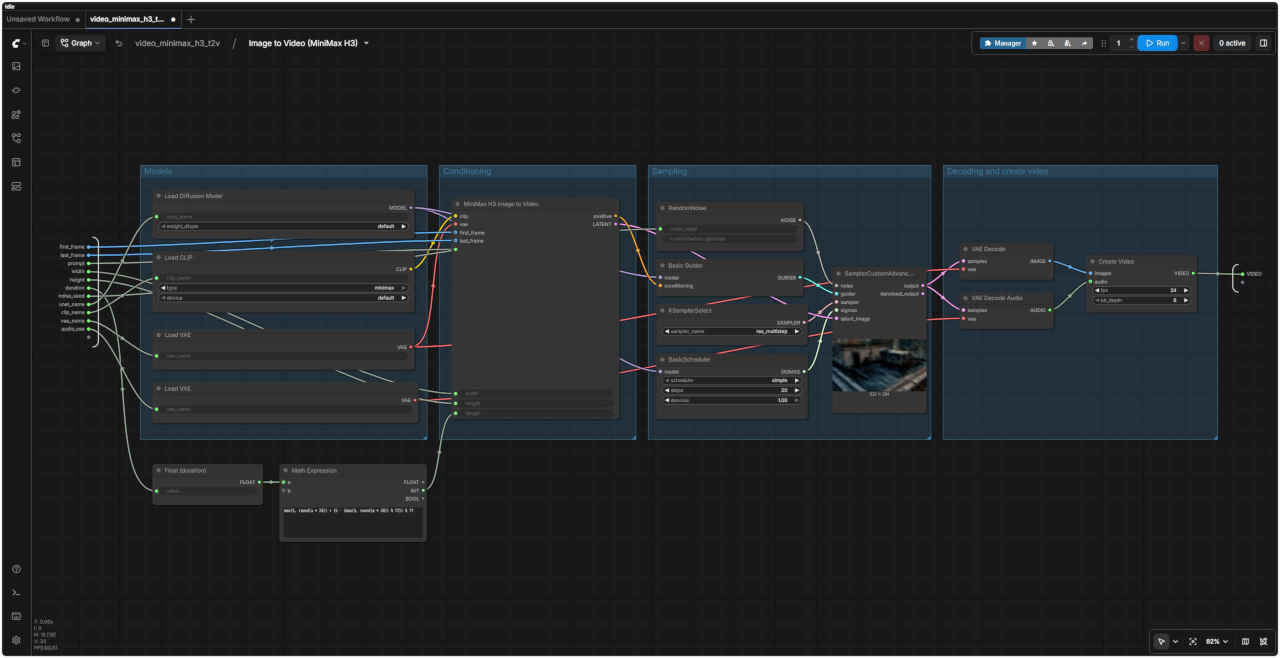
| MiniMax H3: Text to Video ワークフロー | MiniMax H3: Text to Video SubGraph |
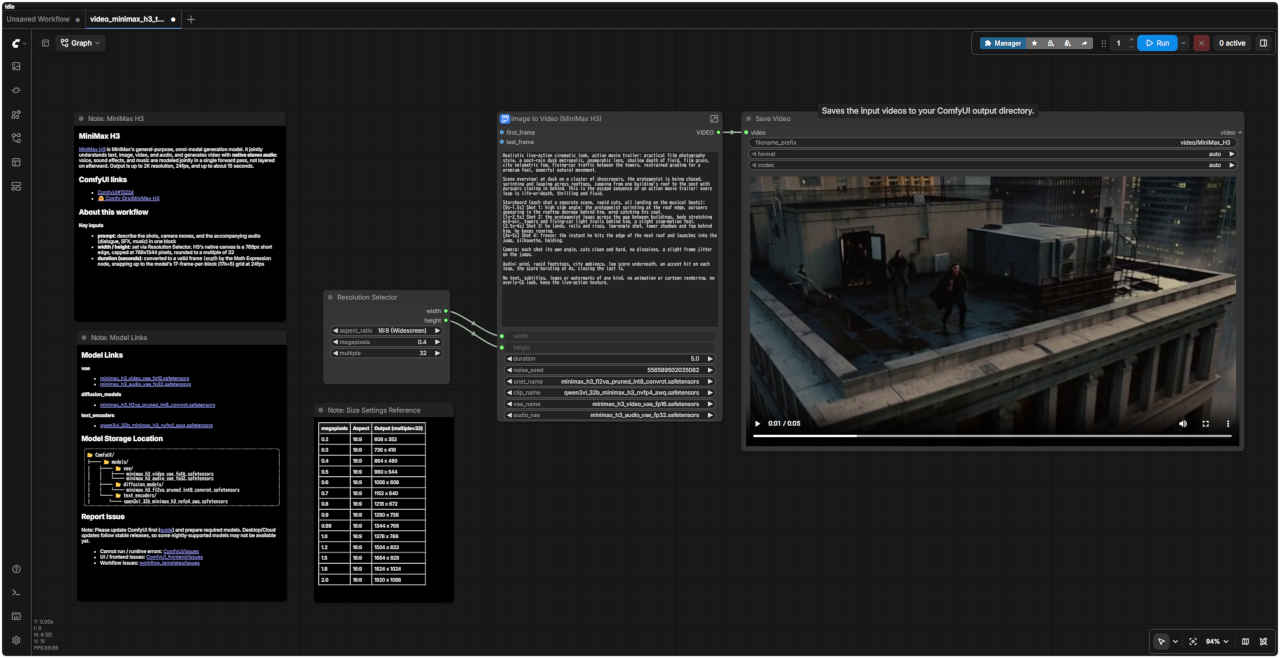 |  |
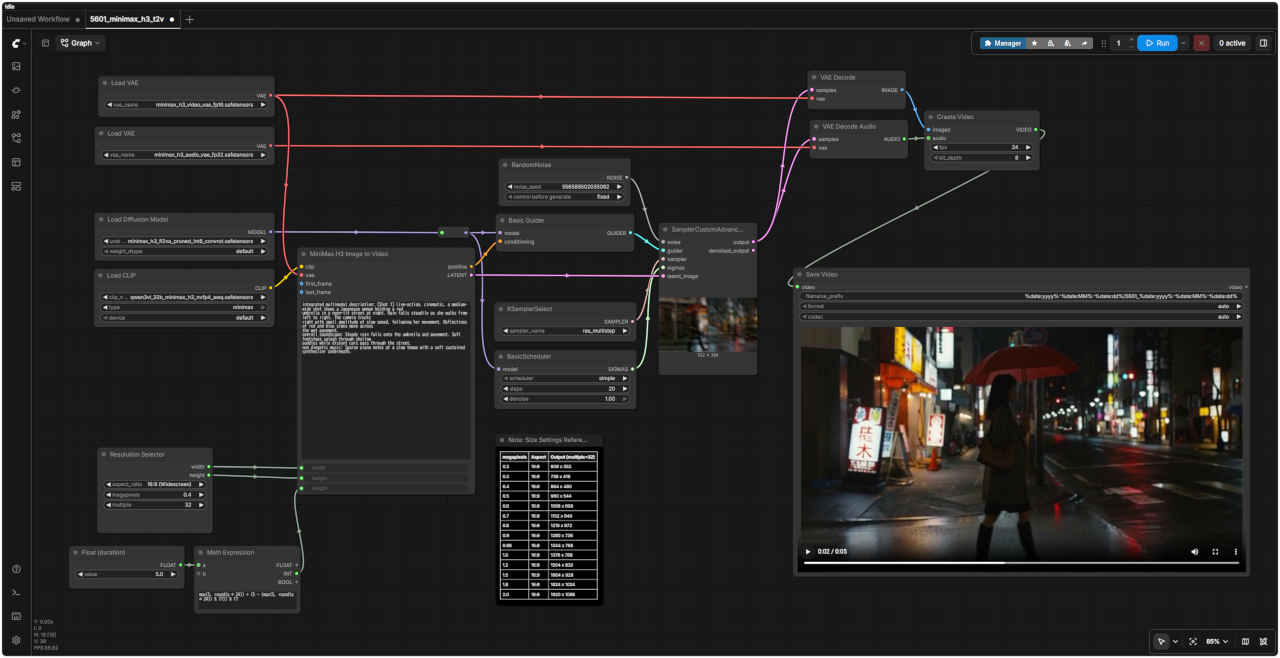
| 「MiniMax/」video_minimax_h3_t2v.json | |
| MiniMax H3 | |
| MiniMax H3は、MiniMaxが提供する汎用的なマルチモーダル生成モデルです。テキスト、画像、動画、音声を統合的に理解し、ステレオ音声を伴う動画を生成します。音声(セリフ、効果音、音楽)は後から重ね合わせるのではなく、単一の推論プロセス(フォワードパス)内で統合的に生成されます。出力仕様は、最大解像度2K、24fps、最大約15秒間です。 | |
| 主な入力項目 | |
| prompt(プロンプト) | ショットの内容、カメラワーク、および付随する音声(セリフ、効果音、音楽)を一つのブロックにまとめて記述します。 |
| width / height(幅 / 高さ) | Resolution Selector(解像度選択ノード)で設定します。H3のネイティブなキャンバスサイズは短辺768pxを基準とし、上限は768x1344ピクセル、値は32の倍数に丸められます。 |
| duration (seconds)(長さ(秒)) | Math Expressionノードによって適切なフレーム数に変換されます。24fpsにおいて、モデルの仕様である「1ブロックあたり17フレーム(17k+5)」のグリッドに合わせて切り上げ処理が行われます。 |
| 生成動画 864x480 | Size Settings Reference | ||
| megapixels | Aspect | Output (multiple = 32) | |
| 0.2 | 16:9 | 608 x 352 | |
| 0.3 | 16:9 | 736 x 416 | |
| 0.4 | 16:9 | 864 x 480 | |
| 0.5 | 16:9 | 960 x 544 | |
| 0.6 | 16:9 | 1056 x 608 | |
| 0.7 | 16:9 | 1152 x 640 | |
| 0.8 | 16:9 | 1216 x 672 | |
| 0.9 | 16:9 | 1280 x 736 | |
| 0.98 | 16:9 | 1344 x 768 | |
| 1.0 | 16:9 | 1376 x 768 | |
| 1.2 | 16:9 | 1504 x 832 | |
| 1.5 | 16:9 | 1664 x 928 | |
| 1.8 | 16:9 | 1824 x 1024 | |
| 2.0 | 16:9 | 1920 x 1088 | |
| プロンプト |
|
Editorial tech product film. The transparent gaming mouse from <Picture 1> in its original scene: a pitch-black studio void with a dark, subtle reflective surface, lit by dramatic duotone vibrant blue and warm neon orange rim lighting, deep soft shadow falloff into pure black. Monochromatic dark palette with electric blue and amber accents. Material motif: glowing internal metallic micro-components and glossy acrylic refractions. The environment is constant throughout. SHOT 1: The scene opens exactly on image 1, the mouse resting confidently on the dark surface; the blue and orange lights slowly pulse brighter, refracting deeply through the transparent acrylic shell as the camera executes a slow, deliberate push-in to reveal the intricate circuitry. SHOT 2: Cut to an extreme macro profile of the ridged scroll wheel and layered internal micro-components; the camera glides slowly along the side as a sharp beam of warm orange light sweeps across the metallic textures, contrasting perfectly against the deep blue ambient glow. SHOT 3: Cut to a low-angle beauty shot: the mouse levitates weightlessly a few centimeters above the dark reflective surface, rotating in a slow, precise orbit; the duotone lighting flares gently along the glassy transparent edges before fading slowly into a sleek silhouette. Audio: deep pulsing sub-bass room tone, sharp tactile mechanical clicks, a sweeping glassy whoosh on cuts, and a rising electronic swell that resolves to near-silence on the final fade. |
| テック製品のプロモーション映像。舞台は<画像1>にある透明なゲーミングマウスが置かれた空間です。漆黒のスタジオを背景に、ほのかに光を反射する暗い台座を配置。鮮やかなブルーと温かみのあるネオンオレンジのデュオトーン(2色)によるドラマチックなリムライトが当てられ、深い影が純粋な黒へと溶け込んでいきます。全体はダークトーンのモノクロームを基調としつつ、エレクトリックブルーとアンバー(琥珀色)をアクセントに採用。内部で発光する微細な金属パーツや、光を屈折させる光沢のあるアクリル素材が視覚的なポイントとなります。環境設定は全編を通して統一されています。 ショット1:<画像1>の構図で開始。暗い台座の上に堂々と鎮座するマウス。ブルーとオレンジの光がゆっくりと明滅し、透明なアクリルシェルを通して光が深く屈折する中、カメラがゆっくりと被写体に寄り(プッシュイン)、複雑な回路構造を明らかにしていきます。 ショット2:カットが切り替わり、凹凸のあるスクロールホイールと重なり合う内部の微細パーツを捉えた極端な接写(エクストリーム・マクロ)へ。カメラが側面をゆっくりと移動する間、鋭いオレンジ色の光線が金属の質感をなめるように走り、周囲の深いブルーの輝きと鮮やかなコントラストを生み出します。 ショット3:ローアングルからのビューティーショット。暗く光を反射する台座の数センチ上にマウスが重力を感じさせずに浮遊し、ゆっくりと正確な軌道で回転しています。ガラスのように透明なエッジに沿ってデュオトーンの光が優しく輝き、やがて滑らかなシルエットへと静かに溶け込んでいきます。 オーディオ:重低音のサブベースが脈打つような環境音、メカニカルスイッチ特有の鋭いクリック音、カットの切り替わり時に響くガラスのような風切り音(ウーッシュ音)、そして徐々に高まる電子音が、最後のフェードアウトと共に静寂へと収束していきます。 |
| MiniMax H3: Text to Video ワークフロー | MiniMax H3: Text to Video SubGraph |
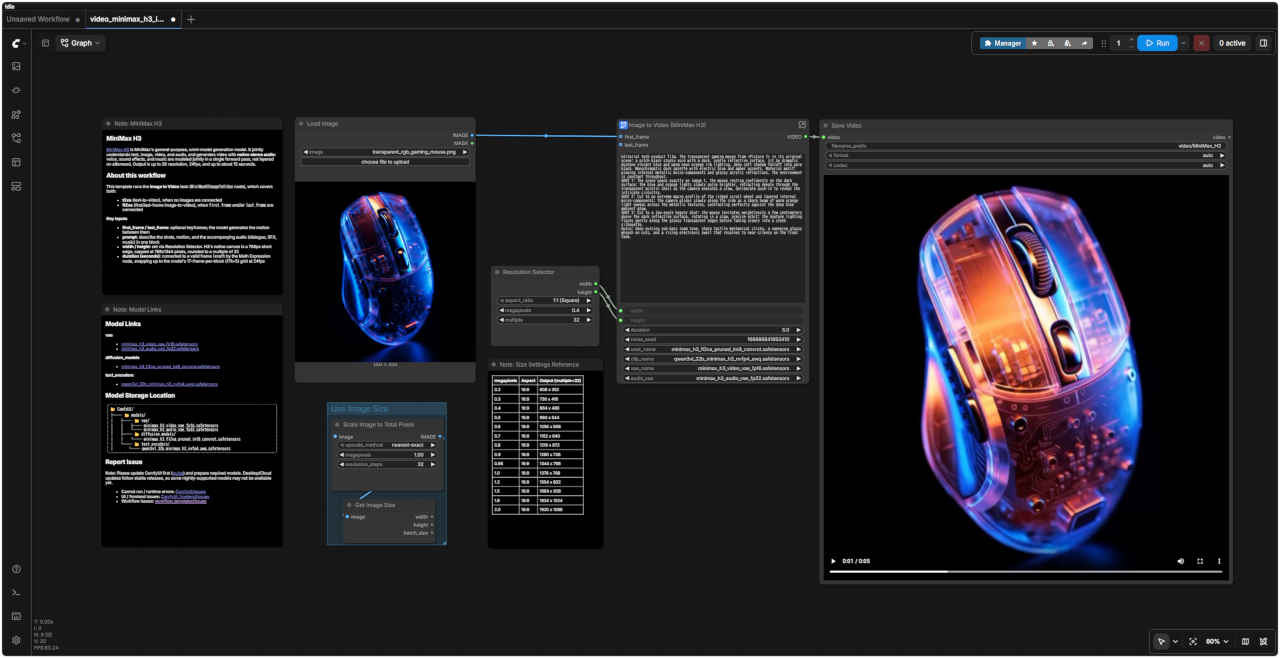 | 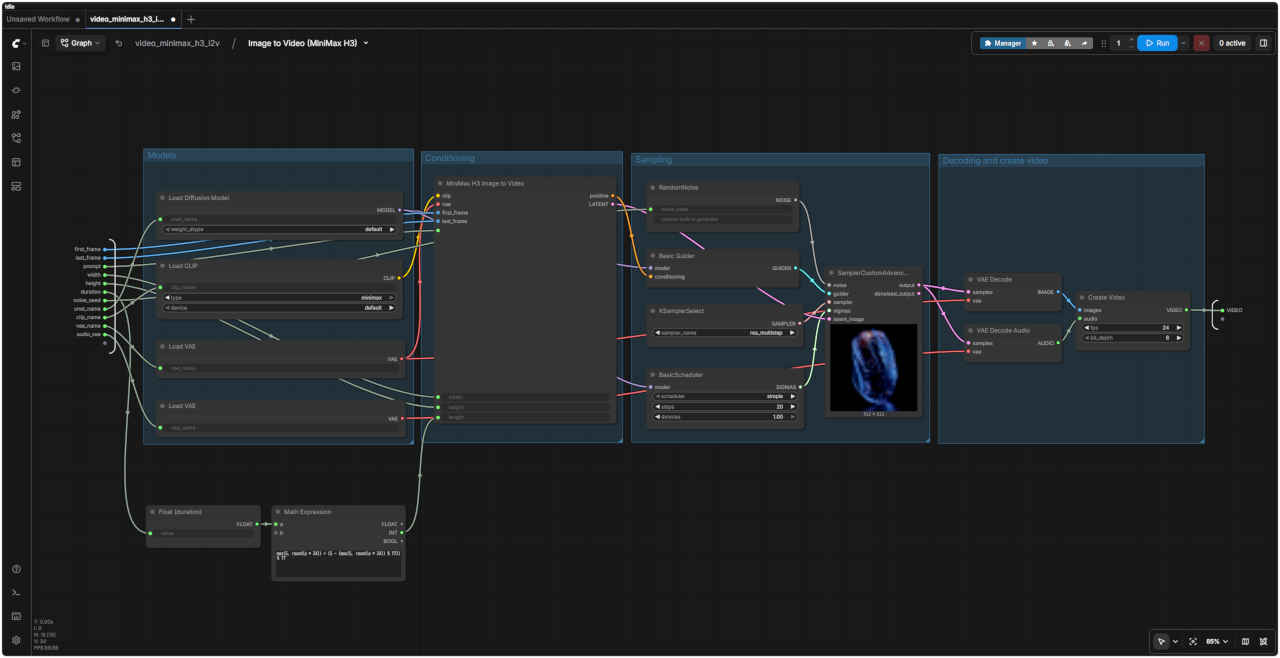 |
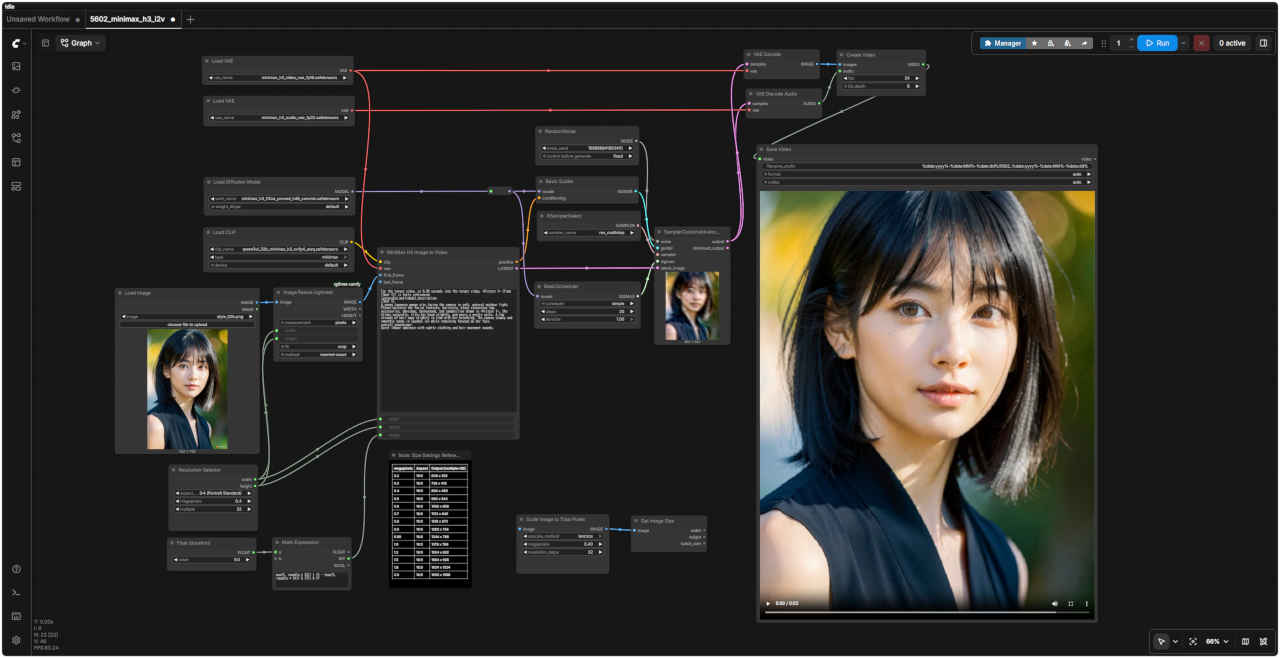
| 「MiniMax/」video_minimax_h3_i2v.json | |
| About this workflow(このワークフローについて) | |
| このテンプレートは「Image to Video」タスク(MiniMaxH3ImageToVideoノード)を実行するもので、以下の両方のケースに対応しています。 ・t2va (text-to-video):画像が接続されていない場合 ・fl2va (first/last-frame image-to-video):first_frame(開始フレーム)やlast_frame(終了フレーム)が接続されている場合 | |
| 主な入力項目 | |
| first_frame / last_frame | オプションのキーフレーム。モデルはこれらのフレーム間の動きを生成します。 |
| prompt(プロンプト) | ショットの内容、カメラワーク、および付随する音声(セリフ、効果音、音楽)を一つのブロックにまとめて記述します。 |
| width / height(幅 / 高さ) | Resolution Selector(解像度選択ノード)で設定します。H3のネイティブなキャンバスサイズは短辺768pxを基準とし、上限は768x1344ピクセル、値は32の倍数に丸められます。 |
| duration (seconds)(長さ(秒)) | Math Expressionノードによって適切なフレーム数に変換されます。24fpsにおいて、モデルの仕様である「1ブロックあたり17フレーム(17k+5)」のグリッドに合わせて切り上げ処理が行われます。 |
| 入力静止画像 | 生成動画 640x640 |
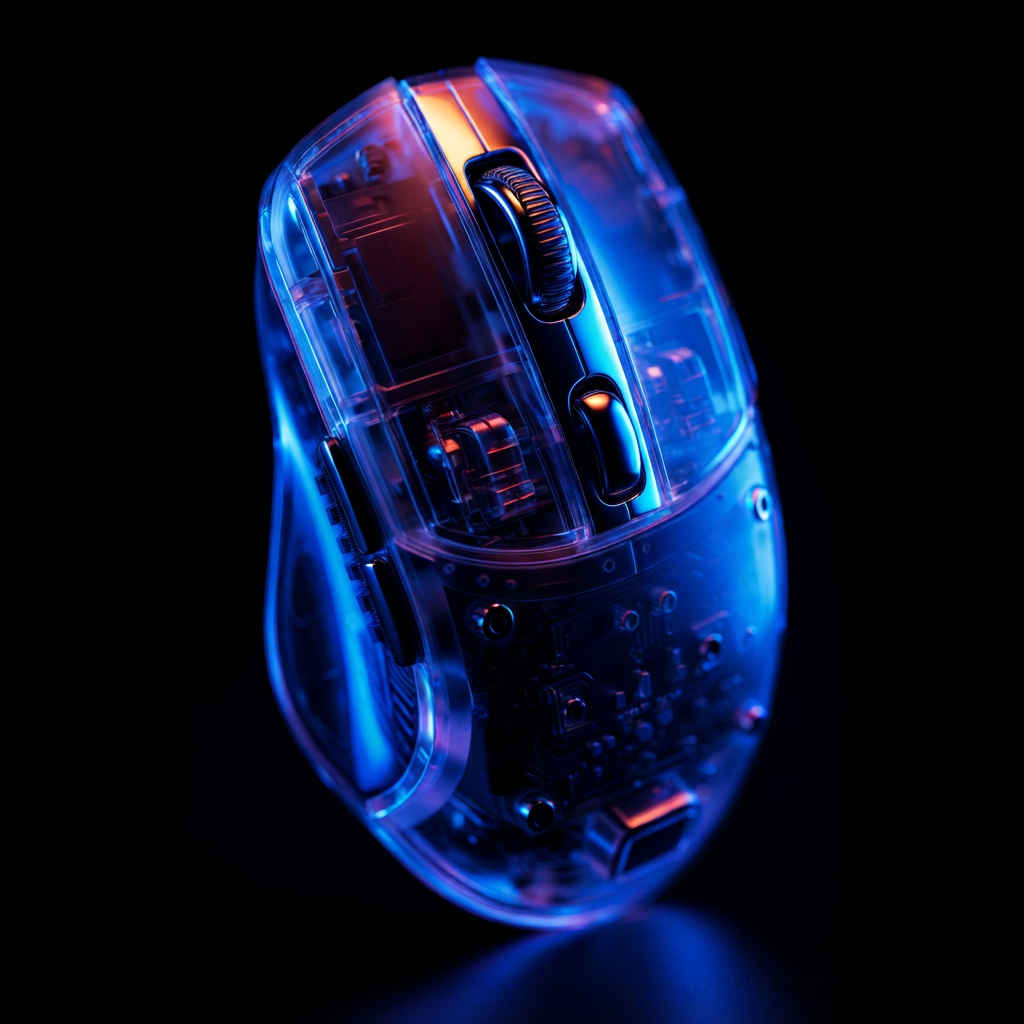 transparent_rgb_gaming_mouse.png | |
| 参照用静止画像 ① | 参照用静止画像 ② |
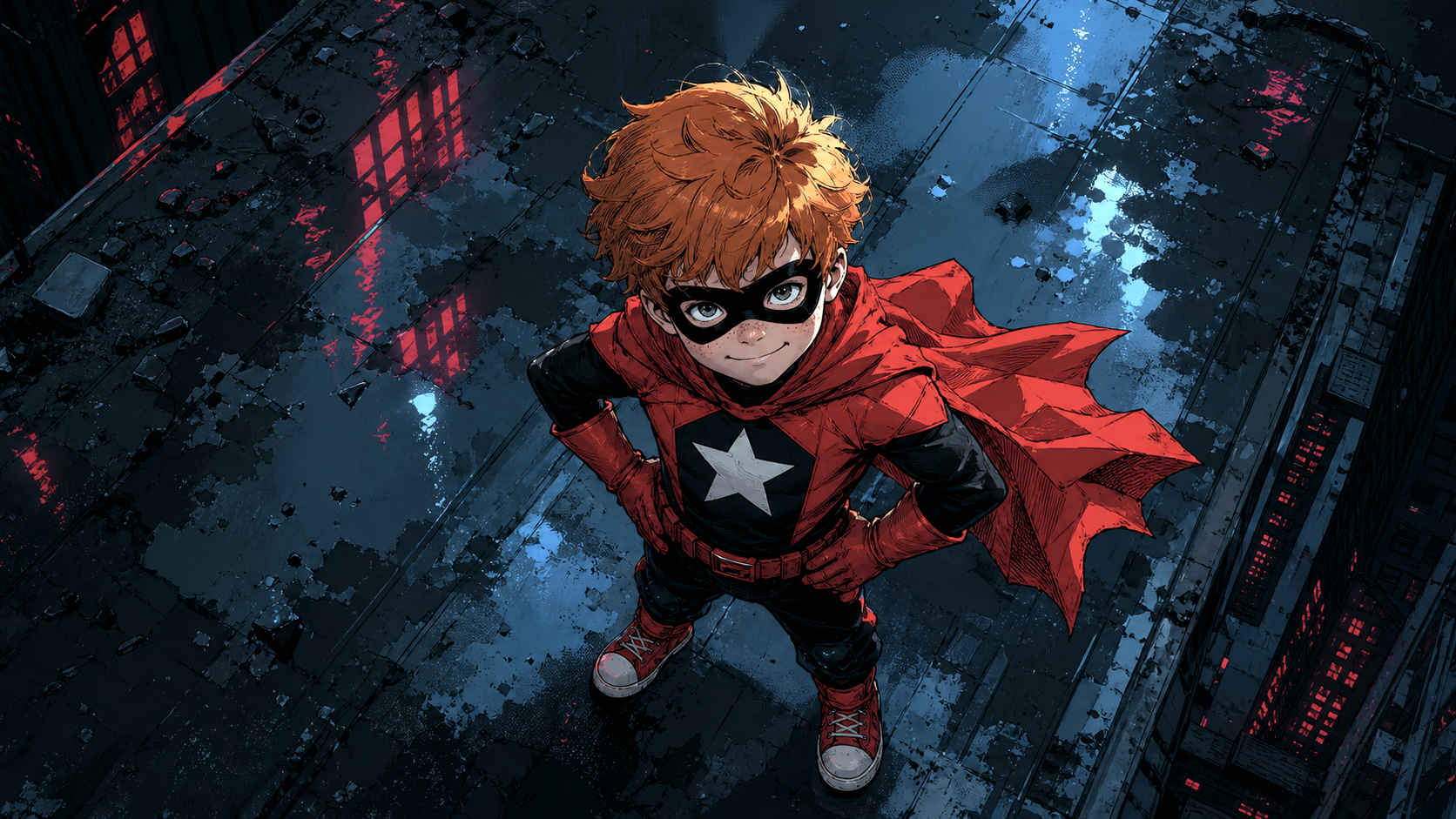 red_superboy_on_city_roof.png | 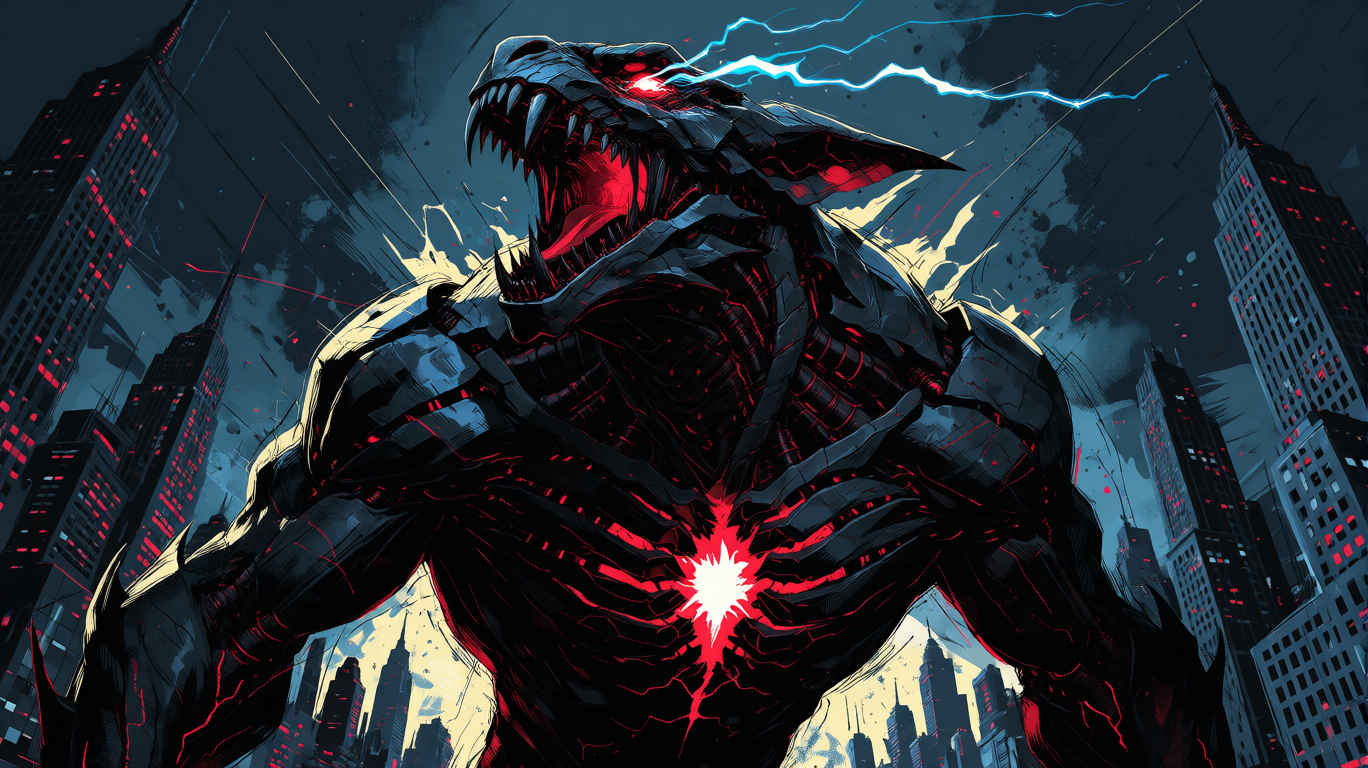 mecha_dragon_lightning.png |
| プロンプト |
|
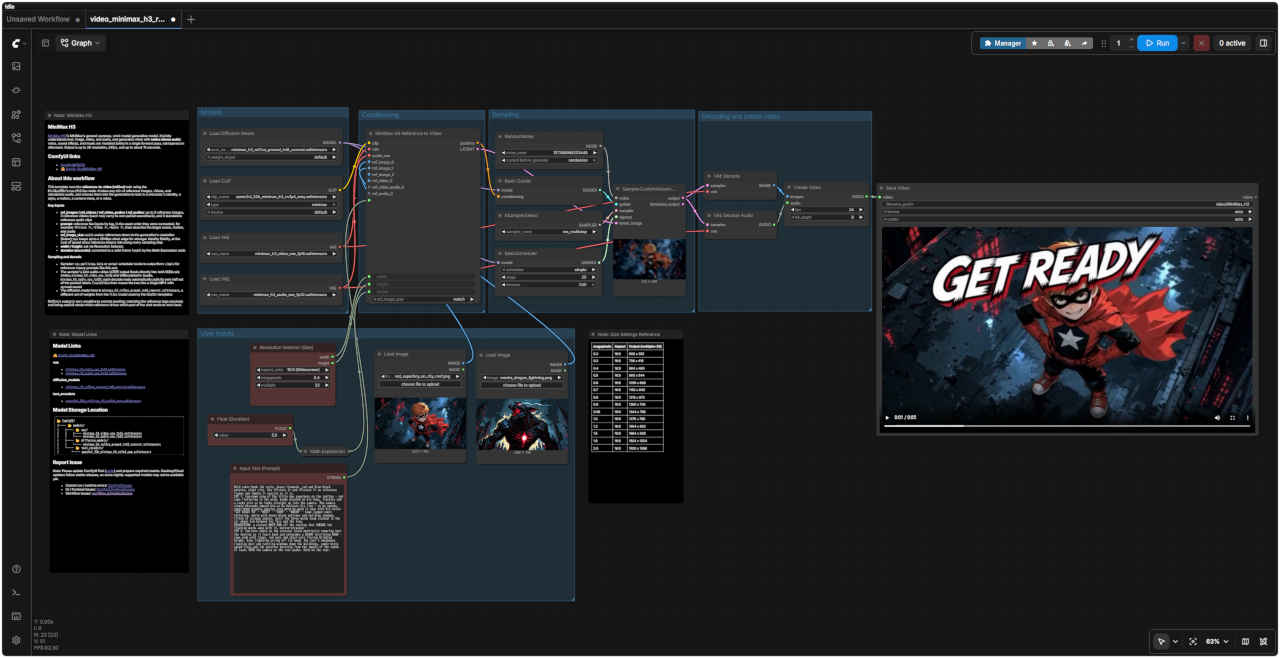
Bold comic-book ink style, heavy linework, red and blue-black palette, night city. Use <Picture 2> and <Picture 1> as reference frames and <Audio 1> exactly as it is. CUT 1: top-down view of the little boy superhero on the rooftop — red cape fluttering in the wind, hands planted on his hips, freckles and a cocky grin as he looks straight up into the camera. The camera slowly descends toward him as he delivers his line — as he speaks, comic-book graphic overlay text word by word in sync with his voice: "GET READY TO" - "MEET" — "YOUR" — "MAKER" — huge jagged comic lettering, white with heavy black outlines and red drop shadows, tilted at scrappy angles, until the three words hang stacked in the air above him between his face and the lens. TRANSITION: a violent WHIP PAN off the rooftop that SMEARS the floating words away with it, motion-streaked — CUT 2: low hero angle on the colossal black mech-kaiju towering over the skyline as it rears back and unleashes a GIANT terrifying ROAR — jaws wide with fangs, red eyes and chest-core flaring blinding bright, blue lightning arcing off its head, the roar's shockwave rippling dust and rattling windows down the buildings, comic-style speed-lines and ink splatter bursting from the impact of the sound. It leans INTO the camera as the roar peaks. Hold on the roar. |
| 大胆なコミック調のインク画スタイル、力強い輪郭線、赤と青黒を基調とした配色、夜の都会。参考画像として<Picture 2>と<Picture 1>を使用し、音声は<Audio 1>をそのまま使用すること。 カット1:屋上に立つ少年スーパーヒーローを真上から捉えた構図。赤いマントを風になびかせ、腰に手を当て、そばかす顔で不敵な笑みを浮かべながらカメラを真っ直ぐに見上げている。彼がセリフを言うのに合わせてカメラがゆっくりと下降し、声と同期してコミック調の文字が一つずつオーバーレイ表示される。「GET READY TO(覚悟しろ)」―「MEET(会う)」―「YOUR(お前の)」―「MAKER(創造主=死神)」―。文字は太い黒の縁取りと赤いドロップシャドウを施した白のギザギザしたコミック風フォントで、荒々しい角度で配置され、最終的に彼の顔とレンズの間の空中に3つの単語が積み重なるように浮かぶ。 トランジション:屋上から激しいウィップパン(急激なカメラの振り)を行い、空中に浮かんでいた文字をモーションブラー(残像)と共に吹き飛ばす。 カット2:スカイラインを見下ろすようにそびえ立つ巨大な黒いメカ怪獣を、下から見上げる「ヒーローアングル」で捉える。怪獣が身を反らせ、恐ろしい巨大な咆哮を放つ。牙をむき出しにした大きな顎、赤く輝く目と胸のコアが眩い光を放ち、頭部からは青い稲妻が走る。咆哮の衝撃波が土煙を巻き上げ、ビルの窓ガラスをガタガタと揺らす。音の衝撃と共に、コミック調のスピード線やインクの飛沫が弾け飛ぶ。咆哮が最高潮に達する瞬間、怪獣がカメラに向かって身を乗り出す。咆哮のシーンをそのまま維持する。 |
| About this workflow(このワークフローについて) | |
| このテンプレートは、`MiniMaxH3ReferenceToVideo`ノードを使用して reference-to-video (ref2va) タスクを実行します。参照用の画像、動画、音声を任意に組み合わせて生成に反映させることで、キャラクターの同一性、スタイル、動き、カメラワーク、あるいは音声を固定(維持)することができます。 | |
| 主な入力項目 | |
| ref_images / ref_videos / ref_video_audios / ref_audios | 最大9枚の参照画像、3つの参照動画(それぞれ対応する音声トラックを含むことが可能)、および3つの独立した参照音声クリップ。 |
| prompt(プロンプト) | 接続した順序通りにタグ(例: `<Picture 1>`、`<Video 1>`、`<Audio 1>`)を使って入力を参照し、その後にターゲットとなるシーン、動き、音声を記述します。 |
| ref_image_size | `match`は参照画像を生成解像度に合わせて縮小します(高速);`max`は短辺を最大2048pxに維持して同一性の再現度を高めますが、すべてのサンプリングステップで参照トークンが処理されるため、速度は低下します。 |
| width / height(幅 / 高さ) | Resolution Selector(解像度選択ノード)で設定します。H3のネイティブなキャンバスサイズは短辺768pxを基準とし、上限は768x1344ピクセル、値は32の倍数に丸められます。 |
| duration (seconds)(長さ(秒)) | Math Expressionノードによって適切なフレーム数に変換されます。24fpsにおいて、モデルの仕様である「1ブロックあたり17フレーム(17k+5)」のグリッドに合わせて切り上げ処理が行われます。 |
| サンプリングとデコード | |
| Sampler(サンプラー) | `res_multistep` を使用します。今回のようなリファレンスを多用するプロンプトでは、`simple` スケジューラーよりも `beta` や `normal` スケジューラーの方が良好な結果が得られる傾向があります。 |
| ・サンプラーから出力される音声と映像が統合された `LATENT` データは、`VAEDecode`(映像用:`minimax_h3_video_vae_fp16`)と `VAEDecodeAudio`(音声用:`minimax_h3_audio_vae_fp32`)の両方に直接入力されます。各デコードノードは、統合されたLatentデータから自身の担当分(映像または音声)を自動的に抽出します。その後、`CreateVideo` ノードがこれら2つを合成し、音声が同期された単一のMP4ファイルを作成します。 ・ここで使用する拡散モデルは `minimax_h3_ref2va_pruned_int8_convrot.safetensors` です。これは、t2v/i2vテンプレートで使用される `fl2va` モデルとは異なる重みセットを持つモデルです。 | |
| Ref2va の出力はプロンプトの文言に非常に敏感に反応します。リファレンスタグを正確に指定し、どのリファレンスがショットのどの部分を制御するのかを明確に記述することが、最良の結果を得るための鍵となります。 | |
| ComfyUI オフィシャルサイトで公開されているテンプレートのシード値を固定して再現性を確保し動かしながら整理する |
| プロンプト |
|
integrated_multimodal_description: [Shot 1] Live-action, cinematic, a medium-wide shot shows a Japanease woman holding a red umbrella in a neon-lit street at night. Rain falls steadily as she walks from left to right. The camera trucks right with small amplitude at slow speed, following her movement. Reflections of red and blue signs move across the wet pavement. overall_soundscape: Steady rain falls onto the umbrella and pavement. Soft footsteps splash through shallow puddles while distant cars pass through the street. non_diegetic_music: Sparse piano notes at a slow tempo with a soft sustained synthesizer underneath. |
| 統合型マルチモーダル記述: [ショット1] 実写、映画的な映像。夜、ネオンが輝く通りで赤い傘を差した日本人女性が映し出されるミディアムワイド・ショット。雨が絶え間なく降る中、彼女は画面左から右へと歩いていく。カメラは彼女の動きを追うように、ゆっくりとした速度で、わずかな振幅を伴いながら右へ移動(トラック)する。濡れた路面には、赤や青の看板の光が反射し、揺れ動いている。 全体的な音響風景: 傘や路面に絶え間なく雨が降り注ぐ音。浅い水たまりを歩く柔らかな足音と、通りを過ぎていく遠くの車の音が聞こえる。 非劇伴(ノン・ダイエジェティック・ミュージック): ゆったりとしたテンポで奏でられる控えめなピアノの音色と、その下で響く柔らかな持続音のシンセサイザー。 |
| プロンプト | 入力画像 first_frame | |
|
For the target video, at 0.00 seconds into the target video, <Picture 1> (from [Shot 1]) is fully referenced. integrated_multimodal_description: [Shot 1] A young woman sits facing the camera in a softly lit room. Preserve her facial features, hairstyle, beige off-shoulder top, accessories, body proportions, background, and composition from <Picture 1>. She blinks naturally, slightly tilts her head, and gives a gentle smile. A few strands of hair move subtly as she breathes. The camera performs a slow, smooth Push In while keeping her face in focus. overall_soundscape: Quiet indoor ambience with subtle clothing and hair movement sounds. | 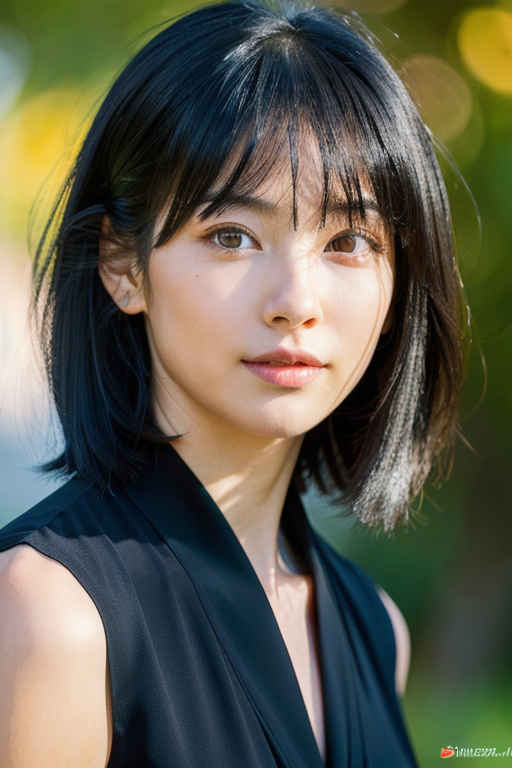 | |
| 対象の動画において、開始時点(0.00秒)では、<Picture 1>([Shot 1]より)の内容が全面的に参照されます。 統合マルチモーダル記述: [Shot 1] 柔らかな照明の部屋で、若い女性がカメラに向かって座っています。<Picture 1>の顔立ち、髪型、ベージュのオフショルダートップス、アクセサリー、体型、背景、構図を維持してください。彼女は自然にまばたきをし、少し首を傾げ、穏やかな微笑みを浮かべます。呼吸に合わせて、数本の髪の毛がわずかに揺れます。カメラは彼女の顔にピントを合わせたまま、ゆっくりと滑らかにズームイン(プッシュイン)します。 全体的な音響環境: 静かな室内の環境音に加え、衣服や髪が動くかすかな音が聞こえます。 |
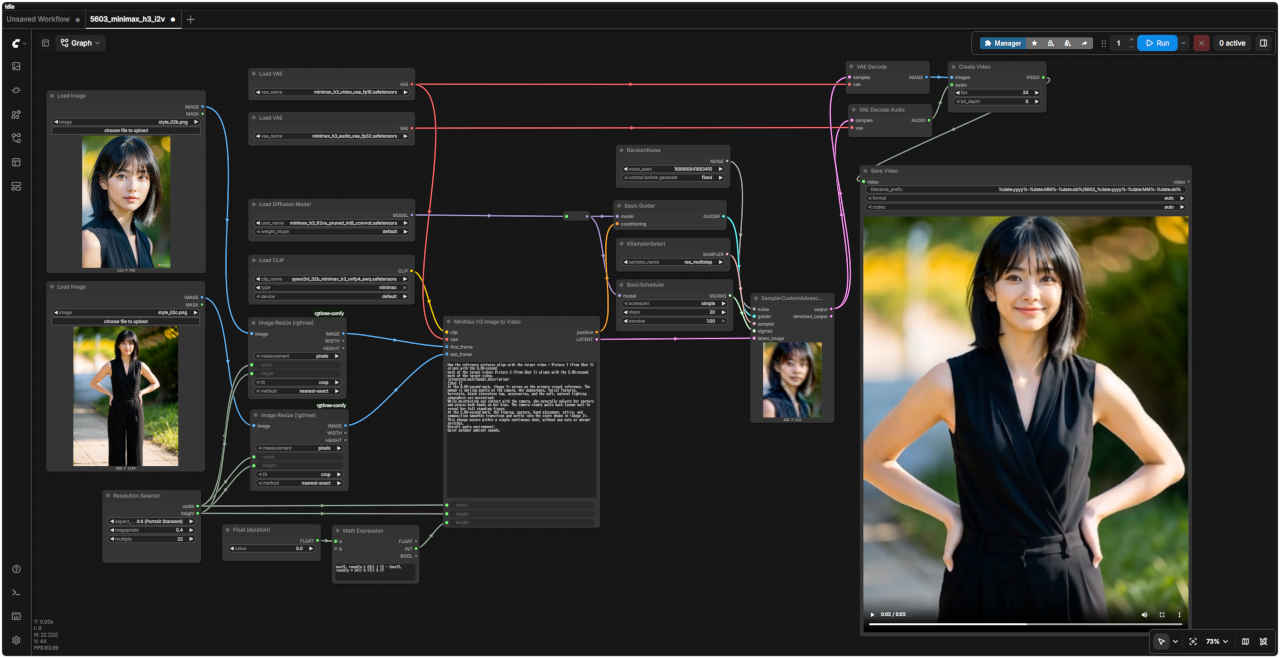
| 静止画像から動画生成 Image to Video V2 (最終フレーム保存) | |
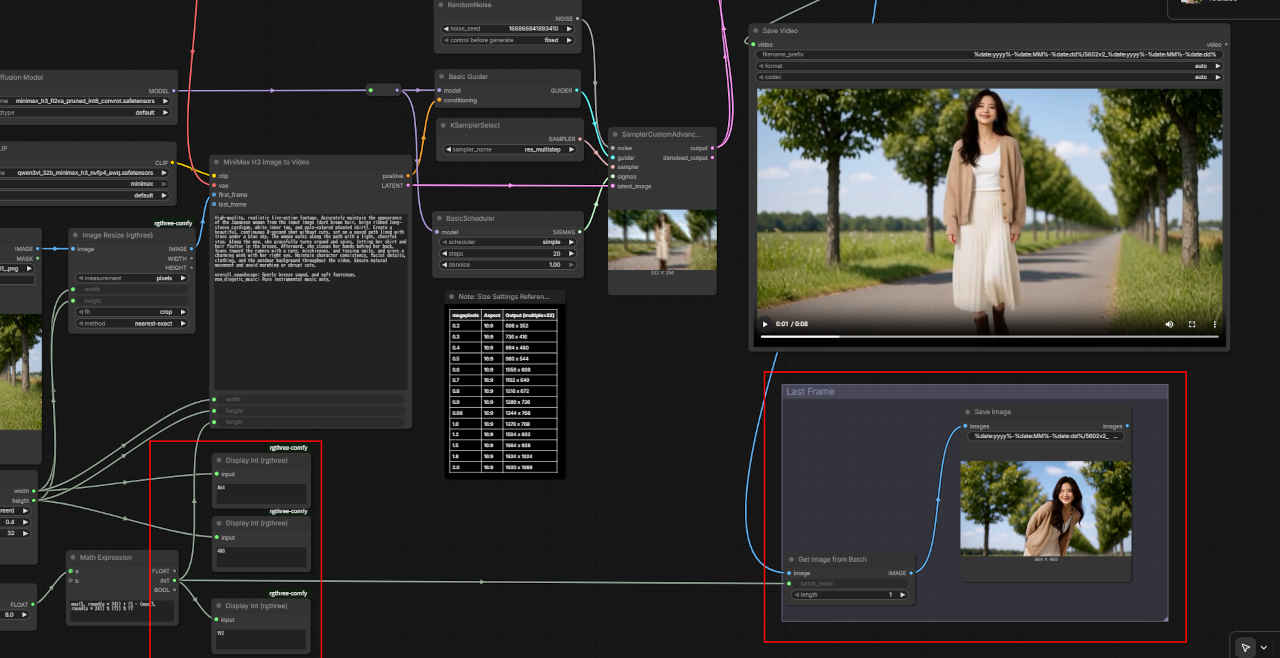 | 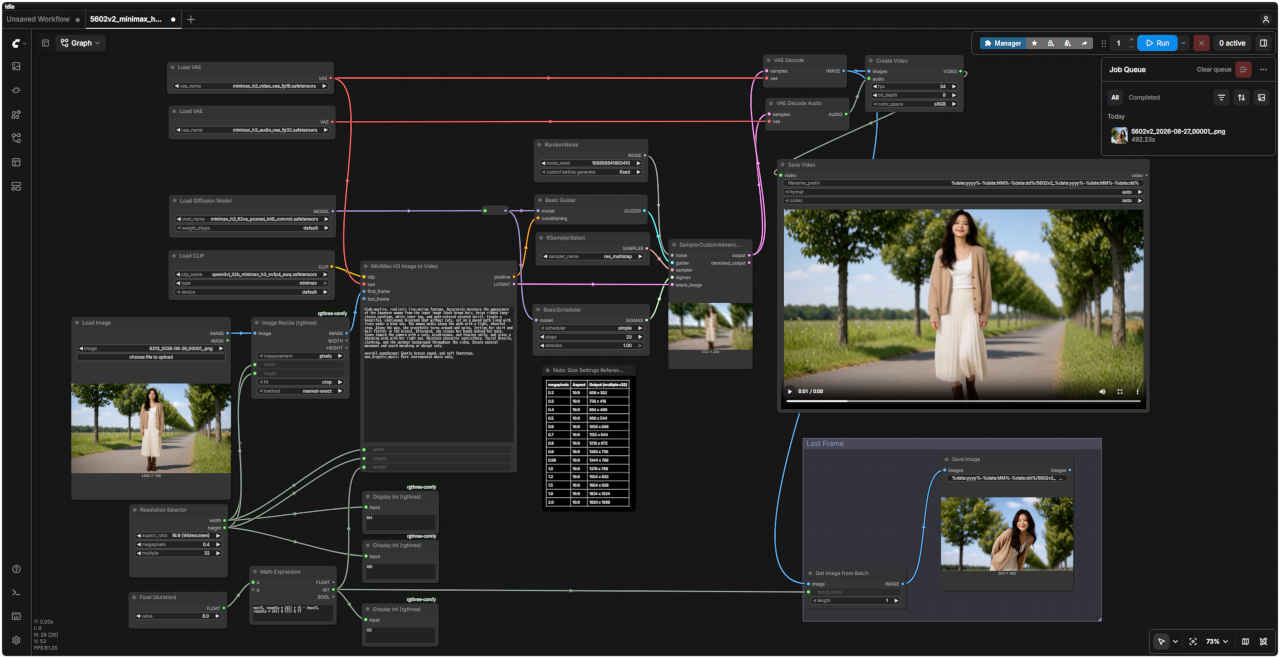 |
| 追加部分 | 「MiniMax/」5602_minimax_h3_i2v.json |
| プロンプト | 入力画像 ① first_frame | 入力画像 ② last_frame |
|
How the reference pictures align with the target video — Picture 1 (from Shot 1) aligns with the 0.00-second mark of the target video; Picture 2 (from Shot 1) aligns with the 5.00-second mark of the target video. integrated_multimodal_description: [Shot 1] At the 0.00-second mark, <Image 1> serves as the primary visual reference. The woman is smiling gently at the camera. Her appearance, facial features, hairstyle, black sleeveless top, accessories, and the soft, natural lighting atmosphere are maintained. While maintaining eye contact with the camera, she naturally adjusts her posture and places both hands on her hips. The camera slowly pulls back (zooms out) to reveal her full standing figure. At the 5.00-second mark, the framing, posture, hand placement, attire, and composition smoothly transition and settle into the state shown in <Image 2>. This change occurs within a single continuous shot, without any cuts or abrupt switches. Overall audio environment: Quiet outdoor ambient sounds. | | 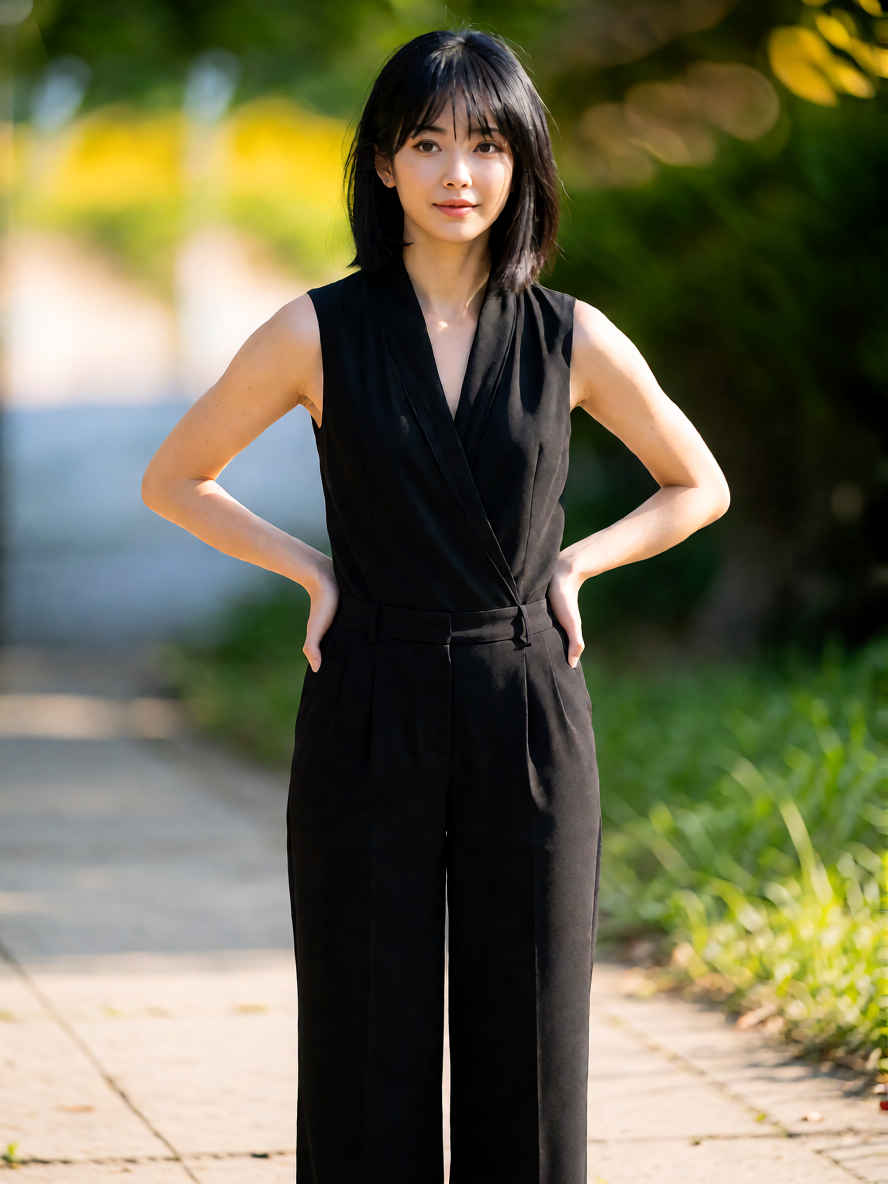 |
| 参照画像とターゲット動画の対応関係:画像1(ショット1由来)はターゲット動画の0.00秒時点に対応し、画像2(ショット1由来)はターゲット動画の5.00秒時点に対応しています。 統合マルチモーダル記述: [ショット1] 0.00秒時点では、<画像1>が主要な視覚的参照となります。女性はカメラに向かって穏やかに微笑んでいます。彼女の容姿、顔立ち、髪型、黒いノースリーブのトップス、アクセサリー、そして柔らかく自然な照明の雰囲気はそのまま維持されています。 カメラと視線を合わせたまま、彼女は自然に姿勢を整え、両手を腰に当てます。カメラはゆっくりと後退(ズームアウト)し、彼女の全身を映し出します。 5.00秒時点では、フレーミング、姿勢、手の位置、服装、構図が滑らかに変化し、<画像2>の状態へと移行します。この変化は、カットや急激な切り替えを伴わない、単一の連続したショットの中で行われます。 全体的な音声環境: 静かな屋外の環境音。 |
| プロンプト | 入力画像 ① ref_image_0 | 入力画像 ② ref_image_1 |
| A full-body shot of the woman in <image_1> wearing the exact outfit from <image_2> (a cream knitted cardigan over a blue and white checkered gingham dress) walking confidently outdoors on a sunny day. The camera slowly tracks her movement, capturing realistic motion, soft lighting, and natural fabric physics. High quality, smooth 24fps video with subtle ambient sound. | | 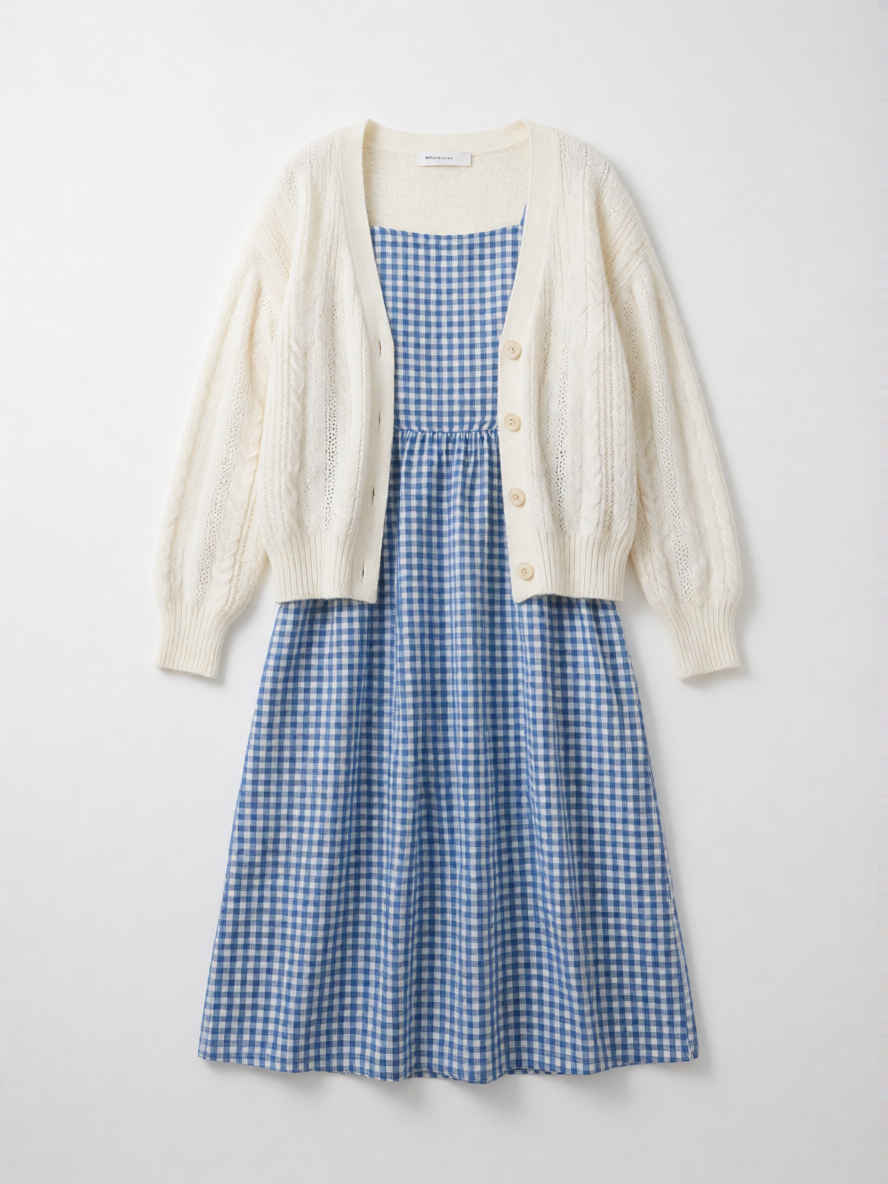 |
| 晴れた日に屋外を自信に満ちた様子で歩く、<image_1>の女性の全身ショット。<image_2>と全く同じ服装(青と白のギンガムチェックのワンピースに、クリーム色のニットカーディガンを羽織ったスタイル)を着用しています。カメラが彼女の動きをゆっくりと追い、リアルな動作、柔らかな光、そして自然な生地の質感を捉えます。繊細な環境音を伴う、高品質で滑らかな24fpsの映像です。 |
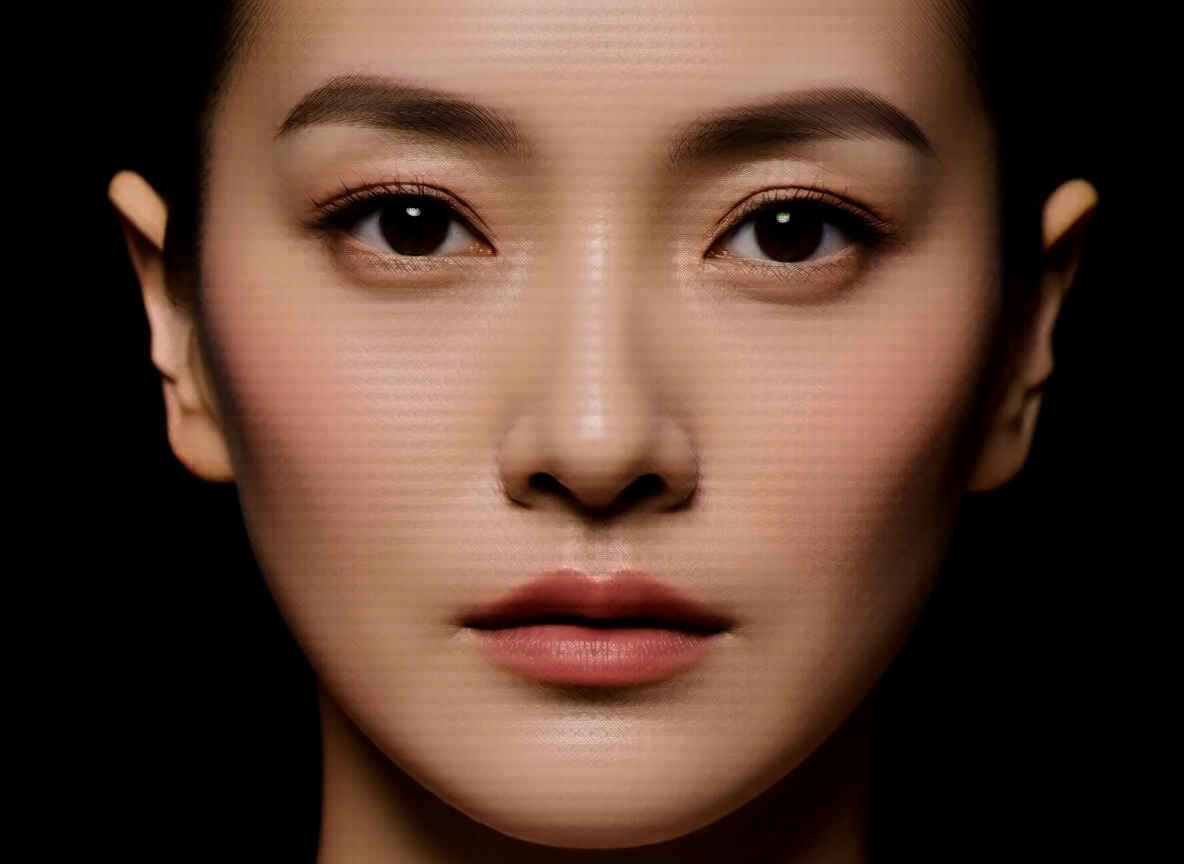
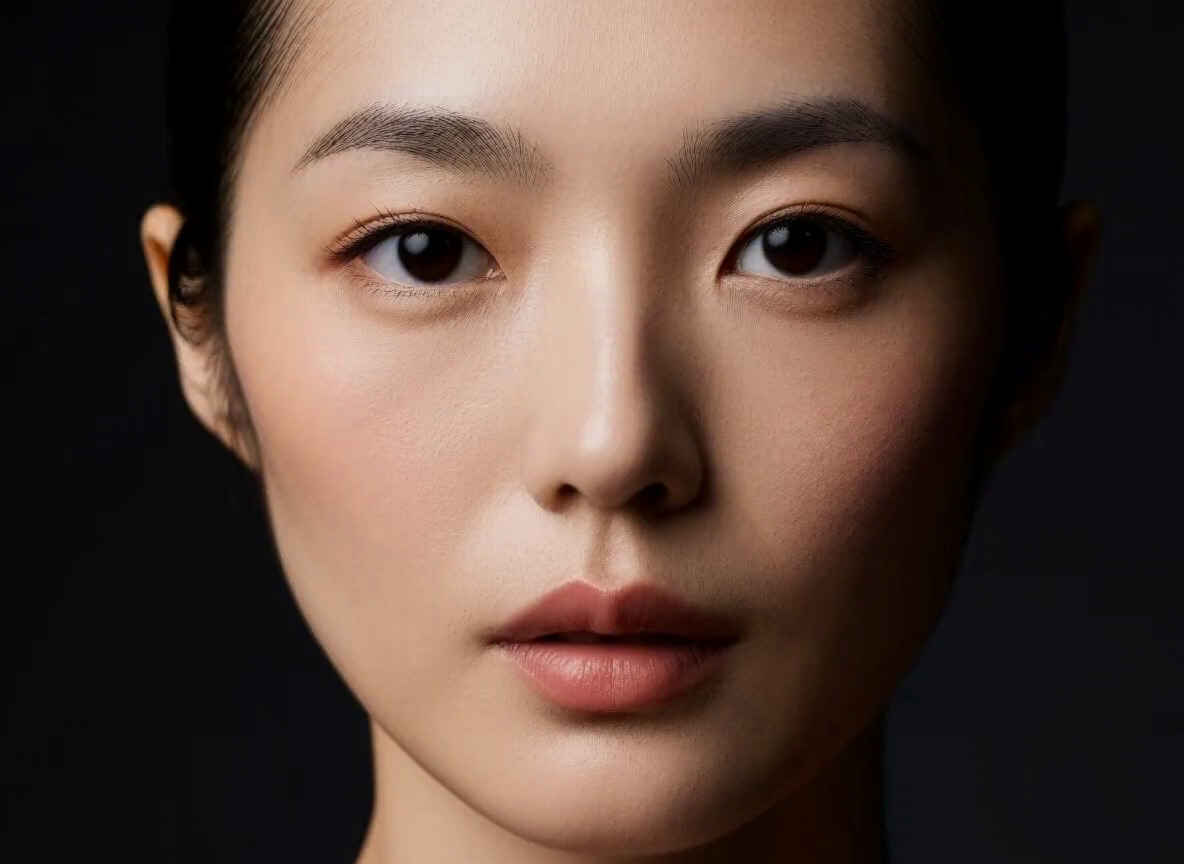
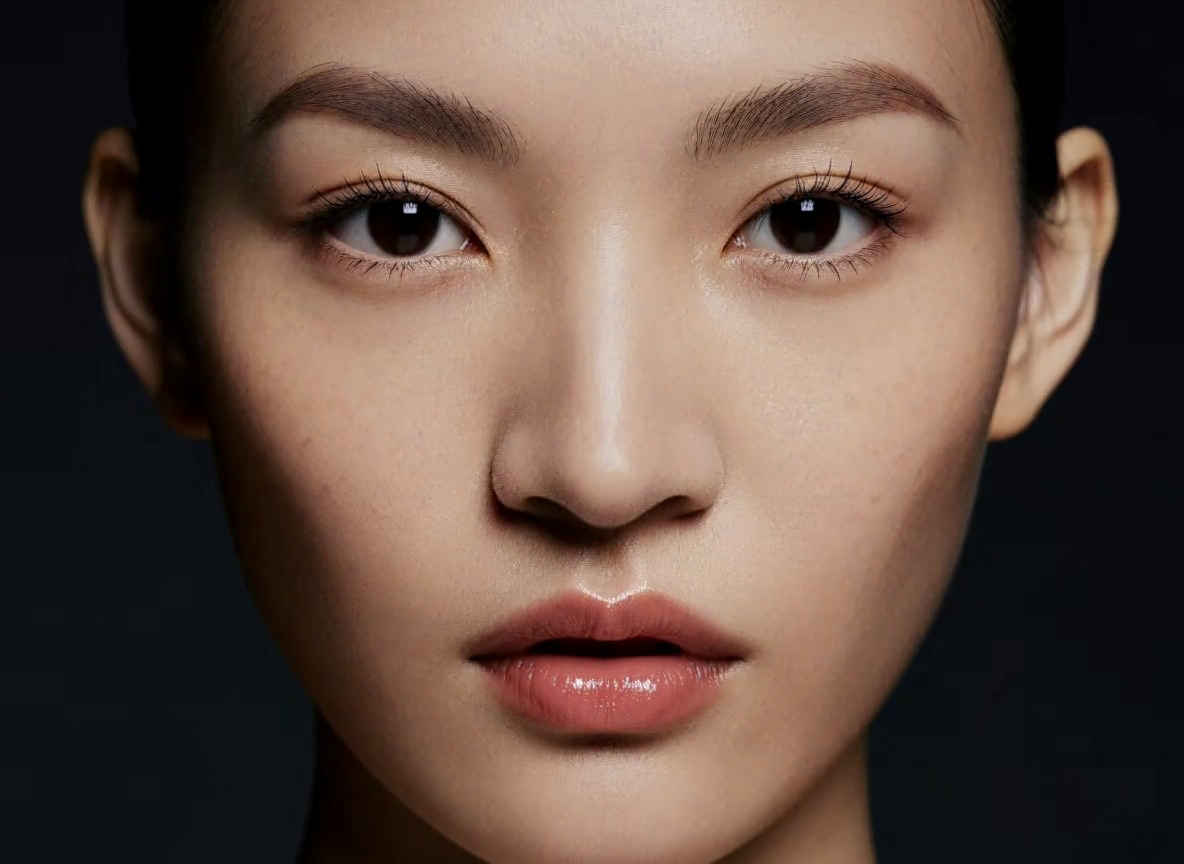
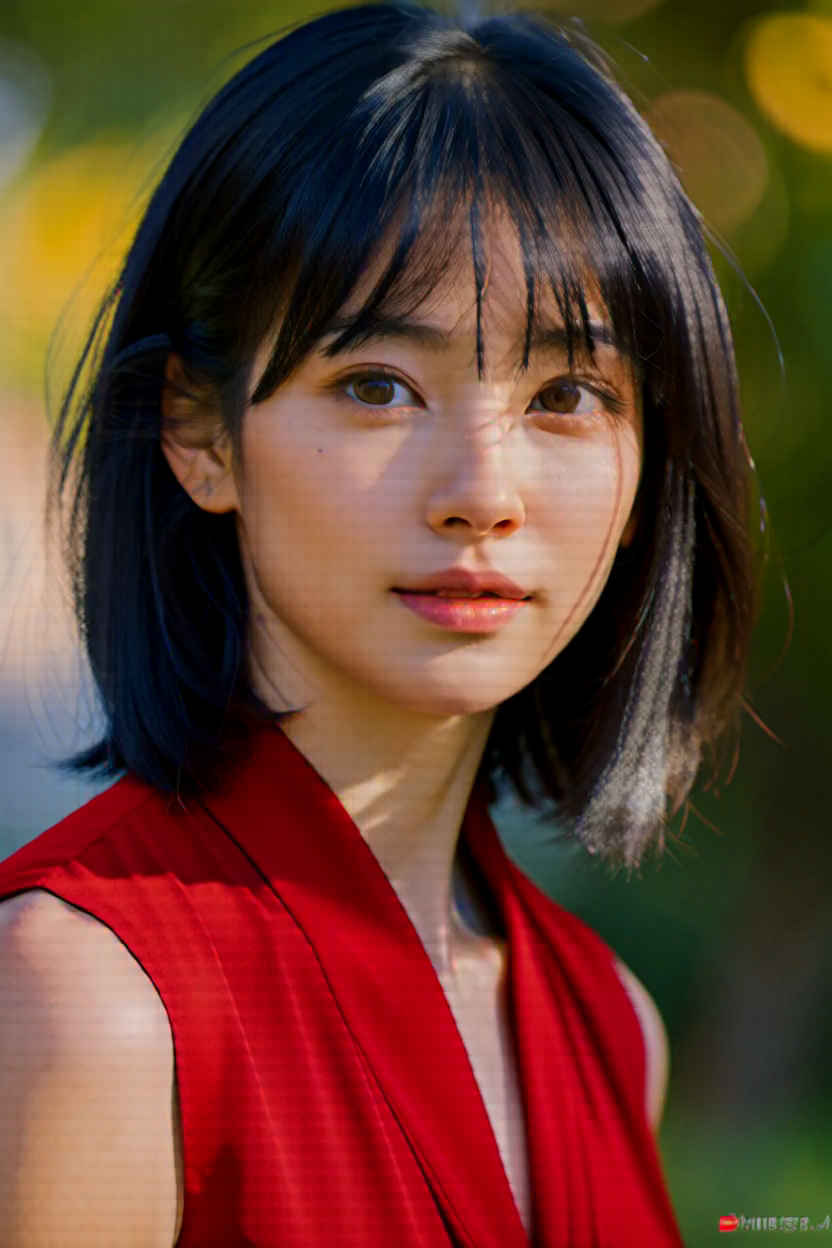
| 動画生成モデル「MiniMax H3」を静止画像生成をする拡張ノード「ComfyUI-MiniMax-H3-Image-Studio」を検証する ・参考URL → https://www.techno-edge.net/article/2026/08/15/5396.html |
| プロンプト |
| A finished cinematic editorial portrait of an Japanease adult woman, precise facial detail and natural skin texture, controlled Rembrandt studio lighting, sharp eyes, clean dark background, shallow depth of field, premium fashion photography. |
| 日本人女性を捉えた、映画のような仕上がりのエディトリアル・ポートレート。精緻な顔のディテールと自然な肌の質感、計算されたレンブラント・スタジオ・ライティング、鋭い眼差し、すっきりとした暗い背景、浅い被写界深度を特徴とする、高級感あふれるファッション写真。 |
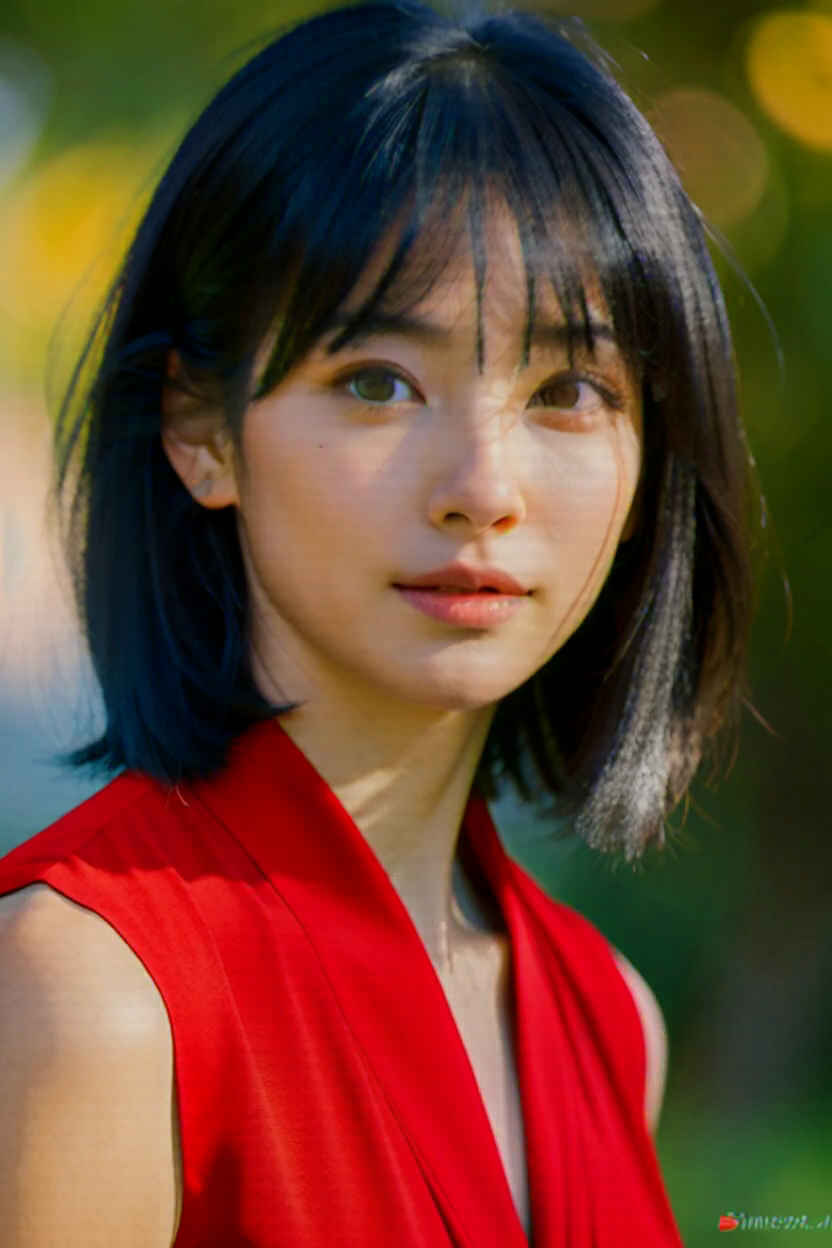
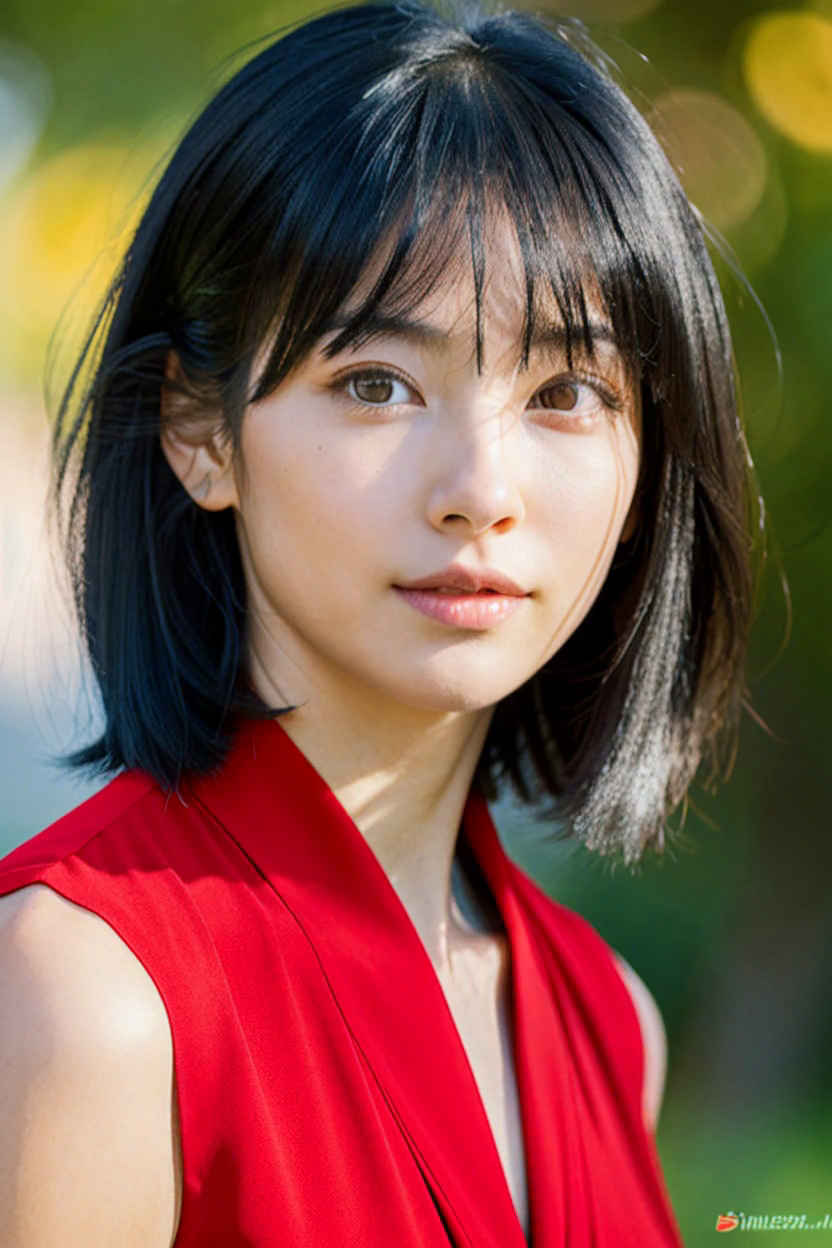
| プロンプト |
| Change the black clothes to red. |
| 黒い服を赤に変えてください。 |
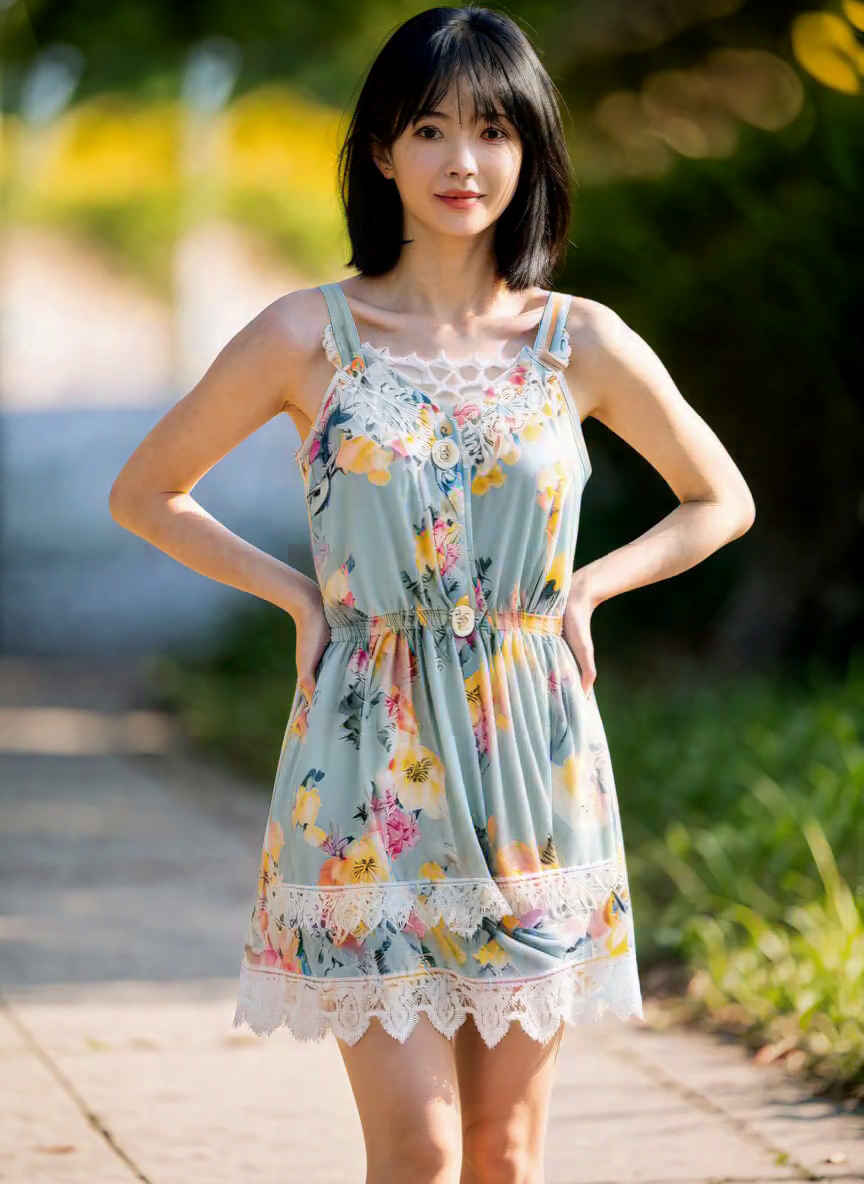
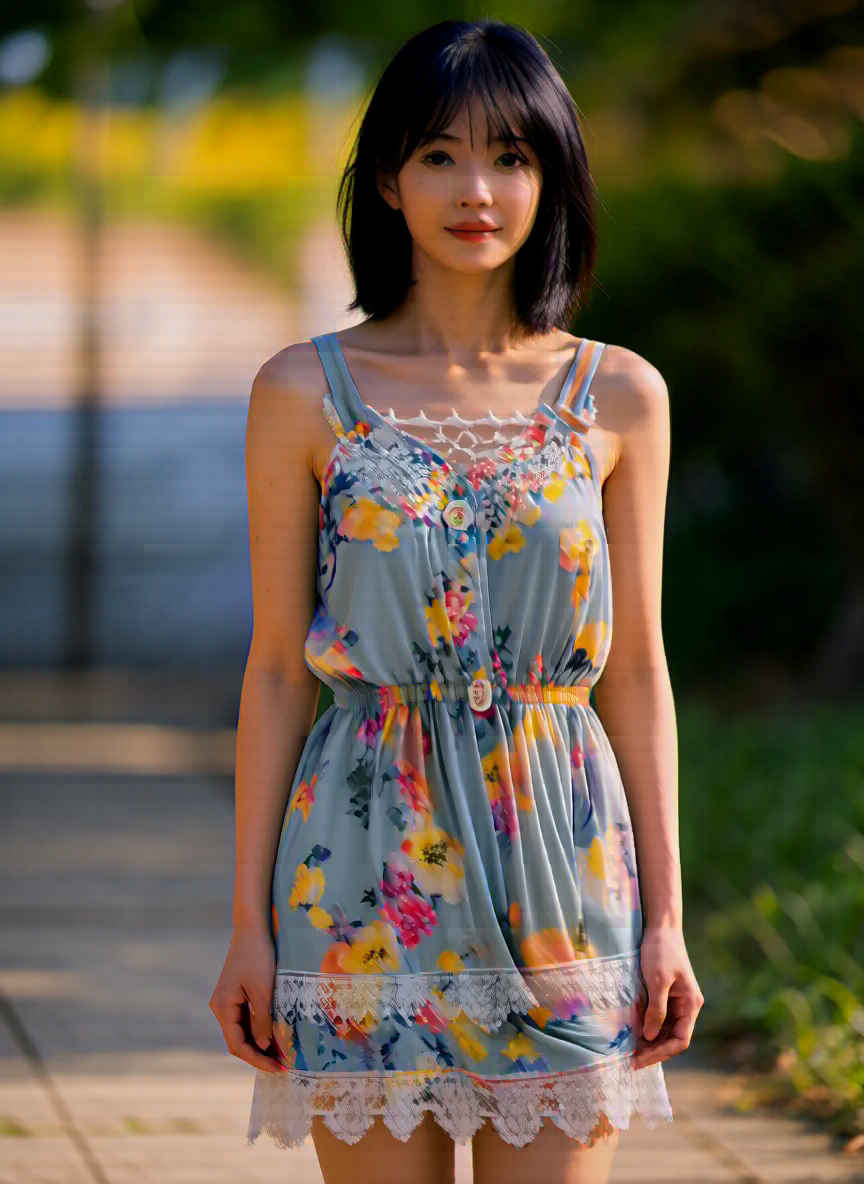
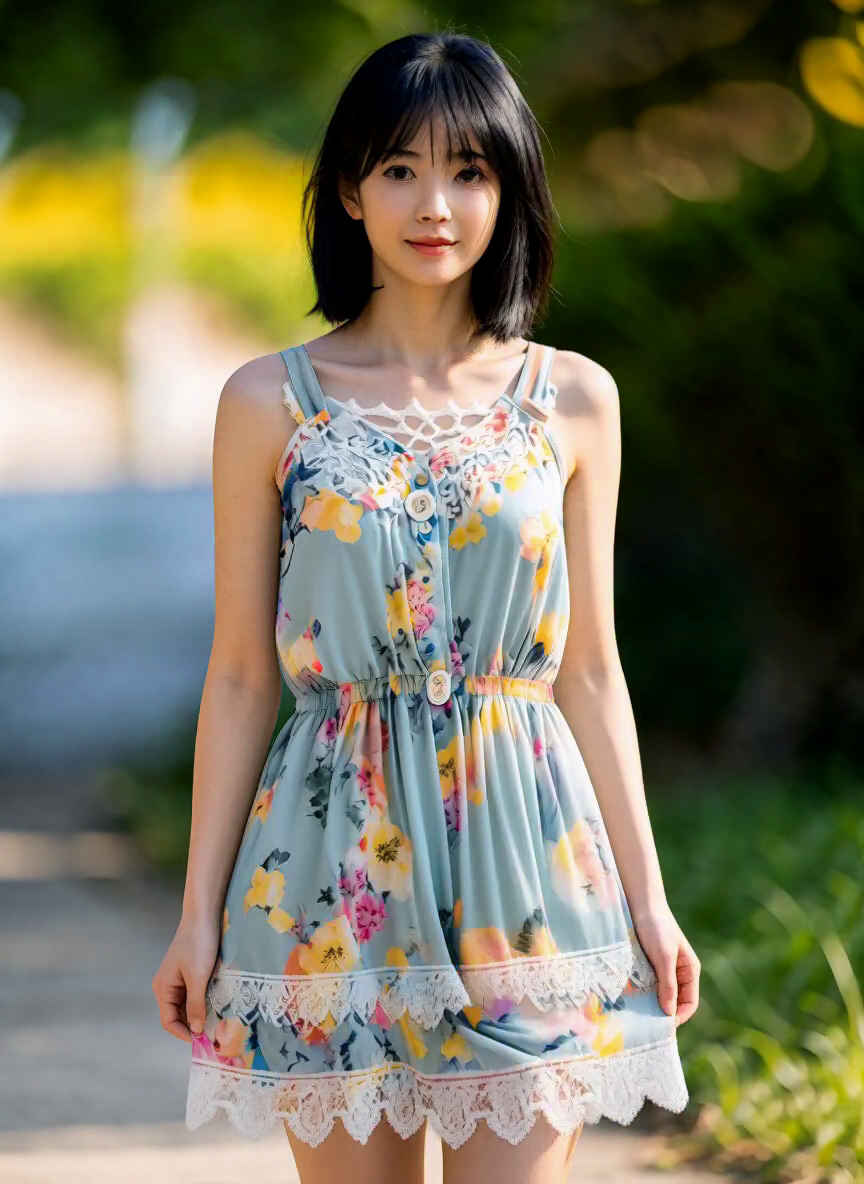
| プロンプト |
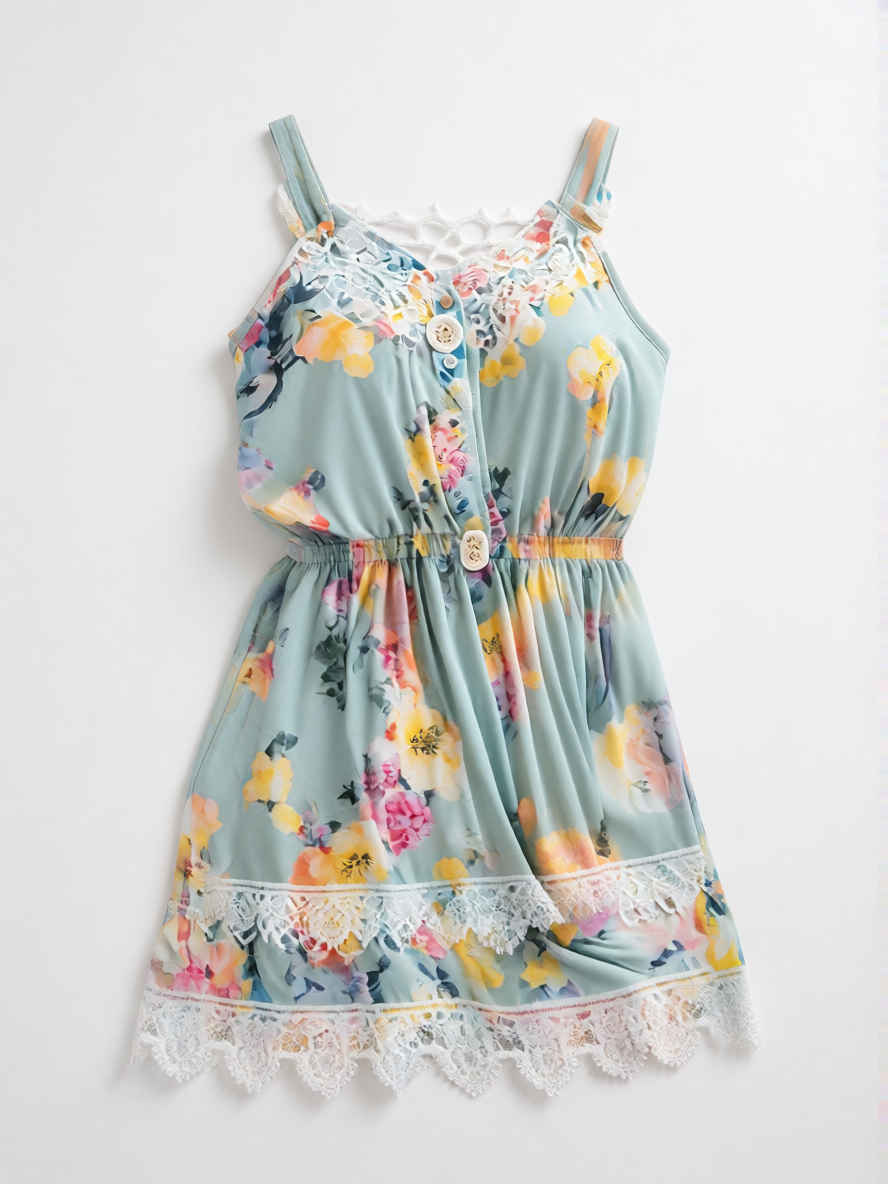
| By retaining the subject, face, pose, camera angle, and setting from <Picture 1> and combining them with the outfit from <Picture 2>—but have her wear the dress (one-piece) from —the result is a sophisticated medium-shot portrait. |
| <Picture 1>の被写体、表情、ポーズ、カメラアングル、背景設定を維持しつつ、<Picture 2>の衣装(ただしドレス/ワンピースを着用)を組み合わせることで、洗練されたミディアムショットのポートレートに仕上がります。 |
| 生成画像(quality_profile = 9) | |
 |
| プロファイル | フレーム数 | 備考 | |
| Single image | 単一画像 | 1 | T2I、I2I、またはREF2VA。実験的な画像用VAEとハイブリッド・チェックポイントを使用 |
| Recommended | 推奨 | 5 | デフォルト |
| Extended | 拡張 | 9 | より多くの時間的コンテキストを考慮 |
| High | 高 | 13 | メモリ使用量と実行時間が増加 |
| Maximum | 最大 | 20 | メモリ使用量と実行時間が最大 |
| Single image: 1 | Recommended: 5 | Extended: 9 |
 |  |  |
 |  |  |
 |  | |