私的AI研究会 > ComfyUI9f
「ComfyUI」を使ってローカル環境でのAI画像生成を検証する
| 2026年7月発表されたテキスト、画像、動画、音声をひとつの文脈として同時に処理できる最新の汎用マルチモーダル動画生成AIモデルの検証 |
| このプロジェクトで作成するワークフローと関連データは下記にアップロードしている(更新されている場合は再度ダウンロードのこと) |
📂ComfyUI
  └─📂user
        └─📂default
              └─📂workflows        ← ワークフローの保存場所
                    :
                    ├─📂MinMax       ← この章で作成するワークフロー
                    :
・解凍してできる「ComfyUI/」フォルダを「StabilityMatrix/Data/Packages/ComfyUI」へ上書きコピーする| モデル名 | ファイル名(.safetensors) | 配置先(/StabilityMatrix/Data/) | ダウンロード URL | 利用先 | |
| diffusion_models | minimax_h3_fl2va_pruned_int8_convrot | Models/ | DiffusionModels/ | minimax_h3_fl2va_pruned_int8_convrot.safetensors | |
| minimax_h3_ref2va_pruned_int8_convrot | minimax_h3_ref2va_pruned_int8_convrot.safetensors | ||||
| text_encoders | qwen3vl_32b_minimax_h3_nvfp4_awq | TextEncoders | qwen3vl_32b_minimax_h3_nvfp4_awq.safetensors | ||
| vae | minimax_h3_video_vae_fp16 | VAE/ | minimax_h3_video_vae_fp16.safetensors | ||
| minimax_h3_audio_vae_fp32 | minimax_h3_audio_vae_fp32.safetensors | ||||
| ComfyUI オフィシャルサイトで公開されているテンプレートのシード値を固定して再現性を確保し動かしながら整理する |
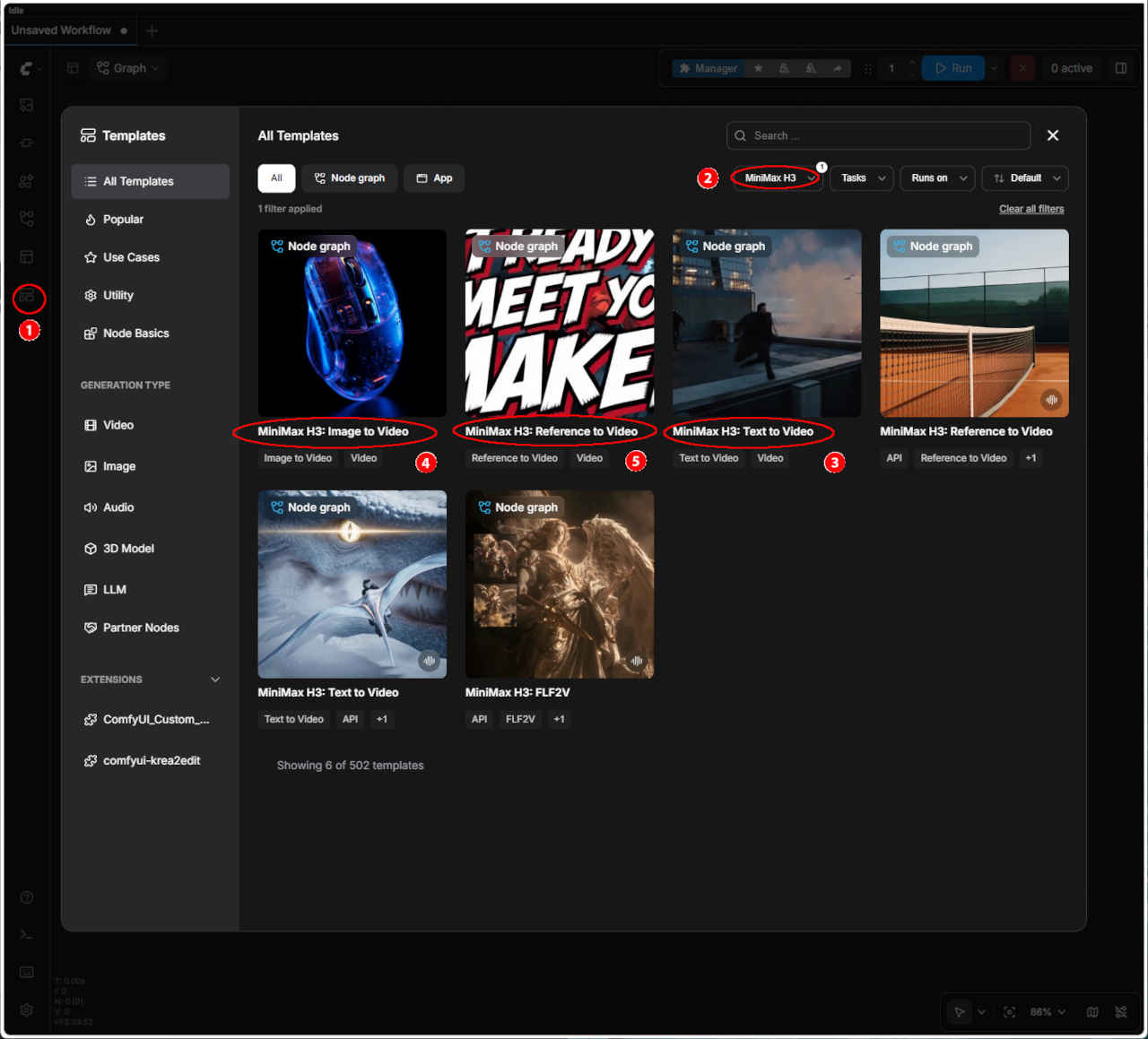 | ① 左端のメニューから「Template」を選択 ②「MinMax H3」を選択する ・表示された一覧からワークフローを選ぶ ③「MinMax H3: Text to Video」 ④「MinMax H3: Image to Video」 ⑤「MinMax H3: Reference to Video」 ・ワークフローでエラーが発生する場合はモデルの配置を確認する |
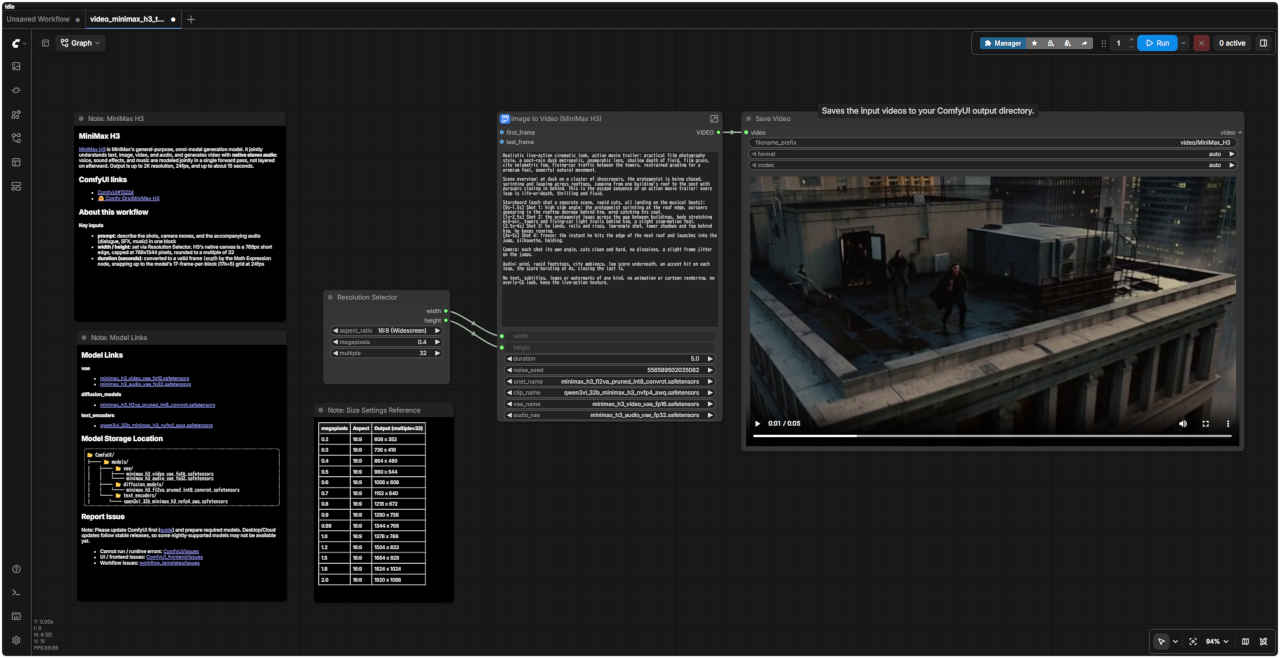
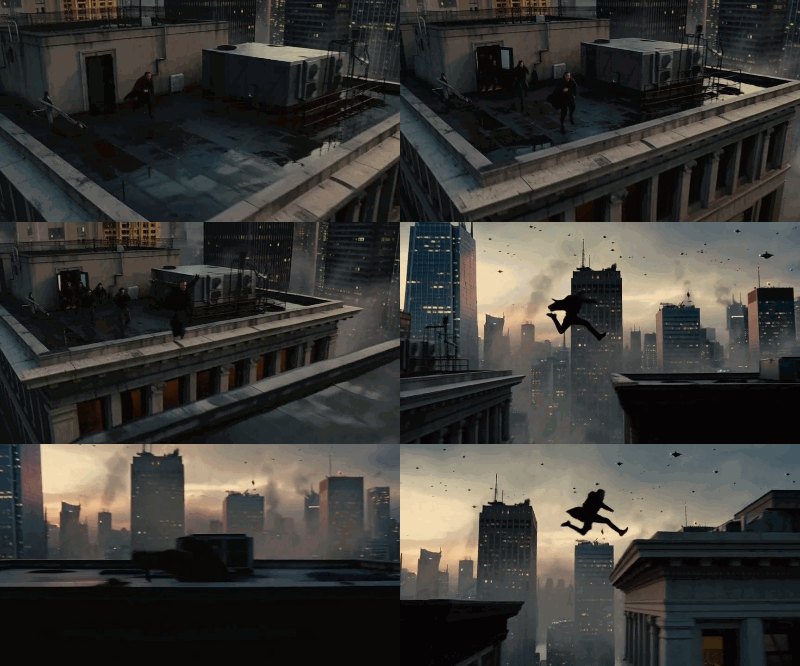
| 生成動画 864x480 | |
| テンプレート名 | モデル | ワークフロー | 保存ワークフロー名 | |
| ③ | MinMax H3: Text to Video | INT8 | video_minimax_h3_t2v.json | video_minimax_h3_t2v.json |
| ④ | MinMax H3: Image to Video | INT8 | video_minimax_h3_i2v.json | video_minimax_h3_i2v.json |
| ⑤ | MinMax H3: Reference to Video | INT8 | video_minimax_h3_r2v.json | video_minimax_h3_r2v.json |
| プロンプト |
|
realistic live-action cinematic look, action movie trailer: practical film photography style, a post-rain dusk metropolis, anamorphic lens, shallow depth of field, film grain, city volumetric fog, flying-car traffic between the towers, restrained grading for a premium feel, powerful natural movement. Scene overview: at dusk on a cluster of skyscrapers, the protagonist is being chased, sprinting and leaping across rooftops, jumping from one building's roof to the next with pursuers closing in behind. This is the escape sequence of an action movie trailer: every leap is life-or-death, thrilling and fluid. Storyboard (each shot a separate scene, rapid cuts, all landing on the musical beats): [0s-1.5s] Shot 1: high side angle: the protagonist sprinting at the roof edge, pursuers appearing in the rooftop doorway behind him, wind catching his coat. [1s-2.5s] Shot 2: the protagonist leaps across the gap between buildings, body stretching mid-air, towers and flying-car light trails behind him, a slight slow-motion feel. [2.5s-4s] Shot 3: he lands, rolls and rises, low-angle shot, tower shadows and fog behind him, he keeps running. [4s-5s] Shot 4: freeze: the instant he hits the edge of the next roof and launches into the jump, silhouette, holding. Camera: each shot its own angle, cuts clean and hard, no dissolves, a slight frame jitter on the jumps. Audio: wind, rapid footsteps, city ambience, low score underneath, an accent hit on each leap, the score bursting at 4s, closing the last 1s. No text, subtitles, logos or watermarks of any kind, no animation or cartoon rendering, no overly-CG look, keep the live-action texture. |
| リアルな実写映画のようなルック、アクション映画の予告編風:フィルム撮影の質感を活かしたスタイル、雨上がりの夕暮れの都市、アナモルフィックレンズ、浅い被写界深度、フィルムグレイン、都市に漂うボリュメトリックフォグ、高層ビル間を行き交う空飛ぶ車、高級感を演出する抑制の効いたカラーグレーディング、力強く自然な動き。 シーンの概要:夕暮れ時の高層ビル群。追っ手が迫る中、主人公が屋上を全力疾走し、あるビルの屋上から別のビルへと飛び移りながら逃走するアクション映画の予告編の一場面。どのジャンプも命がけであり、スリリングかつ流麗な動きが展開される。 絵コンテ(各ショットは独立したシーン、素早いカット割り、すべて音楽のビートに合わせる): [0秒-1.5秒] ショット1:高い位置からのサイド・アングル。屋上の縁を全力疾走する主人公と、背後の屋上入り口に現れる追っ手。風にたなびくコート。 [1秒-2.5秒] ショット2:ビル間の隙間を飛び越える主人公。空中で体を伸ばす姿、背後に広がる高層ビル群と空飛ぶ車の光の軌跡。わずかにスローモーションの演出。 [2.5秒-4秒] ショット3:着地、回転(ロール)、そして立ち上がる動作。ローアングル。背後にはビルの影と霧。そのまま走り続ける。 [4秒-5秒] ショット4:フリーズ(静止画)。次の屋上の縁に到達し、ジャンプへと踏み切る瞬間。シルエット。静止状態で保持。 カメラワーク:各ショットでアングルを変え、ディゾルブ(溶暗・溶明)なしの鋭いカット割り。ジャンプ時にはわずかなフレームの揺れ(ジッター)を加える。 音声:風の音、素早い足音、都市の環境音、低音のBGM(スコア)。各ジャンプの瞬間にアクセントとなる音を入れ、4秒の時点でスコアが盛り上がり、最後の1秒で締めくくる。 テキスト、字幕、ロゴ、透かし(ウォーターマーク)は一切なし。アニメーションやカートゥーン調のレンダリング、過度なCG感も排除し、実写の質感を維持する。 |
| MiniMax H3 | |
| MiniMax H3は、MiniMaxが提供する汎用的なマルチモーダル生成モデルです。テキスト、画像、動画、音声を統合的に理解し、ステレオ音声を伴う動画を生成します。音声(セリフ、効果音、音楽)は後から重ね合わせるのではなく、単一の推論プロセス(フォワードパス)内で統合的に生成されます。出力仕様は、最大解像度2K、24fps、最大約15秒間です。 | |
| 主な入力項目 | |
| prompt(プロンプト) | ショットの内容、カメラワーク、および付随する音声(セリフ、効果音、音楽)を一つのブロックにまとめて記述します。 |
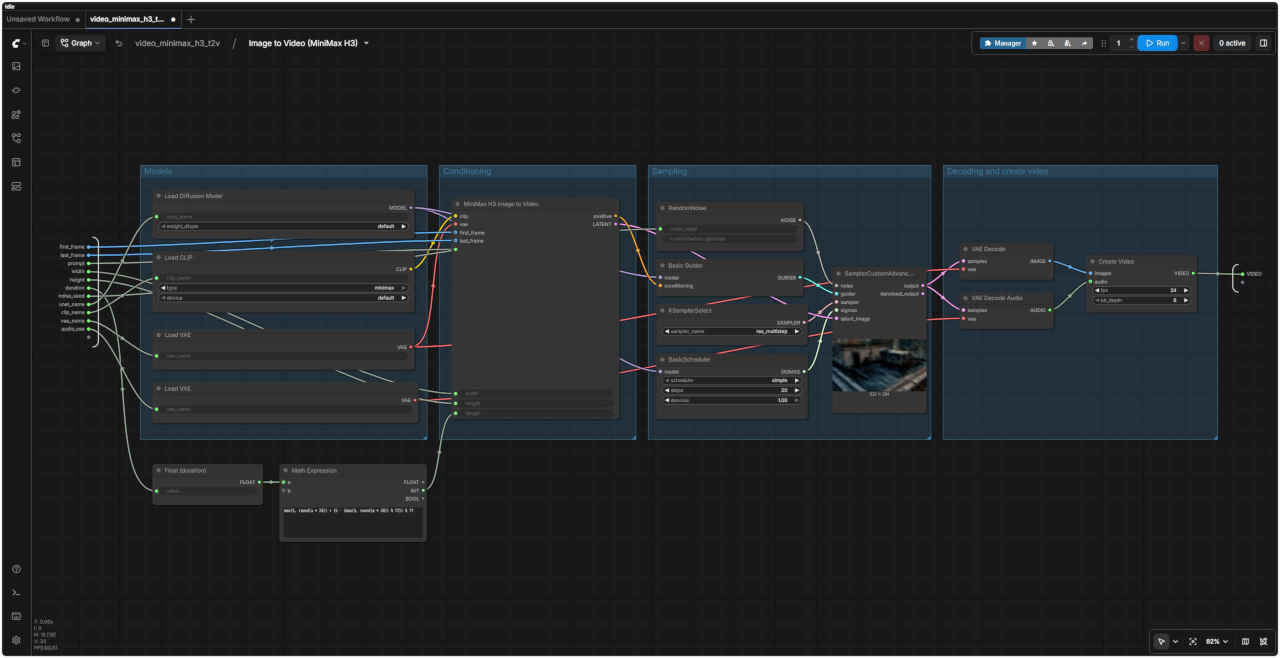
| width / height(幅 / 高さ) | Resolution Selector(解像度選択ノード)で設定します。H3のネイティブなキャンバスサイズは短辺768pxを基準とし、上限は768x1344ピクセル、値は32の倍数に丸められます。 |
| duration (seconds)(長さ(秒)) | Math Expressionノードによって適切なフレーム数に変換されます。24fpsにおいて、モデルの仕様である「1ブロックあたり17フレーム(17k+5)」のグリッドに合わせて切り上げ処理が行われます。 |
| Size Settings Reference | ||
| megapixels | Aspect | Output (multiple = 32) |
| 0.2 | 16:9 | 608 x 352 |
| 0.3 | 16:9 | 736 x 416 |
| 0.4 | 16:9 | 864 x 480 |
| 0.5 | 16:9 | 960 x 544 |
| 0.6 | 16:9 | 1056 x 608 |
| 0.7 | 16:9 | 1152 x 640 |
| 0.8 | 16:9 | 1216 x 672 |
| 0.9 | 16:9 | 1280 x 736 |
| 0.98 | 16:9 | 1344 x 768 |
| 1.0 | 16:9 | 1376 x 768 |
| 1.2 | 16:9 | 1504 x 832 |
| 1.5 | 16:9 | 1664 x 928 |
| 1.8 | 16:9 | 1824 x 1024 |
| 2.0 | 16:9 | 1920 x 1088 |