私的AI研究会 > ComfyUI9h

「ComfyUI」を使ってローカル環境でのAI画像生成を検証する
| 2026年3月発表された音声対応の動画生成モデル。 |
| このプロジェクトで作成するワークフローと関連データは下記にアップロードしている(更新されている場合は再度ダウンロードのこと) |
📂ComfyUI
  ├─📂input              ← ワークフローに含まれる入力画像
  └─📂user
        └─📂default
              └─📂workflows        ← ワークフローの保存場所
                    :
                    ├─📂LTX
                    ├─📂LTX-2.5        ← この章で作成するワークフロー
                    :
・解凍してできる「ComfyUI/」フォルダを「StabilityMatrix/Data/Packages/ComfyUI」へ上書きコピーする| 拡張ノード(検索名) | 拡張ノード URL | 主な機能 / 参照ページ | 特記事項 |
| rgthree | rgthree-comfy | ノードをスイッチで切り替える | すべてのノードに必須 |
| ComfyUI_Custom_Nodes_AlekPet | ComfyUI_Custom_Nodes_AlekPet | プロンプトを日本語入力する |
| モデル名 | ファイル名(.safetensors) | 配置先(/StabilityMatrix/Data/) | ダウンロード URL | サイズ | |
| diffusion_models | ltx-2.5-22b-distilled-transformer-comfy-int8-convrot | Models/ | DiffusionModels/ | ltx-2.5-22b-distilled-transformer-comfy-int8-convrot.safetensors | 21.5GB |
| text_encoders | gemma4-12b-with-proj-ltx-2.5-comfy-int8-convrot | TextEncoders/ | gemma4-12b-with-proj-ltx-2.5-comfy-int8-convrot.safetensors | 15.4GB | |
| gemma4_e2b_it_bf16 | gemma4_e2b_it_bf16.safetensors | 10.3GB | |||
| vae | ltx-2.5-video-vae-bf16 | VAE/ | ltx-2.5-video-vae-bf16.safetensors | 1.47GB | |
| ltx-2.5-audio-vae-bf16.safetensors | ltx-2.5-audio-vae-bf16.safetensors.safetensors | 0.37GB | |||
| latent_upscale_models | ltx-2.5-latent-spatial-upscaler-x2-bf16-1.0 | latent_upscale_models/ | ltx-2.5-latent-spatial-upscaler-x2-bf16-1.0.safetensors | 1.00GB | |
| ComfyUI オフィシャルサイトで公開されているテンプレートの動作を確認する |
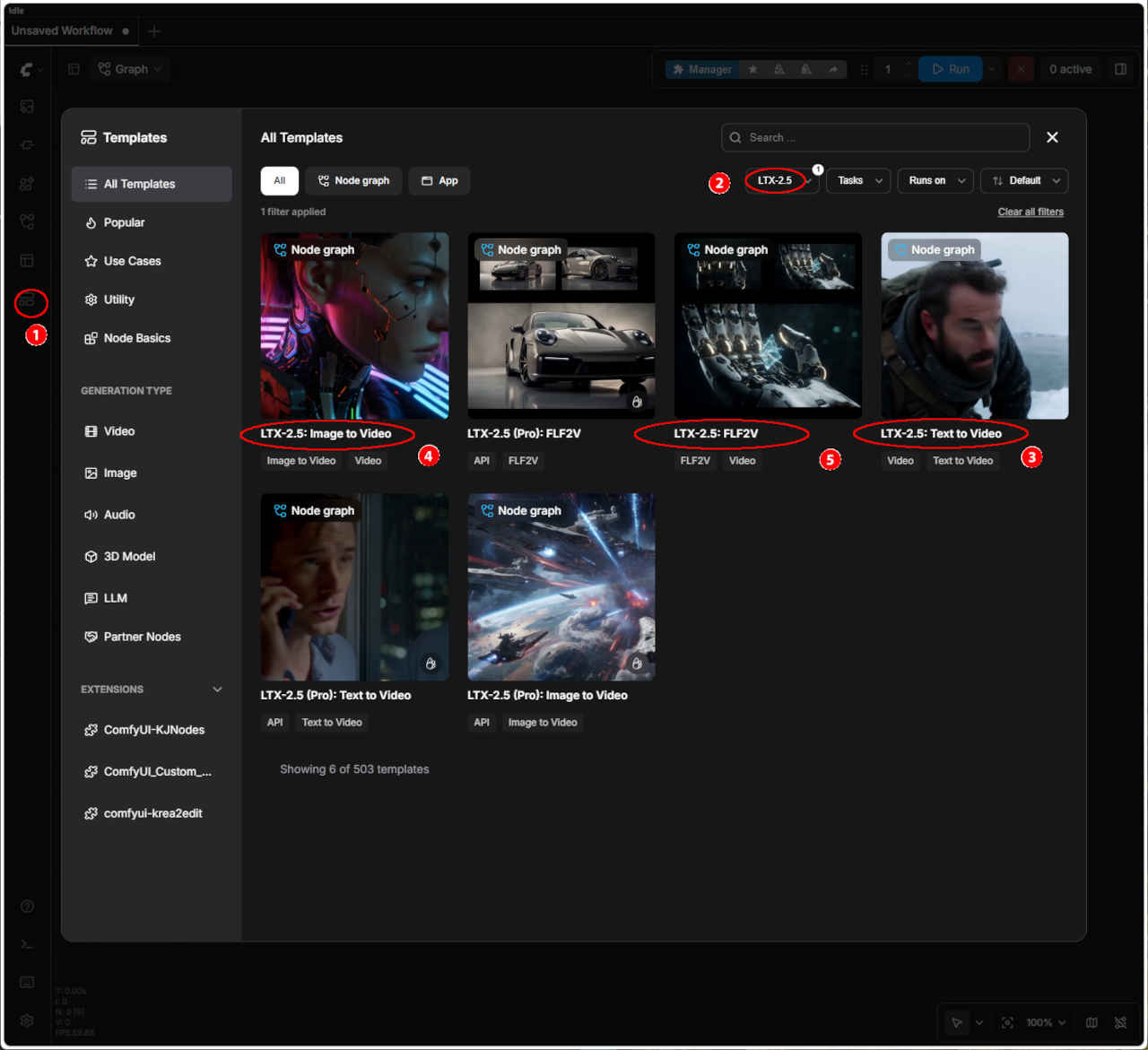 | ① 左端のメニューから「Template」を選択 ②「LTX-2.5」を選択する ・表示された一覧からワークフローを選ぶ ③「LTX-2.5: Text to Video」 ④「LTX-2.5: Image to Video」 ⑤「LTX-2.5: FLF2V」 ・ワークフローでエラーが発生する場合はモデルの配置を確認する | |
| テンプレート名 | 保存ワークフロー名 | |
| ③ LTX-2.5: Text to Video | video_ltx2_5_t2v.json | |
| ④ LTX-2.5: Image to Video | video_ltx2_5_i2v.json | |
| ⑤ LTX-2.5: FLF2V | video_ltx2_5_flf2v.json | |
| プロンプト |
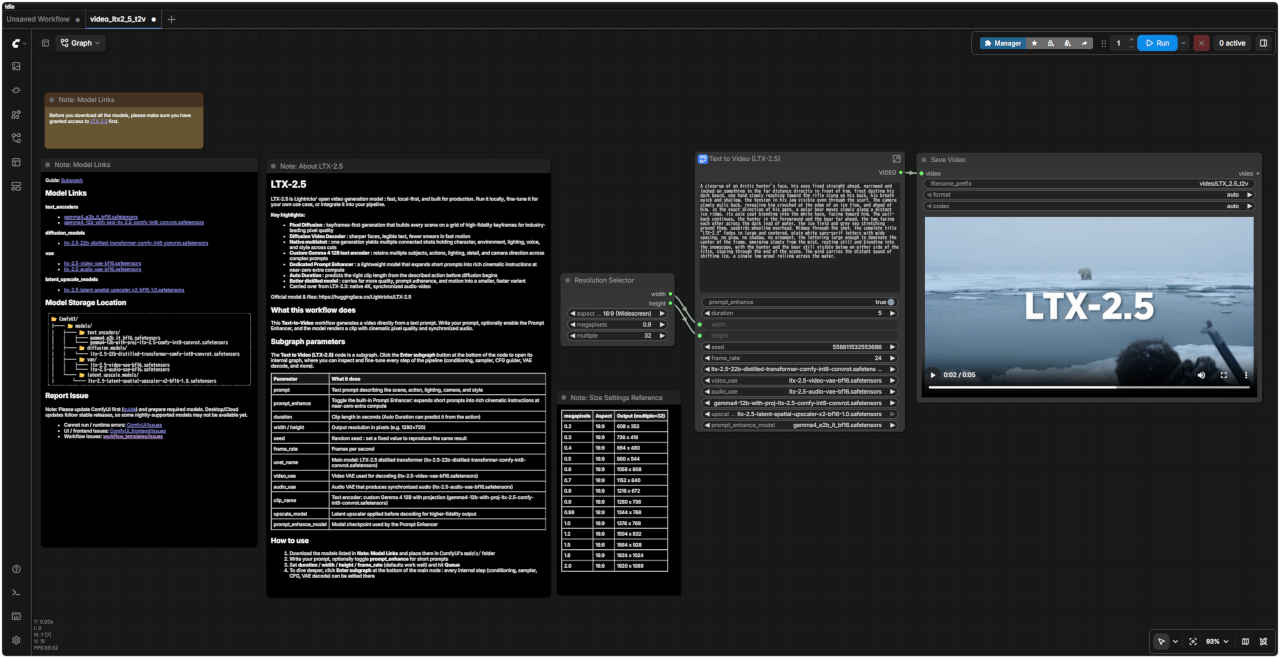
| A close-up of an Arctic hunter's face, his eyes fixed straight ahead, narrowed and locked on something in the far distance directly in front of him, frost dusting his dark beard, one hand slowly reaching toward the rifle slung on his back, his breath quick and shallow, the tension in his jaw visible even through the scarf. The camera slowly pulls back, revealing him crouched at the edge of an ice floe, and ahead of him, in the exact direction of his gaze, a polar bear moves slowly along a distant ice ridge, its pale coat blending into the white haze, facing toward him. The pull-back continues, the hunter in the foreground and the bear far ahead, the two facing each other across the dark lead of water, the ice field and grey sea stretching around them, seabirds wheeling overhead. Midway through the shot, the complete title "LTX-2.5" fades in large and centered, plain white sans-serif letters with wide spacing, no glow, no shadow, no ornament, the lettering large enough to dominate the center of the frame, emerging slowly from the mist, resting still and blending into the snowscape, with the hunter and the bear still visible below on either side of the title, staying through the end of the scene. The wind carries the distant sound of shifting ice, a single low growl rolling across the water. |
| 北極の狩人の顔のクローズアップ。視線は真っ直ぐ前方に固定され、遠くの何かを捉えようと細められている。黒い髭には霜が降り、背負ったライフルへ片手がゆっくりと伸びる。呼吸は速く浅く、スカーフ越しにも顎の緊張がうかがえる。カメラがゆっくりと引くと、彼が流氷の縁にしゃがみ込んでいる姿が現れる。その視線の先、遠く離れた氷の隆起に沿ってホッキョクグマがゆっくりと動いており、その淡い色の毛皮は白い霞に溶け込みながらも、彼の方を向いているのがわかる。さらにカメラが引いていくと、手前の狩人と遥か前方の熊が、暗い海面(リード)を挟んで対峙する構図となる。周囲には氷原と灰色の海が広がり、頭上では海鳥が旋回している。ショットの途中で、タイトル「LTX-2.5」が画面中央に大きくフェードインしてくる。文字はシンプルな白のサンセリフ体で、字間は広く取られ、発光や影、装飾などの加工は一切ない。フレームの中央を占めるほどの大きさで、霧の中からゆっくりと浮かび上がり、雪景色に溶け込むように静止する。タイトルの下、左右には狩人と熊の姿が見えたままで、その状態がシーンの終わりまで続く。風が氷の動く遠くの音を運び、低く響く唸り声が水面を伝わってくる。 |
| プロンプト・エンハンサーにより内部で生成されるプロンプト |
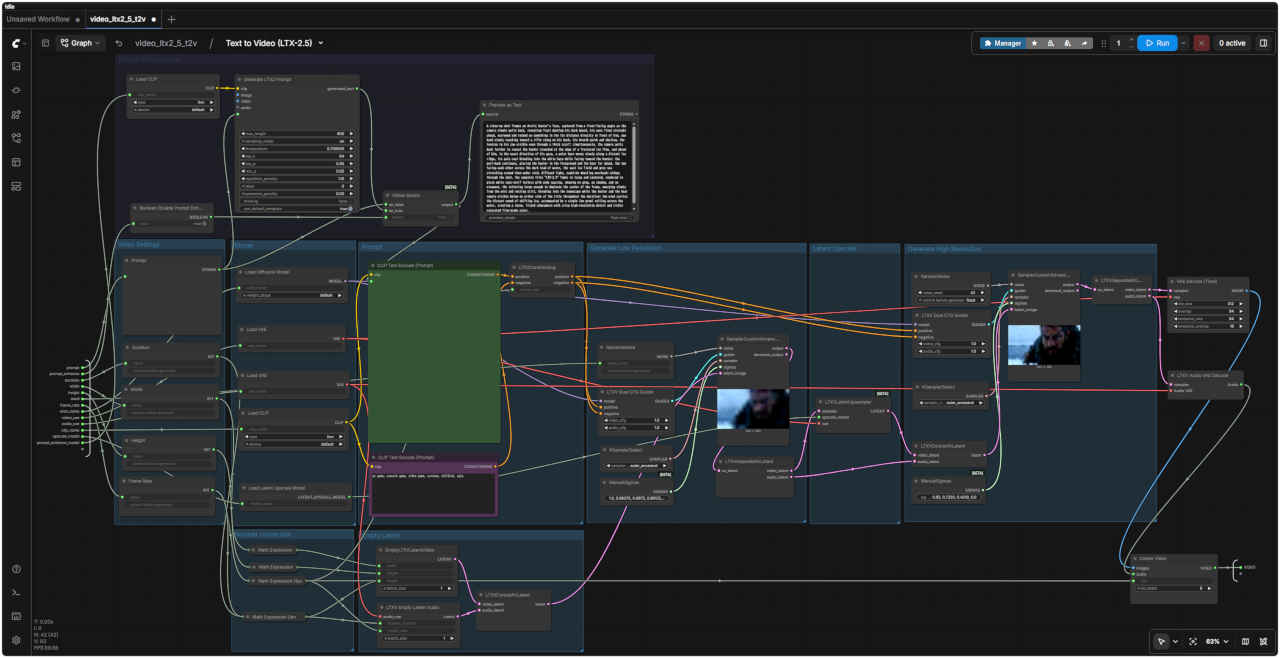
| A close-up shot frames an Arctic hunter's face, captured from a front-facing angle as the camera slowly pulls back, revealing frost dusting his dark beard, his eyes fixed straight ahead, narrowed and locked on something in the far distance directly in front of him, one hand slowly reaching toward a rifle slung on his back, his breath quick and shallow, the tension in his jaw visible even through a thick scarf; simultaneously, the camera pulls back further to reveal the hunter crouched at the edge of a fractured ice floe, and ahead of him, in the exact direction of his gaze, a polar bear moves slowly along a distant ice ridge, its pale coat blending into the white haze while facing toward the hunter; the pull-back continues, placing the hunter in the foreground and the bear far ahead, the two facing each other across the dark lead of water, the vast ice field and grey sea stretching around them under cold, diffused light, seabirds wheeling overhead; midway through the shot, the complete title "LTX-2.5" fades in large and centered, rendered in plain white sans-serif letters with wide spacing, showing no glow, no shadow, and no ornament, the lettering large enough to dominate the center of the frame, emerging slowly from the mist and resting still, blending into the snowscape while the hunter and the bear remain visible below on either side of the title throughout the duration; the wind carries the distant sound of shifting ice, accompanied by a single low growl rolling across the water, creating a tense, frigid atmosphere with crisp high-resolution detail and richly saturated film-grade color. |
| 北極の狩人の顔を正面から捉えたクローズアップから始まり、カメラがゆっくりと引いていくと、彼の黒い髭に霜が降りている様子や、正面の遥か彼方にある何かを凝視して細められた鋭い眼差し、背負ったライフルへゆっくりと伸びる片手、荒く浅い呼吸、そして厚手のスカーフ越しにも見て取れる食いしばった顎の緊張感が明らかになります。さらにカメラが引くと、割れた流氷の縁にしゃがみ込む狩人の姿と、その視線の先、遥か彼方の氷の隆起に沿ってゆっくりと動くホッキョクグマの姿が現れます。白い霞に溶け込むような淡い毛色をしたその熊は、狩人の方を向いています。カメラはさらに引き続け、手前に狩人、遥か前方に熊を配置します。二者は暗い海面(リード)を挟んで対峙し、冷たく柔らかな光の下、広大な氷原と灰色の海が周囲に広がり、頭上では海鳥が旋回しています。映像の途中で、タイトル「LTX-2.5」が画面中央に大きくフェードインして現れます。装飾のないシンプルな白いサンセリフ体で、文字間隔は広く取られ、発光や影などの装飾は一切ありません。フレームの中央を占めるほどの大きさで、霧の中からゆっくりと浮かび上がり、雪景色に溶け込むように静止します。その間も、タイトルの下、左右に狩人と熊の姿が見え続けています。風が氷の動く音を運び、水面を伝う低く響く唸り声がそれに重なります。鮮明な高解像度のディテールと、豊かな彩度を持つ映画品質の色調が、緊張感に満ちた極寒の雰囲気を醸し出しています。 |
| LTX-2.5 | |
| LTX-2.5は、Lightricksが提供するオープンな動画生成モデルです。高速かつローカル環境での動作を優先し、実運用(プロダクション)に耐えうる設計となっています。ローカル環境での実行、特定のユースケースに合わせたファインチューニング、あるいは既存のパイプラインへの組み込みが可能です。 | |
| 主な特徴 | |
| Pixel Diffusion | キーフレームを先行して生成する手法を採用。高精細なキーフレームのグリッドを基にシーンを構築し、業界最高水準の画質(ピクセル品質)を実現します。 |
| Diffusion Video Decoder | 顔の鮮明さ向上、テキストの視認性確保、高速な動きにおけるブレ(スミア)の低減を実現します。 |
| ネイティブ・マルチショット | 1回の生成で、キャラクター、環境、照明、音声、スタイルをカット間で維持したまま、複数の連続したショットを生成します。 |
| カスタムGemma 4 12Bテキストエンコーダー | 複雑なプロンプトにおいても、複数の被写体、アクション、照明、細部、カメラワークの指定を正確に反映・維持します。 |
| 専用プロンプトエンハンサー | 軽量なモデルにより、短いプロンプトを、追加の計算コストをほぼかけずに、映画のような表現豊かな指示へと拡張します。 |
| 自動デュレーション(Auto Duration) | 拡散(ディフュージョン)処理の開始前に、記述されたアクションに基づいて適切なクリップの長さを予測します。 |
| 改良された蒸留モデル | 小型・高速化したモデルでありながら、画質、プロンプトへの忠実度、動きの質を大幅に維持・向上させています。 |
| LTX-2.3からの継承機能 | ネイティブ4K対応、音声と映像の同期。 |
| このワークフローの機能 | |
| この Text-to-Video(テキストから動画への変換) ワークフローは、テキストプロンプトから直接動画を生成します。プロンプトを入力し、必要に応じてプロンプトエンハンサーを有効にすると、モデルは映画のような画質と同期された音声を備えたクリップを生成します。 | |
| サブグラフのパラメータ | |
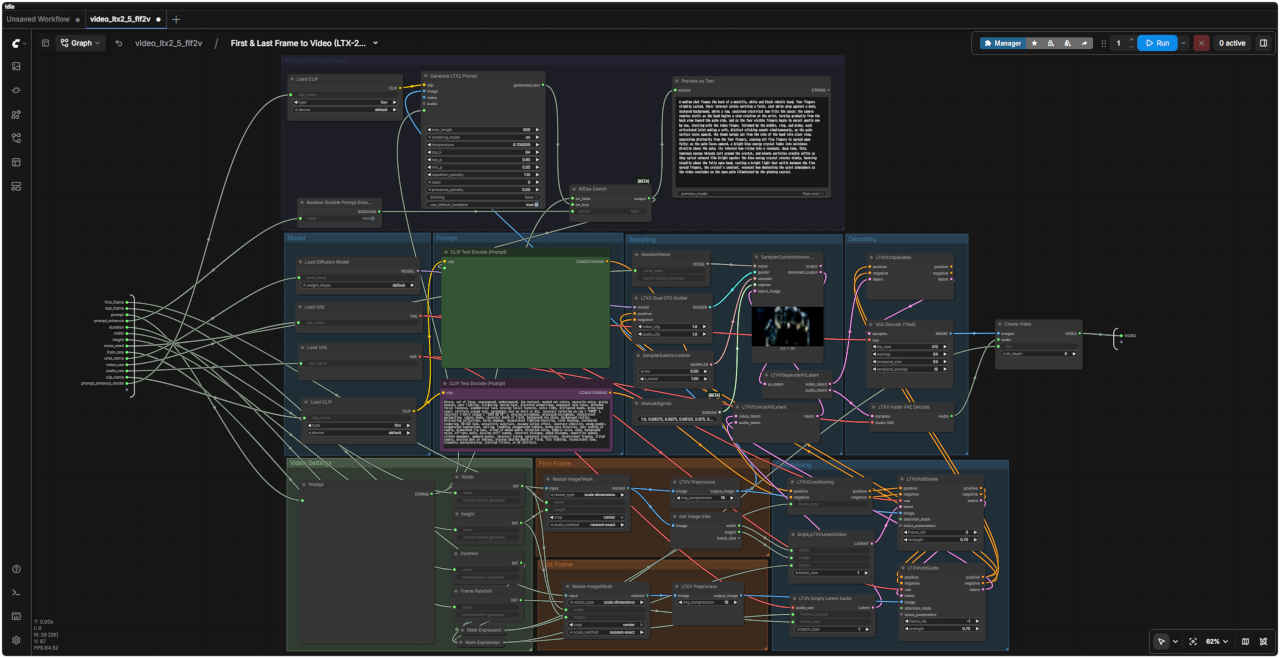
| Text to Video (LTX-2.5) ノードはサブグラフで構成されています。ノード下部にある Enter subgraph ボタンをクリックして内部グラフを開くと、パイプラインの各ステップ(コンディショニング、サンプラー、CFG ガイダー、VAE デコードなど)を確認・微調整できます。 | |
| prompt | シーン、アクション、照明、カメラワーク、スタイルを記述するテキストプロンプト |
| prompt_enhance | 内蔵プロンプトエンハンサーの切り替え:短いプロンプトを、追加の計算コストをほぼかけずに、映画のような表現豊かな指示へと拡張します |
| duration | 秒単位のクリップの長さ Clip_length (「自動デュレーション」機能は、アクションに基づいて長さを予測できます) |
| width / height | 出力解像度(ピクセル単位、例: 1280×720) |
| seed | 乱数シード:固定値を設定すると同じ結果を再現可能 |
| frame_rate | フレームレート(fps) |
| unet_name | メインモデル:LTX-2.5 蒸留済みTransformer (ltx-2.5-22b-distilled-transformer-comfy-int8-convrot.safetensors) |
| video_vae | デコードに使用するビデオVAE (ltx-2.5-video-vae-bf16.safetensors) |
| audio_vae | 同期された音声を生成するオーディオVAE (ltx-2.5-audio-vae-bf16.safetensors) |
| clip_name | テキストエンコーダー:プロジェクション付きカスタムGemma 4 12B (gemma4-12b-with-proj-ltx-2.5-comfy-int8-convrot.safetensors) |
| upscale_model | 高品質な出力のためにデコード前に適用されるLatent Upscaler(潜在空間アップスケーラー) |
| prompt_enhance_model | Prompt Enhancer(プロンプト拡張機能)で使用されるモデルチェックポイント |
| 使用方法 | |
| 1. モデルをダウンロードし、ComfyUIの `models/` フォルダに配置します。 2. プロンプトを入力します。短いプロンプトの場合は、必要に応じて prompt_enhance を有効にしてください。 3. duration / width / height / frame_rate を設定し(デフォルト値で問題なく動作します)、Queue をクリックします。 4. 詳細な設定を行うには、メインノード下部にある Enter subgraph をクリックします。ここから、内部の各ステップ(条件付け、サンプラー、CFG、VAE デコードなど)を編集できます。 | |
| 生成動画 1280x704 | Size Settings Reference | ||
| megapixels | Aspect | Output (multiple = 32) | |
| 0.2 | 16:9 | 608 x 352 | |
| 0.3 | 16:9 | 736 x 416 | |
| 0.4 | 16:9 | 864 x 480 | |
| 0.5 | 16:9 | 960 x 544 | |
| 0.6 | 16:9 | 1056 x 608 | |
| 0.7 | 16:9 | 1152 x 640 | |
| 0.8 | 16:9 | 1216 x 672 | |
| 0.9 | 16:9 | 1280 x 736 | |
| 0.98 | 16:9 | 1344 x 768 | |
| 1.0 | 16:9 | 1376 x 768 | |
| 1.2 | 16:9 | 1504 x 832 | |
| 1.5 | 16:9 | 1664 x 928 | |
| 1.8 | 16:9 | 1824 x 1024 | |
| 2.0 | 16:9 | 1920 x 1088 | |
| プロンプト |
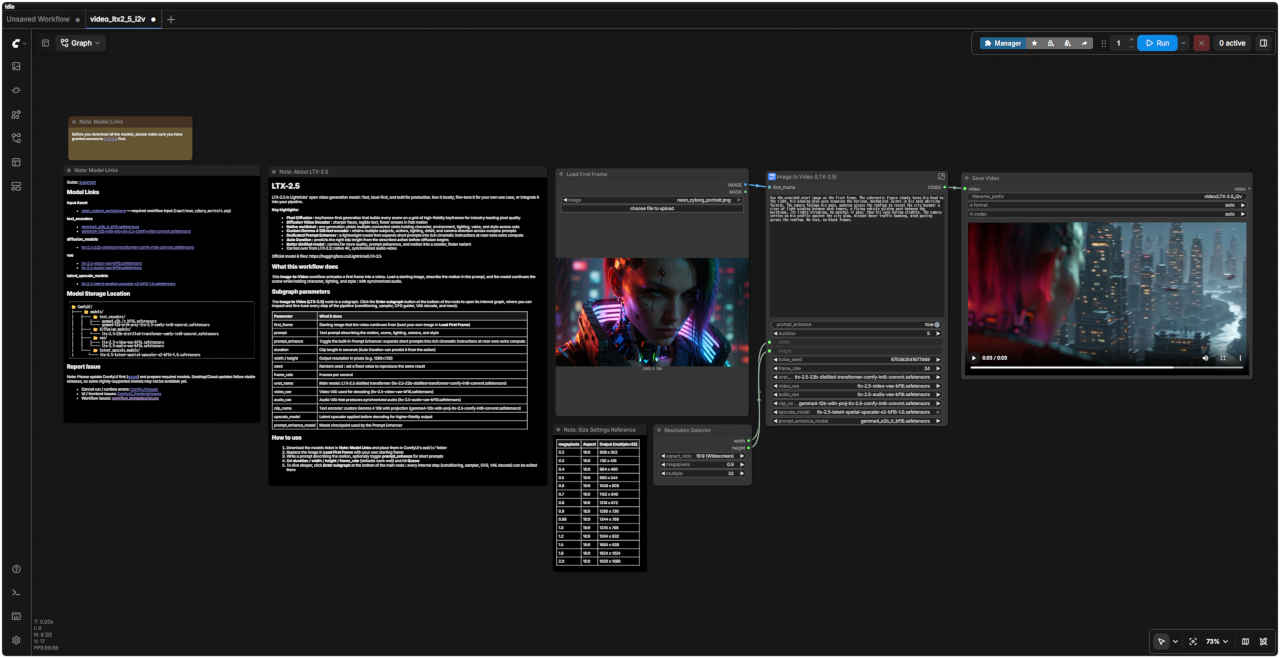
| Use the provided start image as the first frame. The cybernetic figure slowly turns his head to the right, his glowing blue eyes scanning the horizon, mechanical joints in his neck whirring faintly. The camera follows his gaze, panning across the rooftop to reveal the city beyond: a river of light winding between dark towers, a flying vehicle gliding past between the buildings, its lights streaking. He watches it pass, then his eyes narrow slightly. The camera settles on his profile against the city glow, distant hover traffic humming, wind gusting across the rooftop. No text, no black frames. |
| 提供された開始画像を最初のフレームとして使用してください。サイバネティックな姿をした人物がゆっくりと右へ顔を向け、青く光る瞳で地平線を見渡します。その際、首の機械的な関節がかすかな駆動音を立てます。カメラは彼の視線を追い、屋上を横切るようにパンして、その先に広がる都市の光景を映し出します。暗い高層ビルの間を光の川がうねるように流れ、飛行する乗り物がビル群の間を滑るように通り過ぎ、その光が尾を引いていきます。彼はその通過する乗り物を見つめ、やがてわずかに目を細めます。カメラは、都市の輝きを背景にした彼の横顔を捉えます。遠くではホバー車両の往来する音が響き、屋上には突風が吹き抜けています。テキストや黒いフレームは挿入しないでください。 |
| プロンプト・エンハンサーにより内部で生成されるプロンプト |
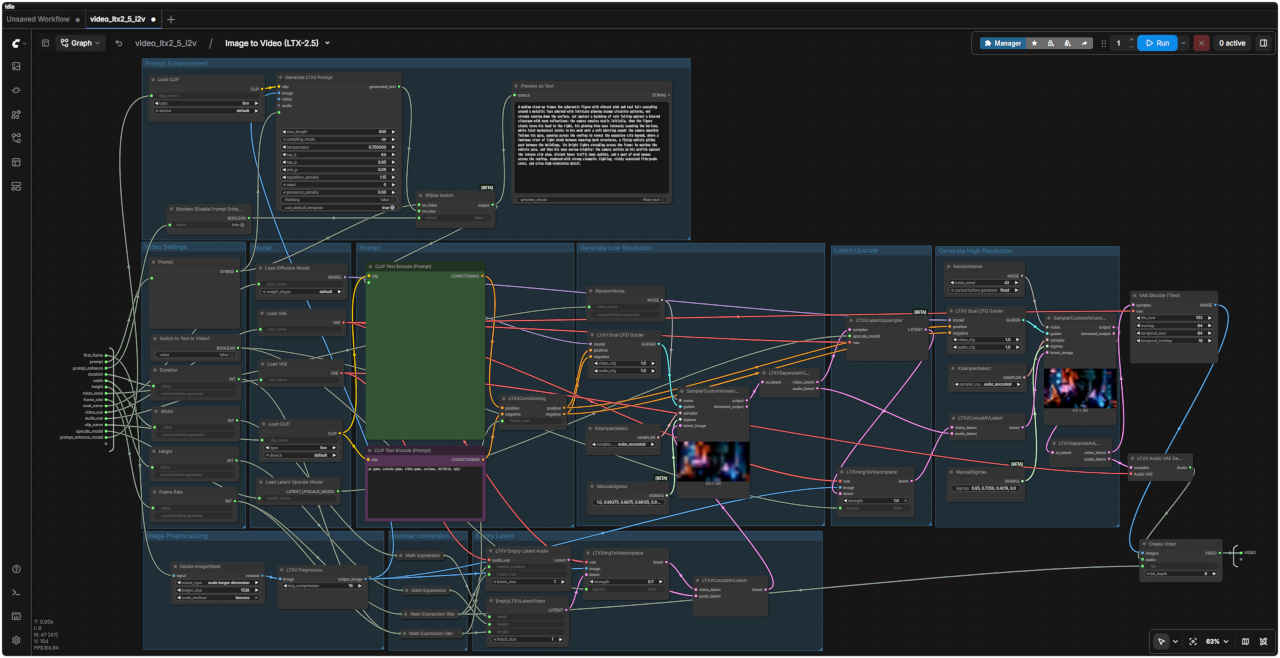
| A medium close-up frames the cybernetic figure with vibrant pink and teal hair cascading around a metallic face adorned with intricate glowing orange circuitry patterns, wet streaks running down the surface, set against a backdrop of rain falling against a blurred cityscape with neon reflections; the camera remains static initially, then the figure slowly turns his head to the right, his glowing blue eyes intensely scanning the horizon, while faint mechanical joints in his neck emit a soft whirring sound; the camera smoothly follows his gaze, panning across the rooftop to reveal the expansive city beyond, where a luminous river of light winds between towering dark structures, a flying vehicle glides past between the buildings, its bright lights streaking across the frame; he watches the vehicle pass, and then his eyes narrow slightly; the camera settles on his profile against the intense city glow, distant hover traffic hums audibly, and a gust of wind sweeps across the rooftop, rendered with strong cinematic lighting, richly saturated film-grade color, and crisp high-resolution detail. |
| 鮮やかなピンクとティールの髪が、オレンジ色に発光する複雑な回路模様と濡れた筋が走るメタリックな顔の周りに流れ落ちるサイバネティックな人物を、ミディアム・クローズアップで捉えています。背景には、ネオンの光が反射するぼやけた街並みに降り注ぐ雨が広がっています。カメラは当初静止していますが、やがて人物がゆっくりと右に顔を向け、青く光る瞳で鋭く地平線を見つめます。その際、首の機械的な関節からかすかな駆動音が響きます。カメラは彼の視線を滑らかに追い、屋上からその先に広がる都市の全景を映し出します。そこでは、そびえ立つ暗い建造物の間を光の川がうねるように流れ、空飛ぶ乗り物がビルの間を滑るように通り過ぎ、その明るい光が画面を横切る軌跡を描きます。彼はその乗り物を見送り、わずかに目を細めます。カメラは、都市の強烈な輝きを背にした彼の横顔を捉えます。遠くではホバー車両の往来する音が響き、突風が屋上を吹き抜けます。映像は、力強いシネマティックな照明、豊かな彩度のフィルムグレードの色調、そして鮮明かつ高精細なディテールで表現されています。 |
| このワークフローの機能 | |
| この Image-to-Video(画像から動画へ) ワークフローは、最初の1枚の画像(ファーストフレーム)を動画へとアニメーション化します。開始画像(ソース画像)を読み込み、プロンプトで動きを記述すると、モデルはキャラクター、照明、スタイルを維持したままシーンを継続生成します(音声の同期も行われます)。 | |
| サブグラフのパラメータ | |
| Image to Video (LTX-2.5) ノードはサブグラフで構成されています。ノード下部にある Enter subgraph ボタンをクリックして内部グラフを開くと、パイプラインの各ステップ(コンディショニング、サンプラー、CFG ガイダー、VAE デコードなど)を確認・微調整できます。 | |
| first_frame | 動画の開始点となる画像(Load First Frame で任意の画像を読み込んでください) |
| prompt | 動き、シーン、照明、カメラワーク、スタイルを記述するテキストプロンプト |
| prompt_enhance | 内蔵のプロンプト拡張機能(Prompt Enhancer)の切り替え:短いプロンプトを、計算コストをほぼ増やさずに、映画のような詳細な指示へと拡張します |
| duration | 秒単位のクリップの長さ(「Auto Duration」を使用すると、アクションに基づいて自動予測されます) |
| width / height | 出力解像度(ピクセル単位、例: 1280×720) |
| seed | 乱数シード:固定値を設定すると、同じ結果を再現できます |
| frame_rate | フレームレート(1秒あたりのフレーム数) |
| unet_name | メインモデル:LTX-2.5 蒸留トランスフォーマー (ltx-2.5-22b-distilled-transformer-comfy-int8-convrot.safetensors) |
| video_vae | デコードに使用するビデオVAE (ltx-2.5-video-vae-bf16.safetensors) |
| audio_vae | 同期された音声を生成するオーディオVAE (ltx-2.5-audio-vae-bf16.safetensors) |
| clip_name | テキストエンコーダー:プロジェクション付きカスタムGemma 4 12B (gemma4-12b-with-proj-ltx-2.5-comfy-int8-convrot.safetensors) |
| upscale_model | より高精細な出力を得るために、デコード前に適用されるLatentアップスケーラー |
| prompt_enhance_model | プロンプト拡張機能で使用されるモデルチェックポイント |
| 使用方法 |
| 1. モデルをダウンロードし、ComfyUIの `models/` フォルダに配置します。 2. Load First Frame(最初のフレームを読み込むノード)の画像を、開始フレームとして使用したい独自の画像に置き換えます 3. 動きを説明するプロンプトを入力します。短いプロンプトの場合は、必要に応じて prompt_enhance を有効にしてください 4. duration / width / height / frame_rate を設定し(デフォルト値でも良好に動作します)、Queue(キューに追加)をクリックします 5. 詳細な調整を行うには、メインノードの下部にある Enter subgraph をクリックします。そこでは、内部の各ステップ(条件付け、サンプラー、CFG、VAEデコードなど)を編集可能です |
| 入力静止画像 | 生成動画 1280x704 |
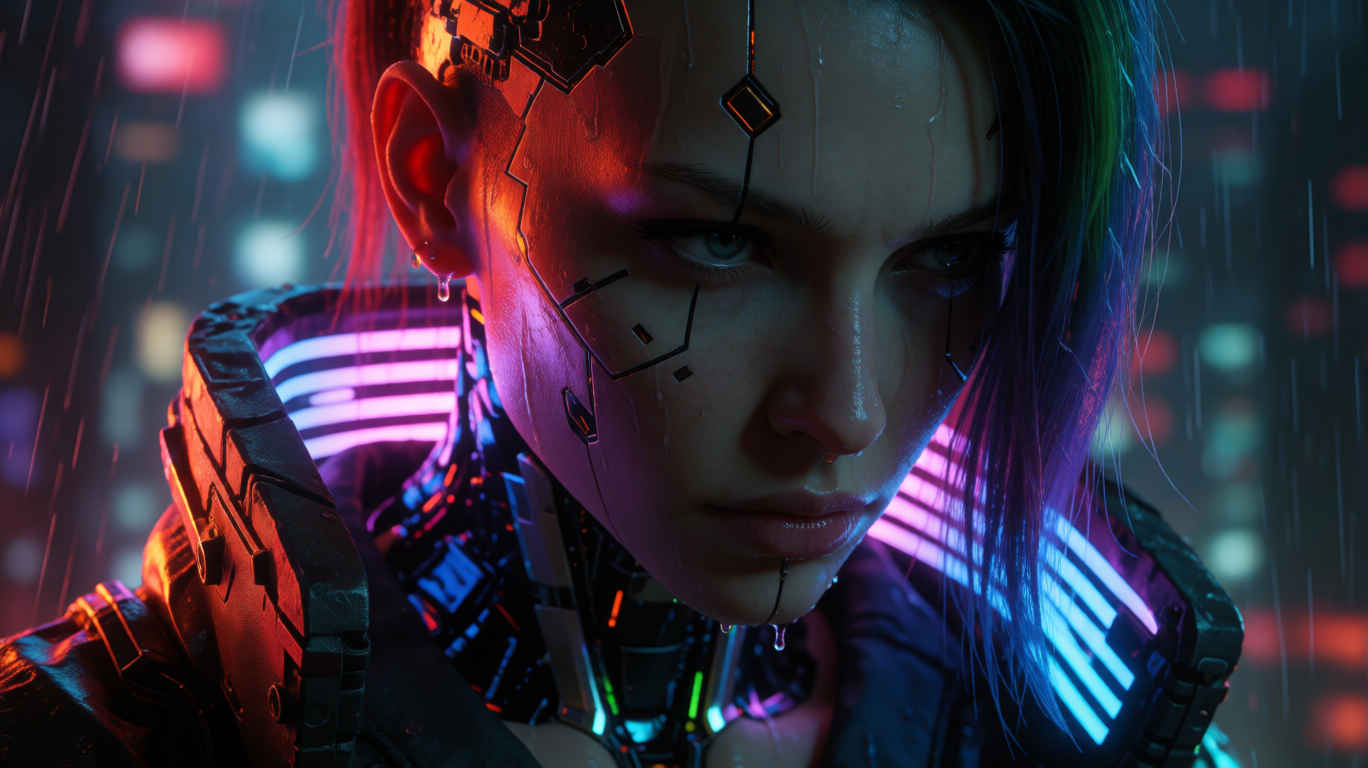 neon_cyborg_portrait_m.png |
| 参照用静止画像 ① | 参照用静止画像 ② |
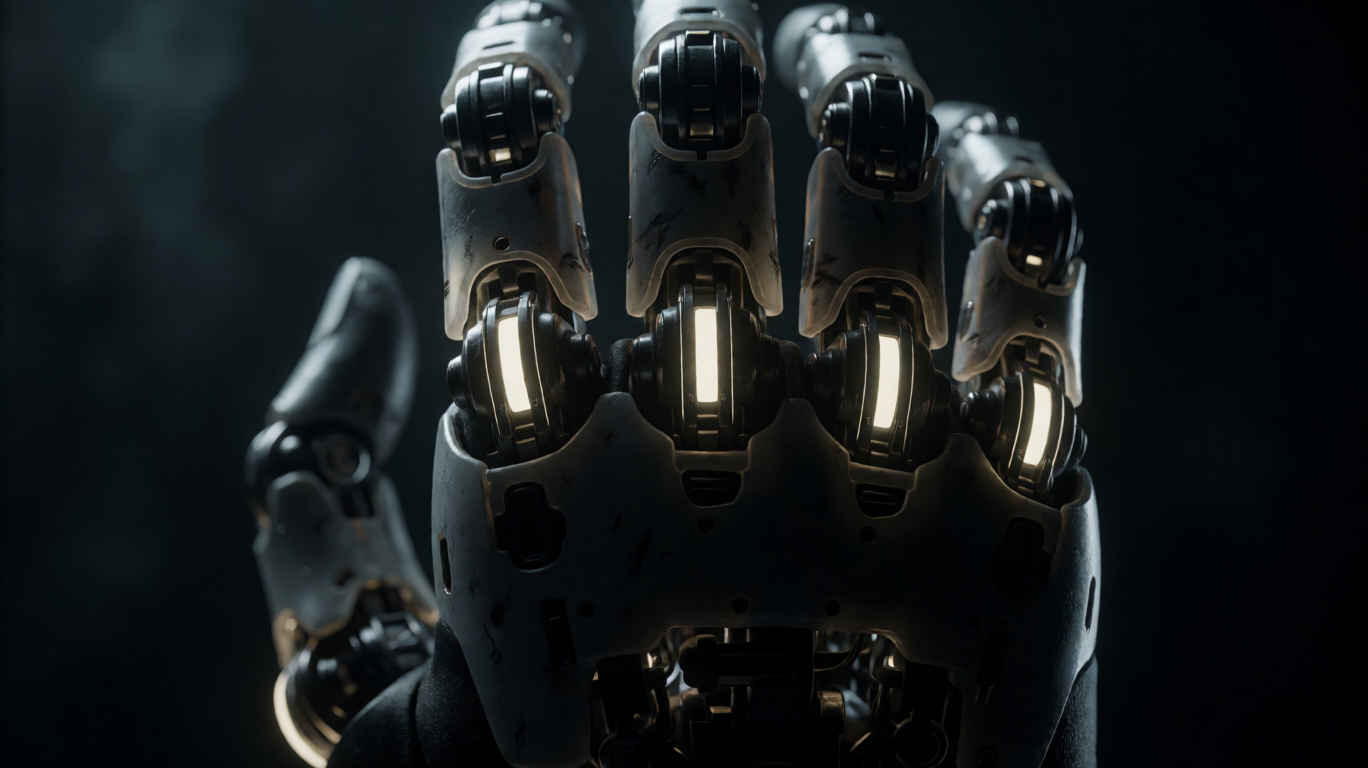 robot_hand.png | 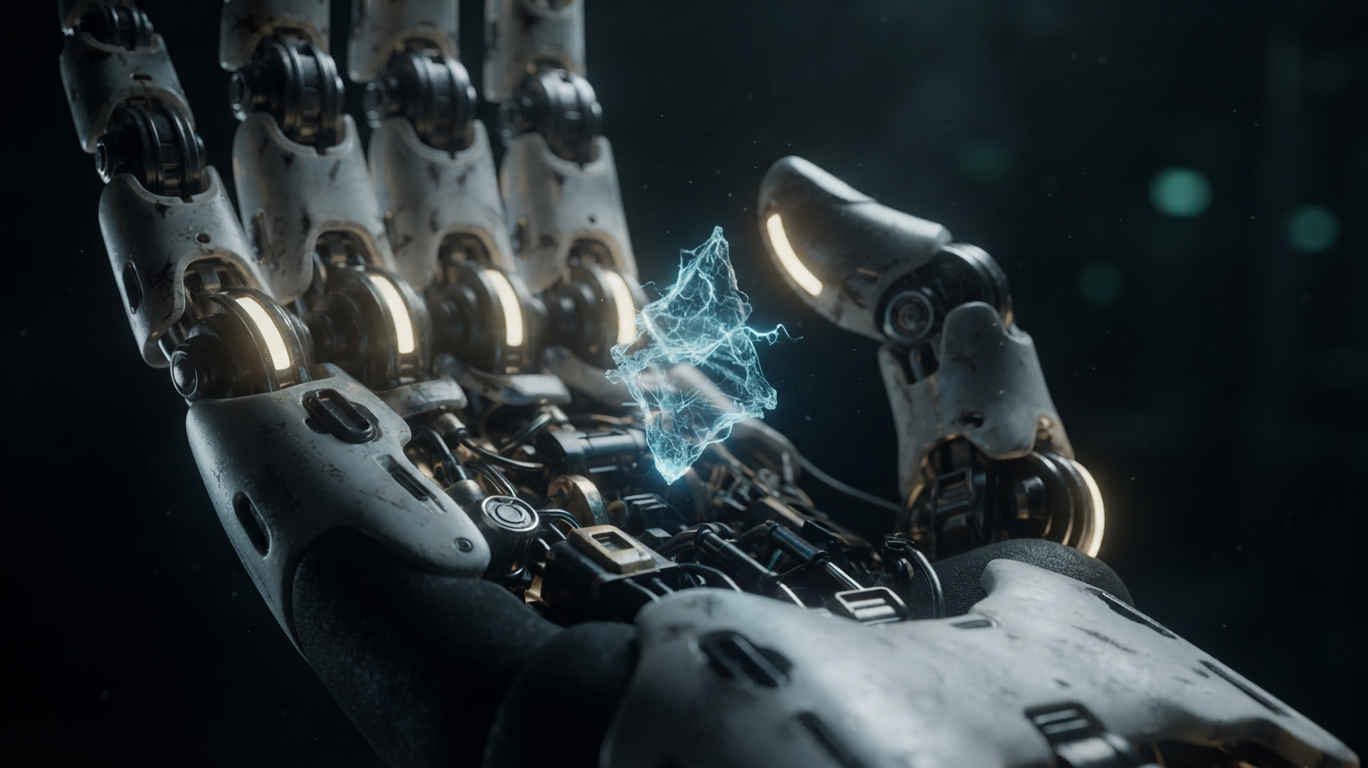 robot_hand_energy.png |
| プロンプト |
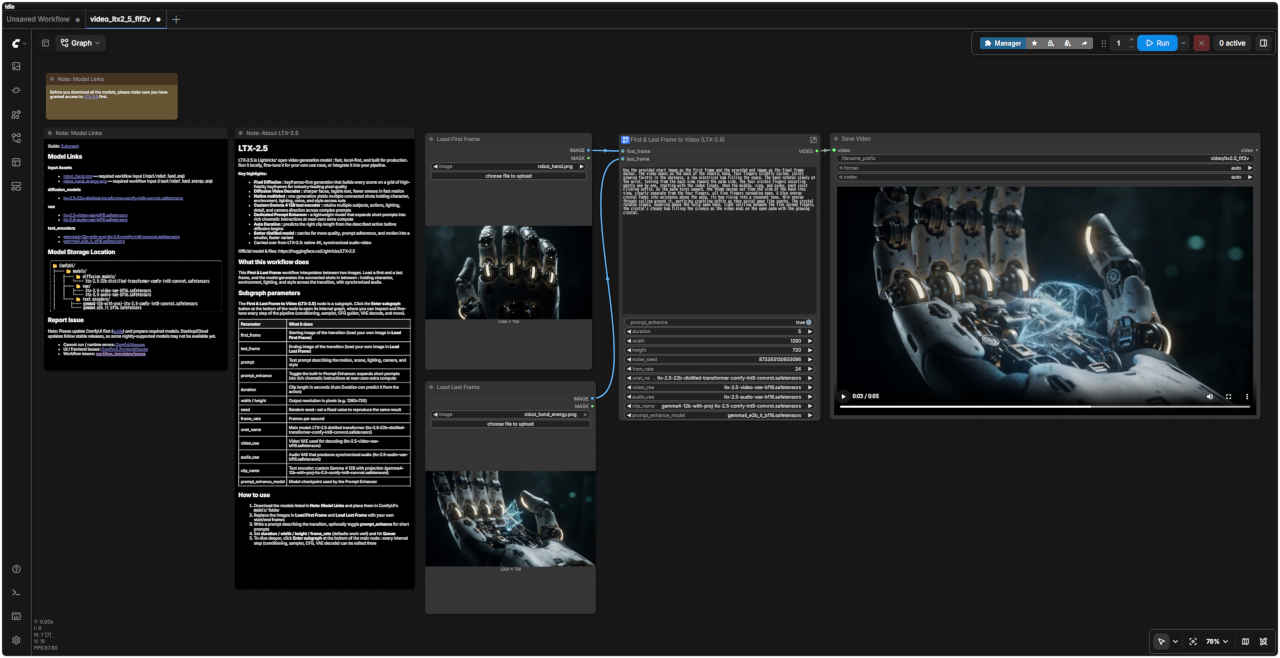
| Use the provided start image as the first frame and the provided end image as the final frame anchor. The video opens on the back of the robotic hand, four fingers slightly curled, joints glowing faintly in the darkness, a low electrical hum filling the space. The hand rotates slowly at the wrist, turning from the back view toward the palm side, the four visible fingers uncurling gently one by one, starting with the index finger, then the middle, ring, and pinky, each joint clicking softly. As the palm turns upward, the thumb swings out from the side of the hand into view, clearly separate from the four fingers, all five fingers spreading open. A blue energy crystal fades into existence above the palm, its hum rising into a resonant tone, thin energy threads coiling around it, particles crackling softly as they spiral away like sparks. The crystal rotates slowly, hovering above the fully open hand, light spilling between the five spread fingers, the crystal's steady hum filling the silence as the video ends on the open palm with the glowing crystal. |
| 提供された開始画像を最初のフレームに、終了画像を最後のフレームのアンカーとして使用します。動画はロボットハンドの甲側から始まります。4本の指は軽く曲がっており、暗闇の中で関節が淡く発光し、低い電気的な唸り音が空間を満たしています。手首を軸にゆっくりと回転して手のひら側へと向きを変えるにつれ、人差し指、中指、薬指、小指の順に、4本の指が一つずつ優しく伸びていきます。その際、各関節からは柔らかなクリック音が響きます。手のひらが上を向くと、親指が手の側面から視界に入り込むように動き出し、他の4本の指とははっきりと離れた位置で、5本すべての指が大きく広がります。手のひらの上には青いエネルギー・クリスタルが徐々に姿を現し、その唸り音は共鳴するような響きへと高まっていきます。クリスタルの周囲には細いエネルギーの糸が巻き付き、火花のように螺旋を描きながら飛び散る粒子が、パチパチと音を立てます。完全に開いた手のひらの上でクリスタルがゆっくりと回転し、広がった5本の指の間から光がこぼれ落ちます。クリスタルの安定した唸り音が静寂を満たす中、光り輝くクリスタルと開かれた手のひらを映し出したまま、動画は幕を閉じます。 |
| プロンプト・エンハンサーにより内部で生成されるプロンプト |
| A medium shot frames the back of a metallic, white and black robotic hand, four fingers slightly curled, their internal joints emitting a faint, cool white glow against a dark, textured background, while a low, sustained electrical hum fills the space; the camera remains static as the hand begins a slow rotation at the wrist, turning gradually from the back view toward the palm side, and as the four visible fingers begin to uncurl gently one by one, starting with the index finger, followed by the middle, ring, and pinky, each articulated joint making a soft, distinct clicking sound; simultaneously, as the palm surface turns upward, the thumb swings out from the side of the hand into clear view, separating distinctly from the four fingers, causing all five fingers to spread open fully; as the palm faces upward, a bright blue energy crystal fades into existence directly above the palm, its internal hum rising into a resonant, deep tone, thin, luminous energy threads coil around the crystal, and minute particles crackle softly as they spiral outward like bright sparks; the blue energy crystal rotates slowly, hovering steadily above the fully open hand, casting a bright light that spills between the five spread fingers, the crystal's constant, resonant hum dominating the quiet atmosphere as the video concludes on the open palm illuminated by the glowing crystal. |
| 暗く質感のある背景を背に、白と黒のメタリックなロボットの「手」の甲がミディアムショットで捉えられています。4本の指はわずかに曲がっており、その関節内部からは淡く冷たい白色の光が漏れ出ています。空間には低く持続する電気的な唸り音が響く中、カメラは固定されたまま、手首を軸にして手がゆっくりと回転し始めます。手の甲側から手のひら側へと徐々に回るにつれ、人差し指、中指、薬指、小指の順に、4本の指が一本ずつ優しく伸びていき、その可動関節からは柔らかくもはっきりとしたクリック音が響きます。同時に、手のひらが上を向く動きに合わせて、親指が手の側面から外側へと大きく開き、他の4本の指とはっきりと離れて、5本すべての指が完全に広がった状態になります。手のひらが上を向くと、その真上に明るい青色のエネルギークリスタルがふわりと現れます。クリスタル内部の唸り音は共鳴するような重低音へと変化し、細く輝くエネルギーの糸がクリスタルに巻き付く中、微細な粒子が明るい火花のように螺旋を描いて外側へと広がり、パチパチと音を立てます。青いエネルギークリスタルは、完全に開いた手の上で安定して浮遊しながらゆっくりと回転し、その明るい光が広がった5本の指の隙間からこぼれ落ちます。クリスタルの絶え間ない共鳴音が静寂な空間を支配する中、輝くクリスタルに照らされた開いた手のひらの映像で、この動画は幕を閉じます。 |
| このワークフローの機能 | |
| この First & Last Frame(開始・終了フレーム) ワークフローは、2つの画像の間の映像を生成(補間)します。開始フレームと終了フレームを読み込むと、モデルはその間をつなぐショットを生成します。その際、トランジション(場面転換)を通じてキャラクター、環境、照明、スタイルの一貫性が保たれ、音声も同期されます。 | |
| サブグラフのパラメータ |
| First & Last Frame to Video (LTX-2.5) ノードはサブグラフで構成されています。ノード下部にある Enter subgraph ボタンをクリックして内部グラフを開くと、パイプラインの各ステップ(コンディショニング、サンプラー、CFG ガイダー、VAE デコードなど)を確認・微調整できます。 |
| first_frame | トランジションの開始画像(Load First Frame で任意の画像を読み込んでください) |
| last_frame | トランジションの終了画像(Load Last Frame で任意の画像を読み込みます) |
| prompt | 動き、シーン、照明、カメラ、スタイルを記述するテキストプロンプト |
| prompt_enhance | 内蔵のプロンプト拡張機能(Prompt Enhancer)の切り替え:短いプロンプトを、計算コストをほぼ増やさずに、映画のような詳細な指示へと拡張します |
| duration | 秒単位のクリップの長さ(Auto Duration を使用すると、アクションに基づいて自動予測されます) |
| width / height | 出力解像度(ピクセル単位、例: 1280×720) |
| seed | 乱数シード:固定値を設定すると、同じ結果を再現できます |
| frame_rate | フレームレート(fps) |
| unet_name | メインモデル:LTX-2.5 蒸留済みTransformer (ltx-2.5-22b-distilled-transformer-comfy-int8-convrot.safetensors) |
| video_vae | デコードに使用するビデオVAE (ltx-2.5-video-vae-bf16.safetensors) |
| audio_vae | 同期された音声を生成するオーディオVAE (ltx-2.5-audio-vae-bf16.safetensors) |
| clip_name | テキストエンコーダー:プロジェクション付きカスタムGemma 4 12B (gemma4-12b-with-proj-ltx-2.5-comfy-int8-convrot.safetensors) |
| prompt_enhance_model | プロンプト拡張機能で使用されるモデルチェックポイント |
| 使用方法 |
| 1. モデルをダウンロードし、ComfyUIの `models/` フォルダに配置します。 2. Load First Frame と Load Last Frame の画像を、独自の開始フレームおよび終了フレームに置き換えます 3. 動きを説明するプロンプトを入力します。短いプロンプトの場合は、必要に応じて prompt_enhance を有効にしてください 4. duration / width / height / frame_rate を設定し(デフォルト値でも良好に動作します)、Queue(キューに追加)をクリックします 5. 詳細な調整を行うには、メインノードの下部にある Enter subgraph をクリックします。そこでは、内部の各ステップ(条件付け、サンプラー、CFG、VAEデコードなど)を編集可能です |
| 生成動画 1280x704 |