私的AI研究会 > ComfyUI20
「ComfyUI」を使ってローカル環境でのAI画像生成を検証する
| 2026年10月15日、Black Forest Labs(BFL)が公開した FLUX.3 Image Klein を検証してみる |
| このプロジェクトで作成するワークフローと関連データは下記にアップロードしている(更新されている場合は再度ダウンロードのこと) |
📂ComfyUI
  └─📂user
        └─📂default
              └─📂workflows        ← ワークフローの保存場所
                    :
                    ├─📂FLUX3       ← この章で作成するワークフロー
                    :
・解凍してできる「ComfyUI/」フォルダを「StabilityMatrix/Data/Packages/ComfyUI」へ上書きコピーする| ワークフロー | 機 能 | モデル | CPU | CPU | ||||||
| エンハンサー | RTX 4070 | RTX 4060 | RTX 4060L | RTX 3050 | GTX 1050 | i7-1260P | i7-1185G7 | |||
| 8500_flux3_klein_PromptEnhancer | FLUX3 klein Prompt Enhancer | INT8 ConvRot | 00:08.97 | × | ||||||
| 8501_flux3_klein_t2i | False | Text to Image 基本ワークフロー | 00:15.85 | 15:55.76 | ||||||
| True | 00:22.15 | × | ||||||||
| 8502_flux3_klein_image_edit | Image Edit 基本ワークフロー | 00:29.92 | 55:41.81 | |||||||
| 8511_flux3_klein_distilled_t2i | False | Text to Image 基本ワークフロー | INT8 ConvRot 蒸留版 | 00:4.89 | 04:47.57 | |||||
| True | 00:13.85 | × | ||||||||
| 8512_flux3_klein_distilled_image_edit | Image Edit 基本ワークフロー | 00:10.34 | 15:01.91 | |||||||
| 拡張ノード(検索名) | 拡張ノード URL | 主な機能 / 参照ページ | ワークフロー |
| rgthree | rgthree-comfy | ノードをスイッチで切り替える | |
| ComfyUI_Custom_Nodes_AlekPet | ComfyUI_Custom_Nodes_AlekPet | プロンプトを日本語入力する |
| モデル名 | ファイル名(.safetensors) | 配置先(/StabilityMatrix/Data/) | ダウンロード URL | サイズ | |
| diffusion_models | flux3-image-klein-base-int8-convrot | Models/ | DiffusionModels/ | flux3-image-klein-base-int8-convrot.safetensors | 5.81GB |
| flux3-image-klein-int8-convrot (蒸留版) | flux3-image-klein-int8-convrot.safetensors | 5.83GB | |||
| text_encoders | qwen3.5_9b_flux3_prompt_upsampler_int8_convrot | TextEncoders/ | qwen3.5_9b_flux3_prompt_upsampler_int8_convrot.safetensors | 9.75GB | |
| qwen3vl_4b_int8_convrot | qwen3vl_4b_int8_convrot.safetensors | 4.86GB | |||
| vae | flux2-vae | VAE/ | flux2-vae.safetensors | 0.34GB | |
| ComfyUI オフィシャルサイトで公開されているテンプレートのシード値を固定して再現性を確保し動かしながら整理する |
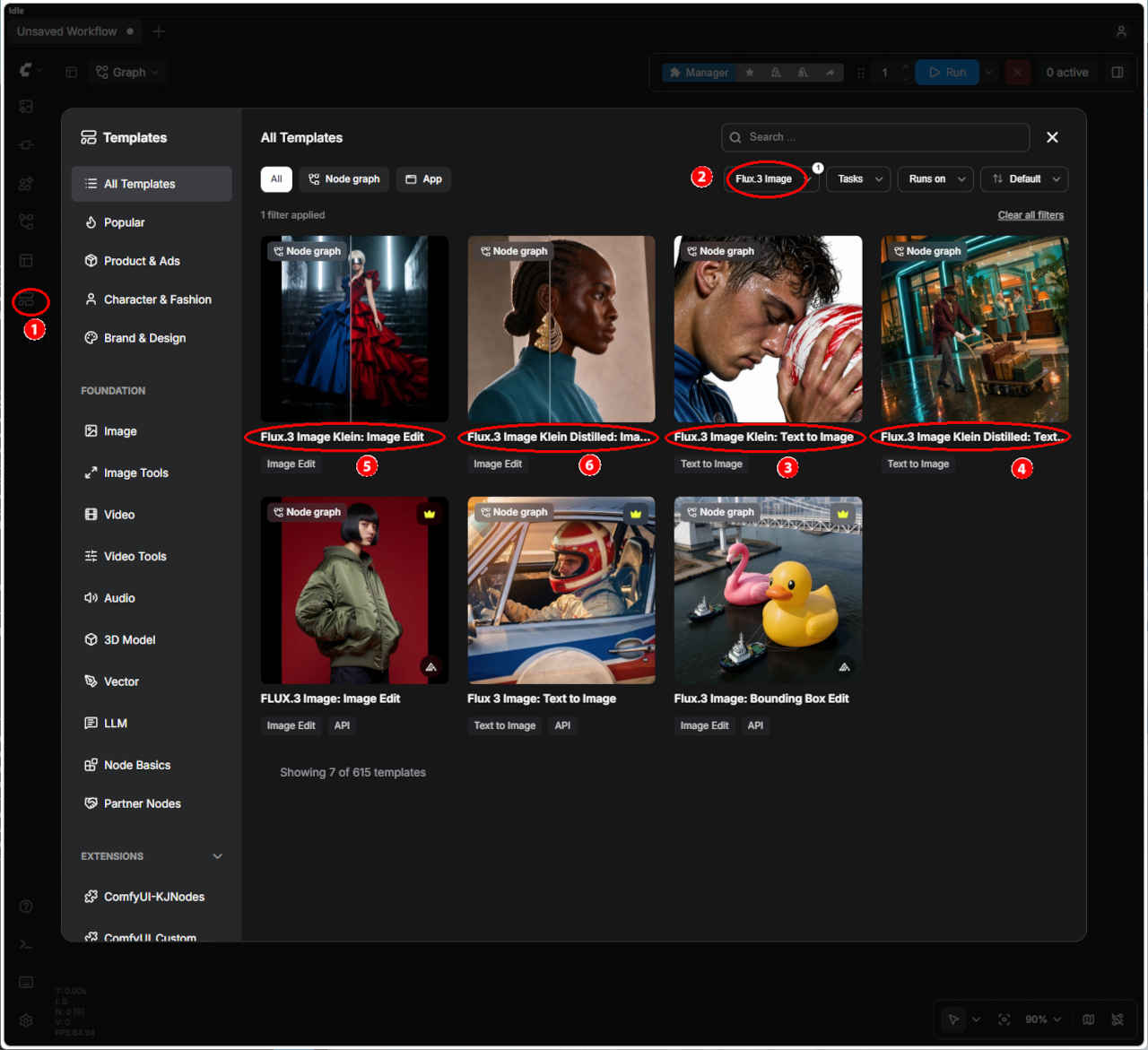 | ① 左端のメニューから「Template」を選択 ②「FLUX3 Image」を入力する ・表示された一覧からワークフローを選ぶ ③「image_flux3_klein_t2i: Text to Image」 ④「image_flux3_klein_image_edit: Image Edit」 ⑤「image_flux3_klein_distilled_t2i: Text to Image(蒸留版)」 ⑥「image_flux3_klein_distilled_image_edit: Image Edit(蒸留版)」 ・ワークフローでエラーが発生する場合はモデルの配置を確認する |
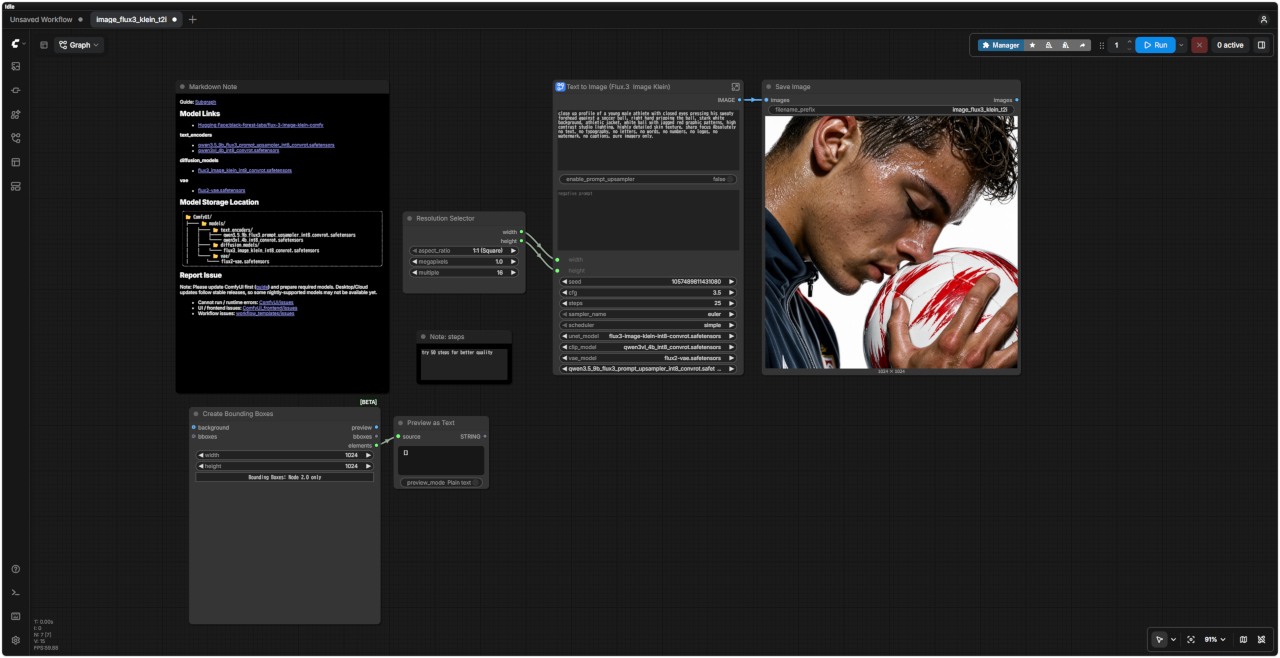
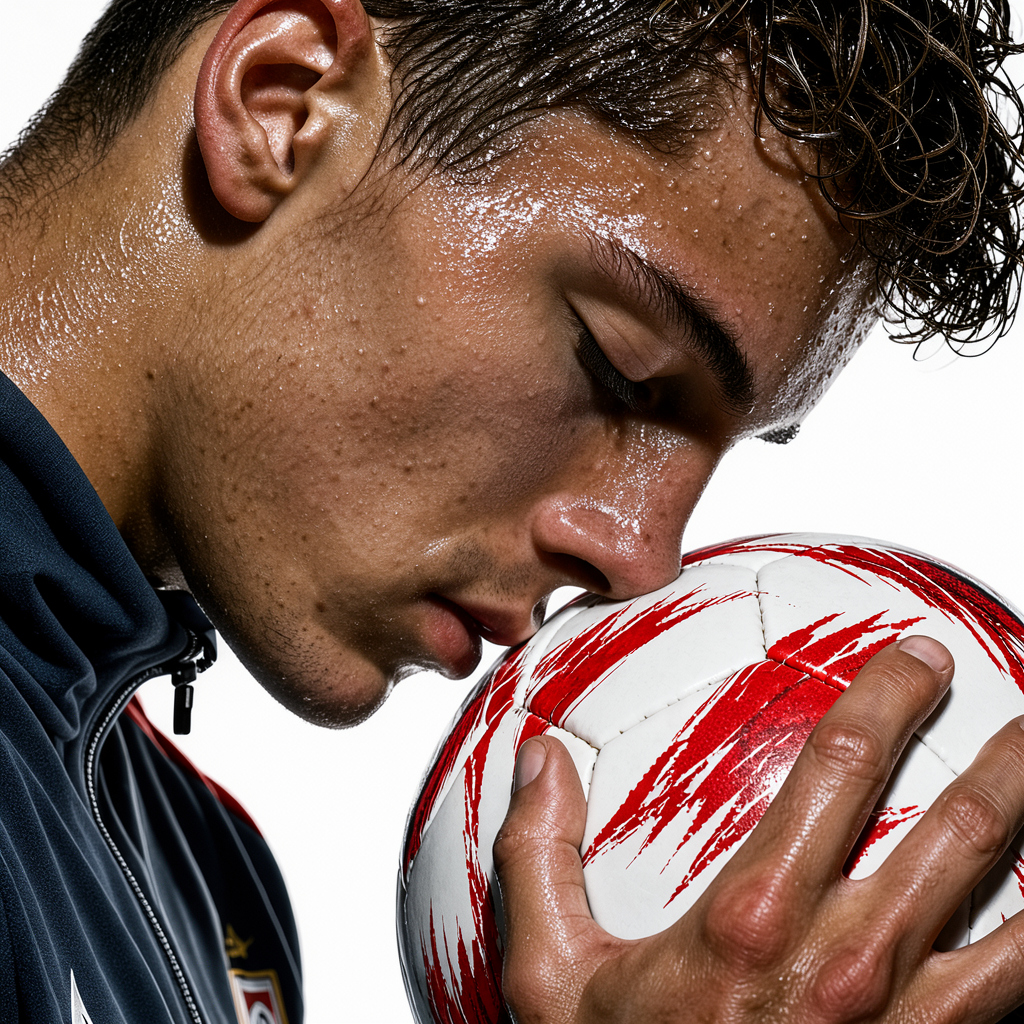
| Text to Image 生成画像 | |
| |
| プロンプト |
| close up profile of a young male athlete with closed eyes pressing his sweaty forehead against a soccer ball, right hand gripping the ball, stark white background, athletic jacket, white ball with jagged red graphic patterns, high contrast studio lighting, highly detailed skin texture, sharp focus Absolutely no text, no typography, no letters, no words, no numbers, no logos, no watermark, no captions, pure imagery only. |
| 目を閉じた若い男性アスリートの横顔のクローズアップ。汗をかいた額をサッカーボールに押し当て、右手でボールをしっかりと掴んでいる。背景は真っ白。アスリート用ジャケットを着用。サッカーボールは白地に赤いギザギザの模様が入っている。コントラストの強いスタジオライティング。肌の質感まで精細に描写され、ピントは鮮明に合っている。文字、タイポグラフィ、数字、ロゴ、透かし(ウォーターマーク)、キャプションなどは一切含まない、純粋な画像のみ。 |
| プロンプト |
| change the dress color to red |
| ドレスの色を赤に変更する |
| 入力画像 | 生成画像 | FLUX3 Image Edit ワークフロー |
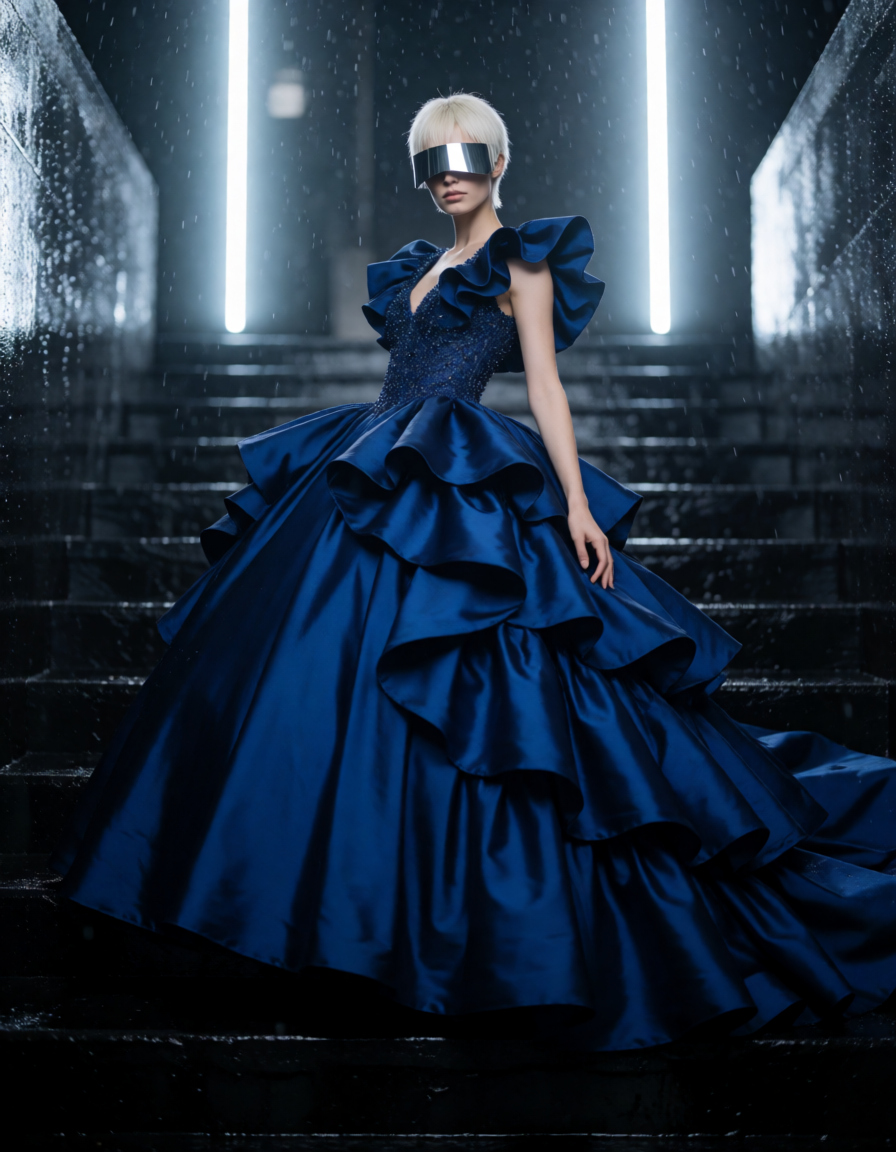 fashion_portrait_blue_silk_gown_vis.png | 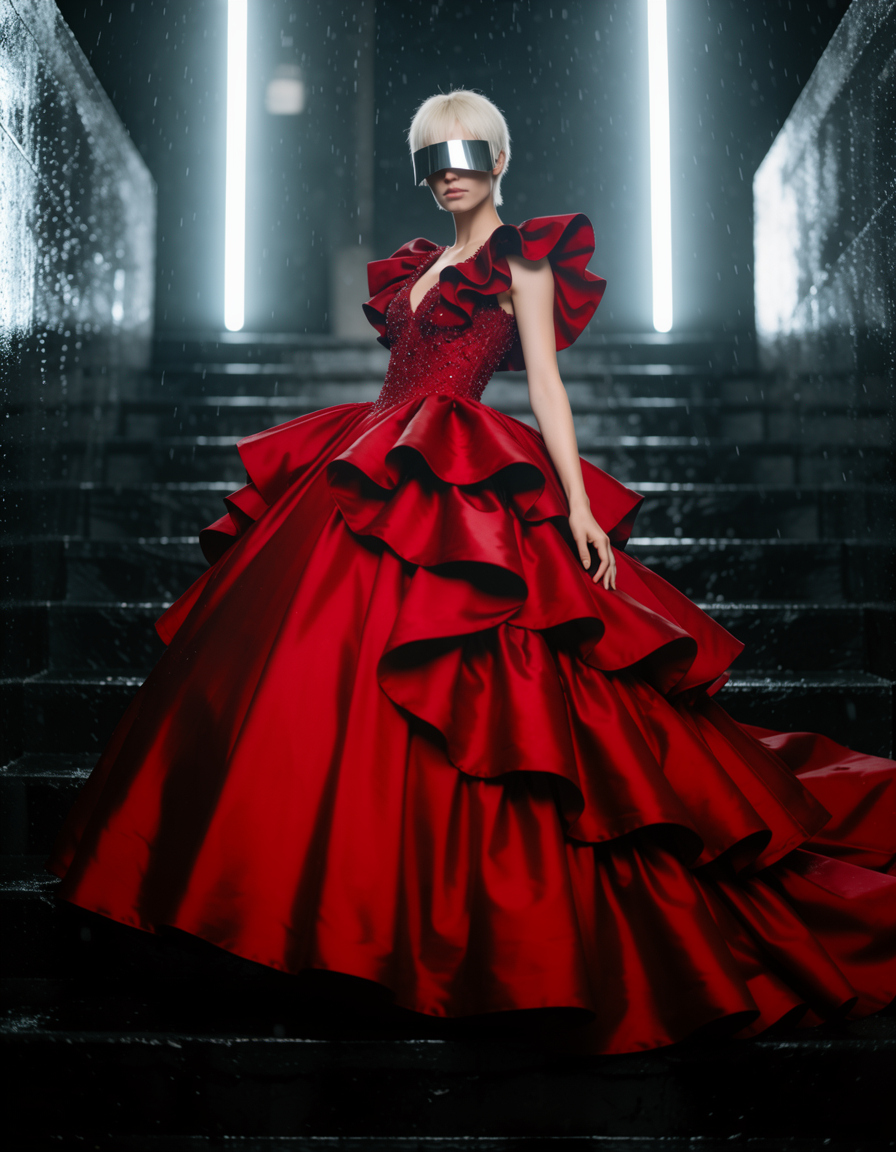 | 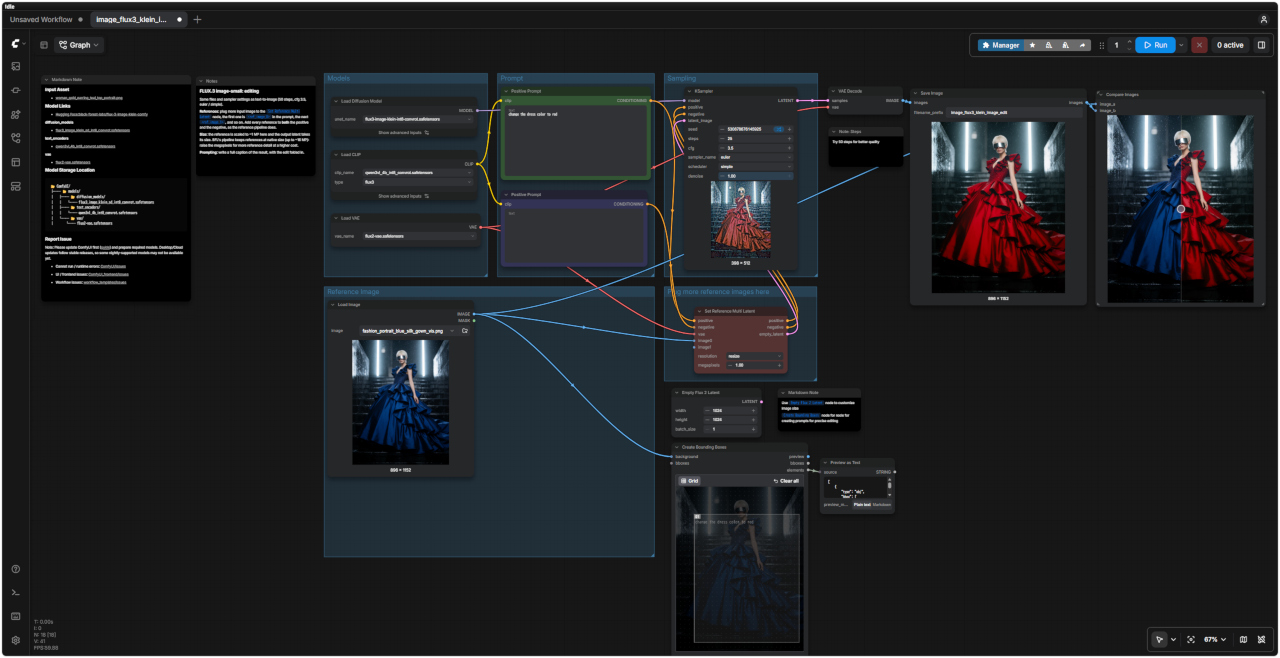 「FLUX3/」image_flux3_klein_image_edit.json |
| FLUX.3 編集(画像編集) | |
| ファイルおよびサンプラーの設定は、テキストから画像を生成する場合(Text-to-Image)と同じです(50ステップ、CFG 3.5、Euler / Simple) | |
| 参照画像(リファレンス) | 「Set Reference Multi Latent」ノードに複数の入力画像を追加します。プロンプト内では、最初の画像が `<ref_image_0>`、次が `<ref_image_1>`……という順序で指定されます。参照パイプラインの仕様に従い、各参照画像をポジティブプロンプトとネガティブプロンプトの両方に追加してください。 |
| サイズ | ここでは参照画像が約1メガピクセル(MP)にスケーリングされ、出力されるLatent(潜在表現)もそのサイズに合わせられます。BFLのパイプラインでは、参照画像は元のサイズ(最大約16MP)のまま保持されます。メガピクセル数を増やすことで、より詳細な参照が可能になりますが、その分コスト(計算負荷)も増加します。 |
| プロンプト | 編集内容を反映させた、結果全体を表す詳細なキャプション(説明文)を記述してください。 |
| ノード | |
| 「Empty Flux 2 Latent」ノード | 画像サイズをカスタマイズする場合 |
| 「Create Bounding Boxes」ノード | 精密な編集を行うためのプロンプトを作成する場合 |
| プロンプト | 生成画像 |
| A cinematic, Dutch angle night shot of a retro hotel entrance illuminated by neon cyan and warm orange lights. A bellhop in uniform pulls a gold luggage cart with suitcases across a wet sidewalk. Inside the brightly lit, teal-toned glass lobby, two women in vintage uniforms stand near a wooden desk alongside tropical plants and a seated figure. The scene features a moody, stylized teal-and-orange color palette with strong neon reflections. Absolutely no text, no typography, no letters, no words, no numbers, no logos, no watermark, no captions, pure imagery only. |  |
| ネオンシアンと温かみのあるオレンジのライトで照らされたレトロなホテルの入り口を、映画のようなダッチアングルで夜景に捉えた写真。制服を着たベルボーイが、濡れた歩道をスーツケースを積んだ金色の荷物カートを引いている。明るく照らされたティール色のガラス張りのロビーでは、ヴィンテージの制服を着た2人の女性が、熱帯植物と座っている人物のそばにある木製のデスクの近くに立っている。このシーンは、強いネオンの反射を伴う、雰囲気のあるスタイリッシュなティールとオレンジのカラーパレットが特徴。テキスト、タイポグラフィ、文字、単語、数字、ロゴ、透かし、キャプションは一切なく、純粋なイメージのみ。 |
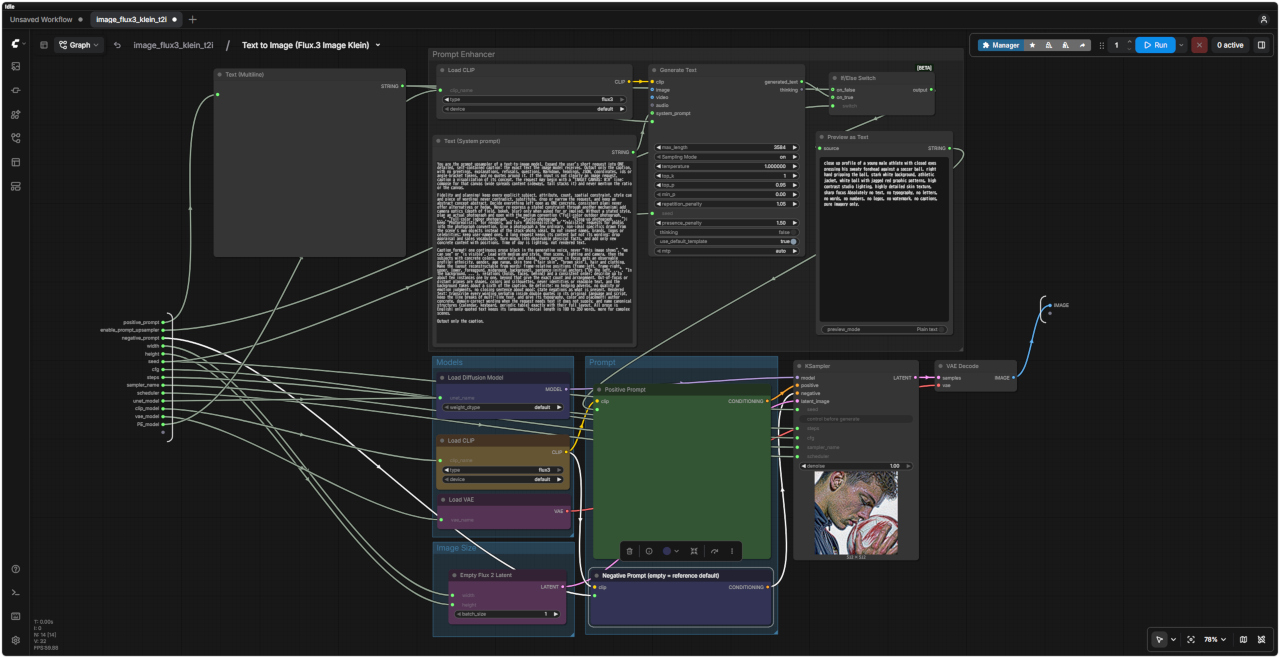
| FLUX3 Text toImage distilled ワークフロー | FLUX3 Text to Image distilled SubGraph |
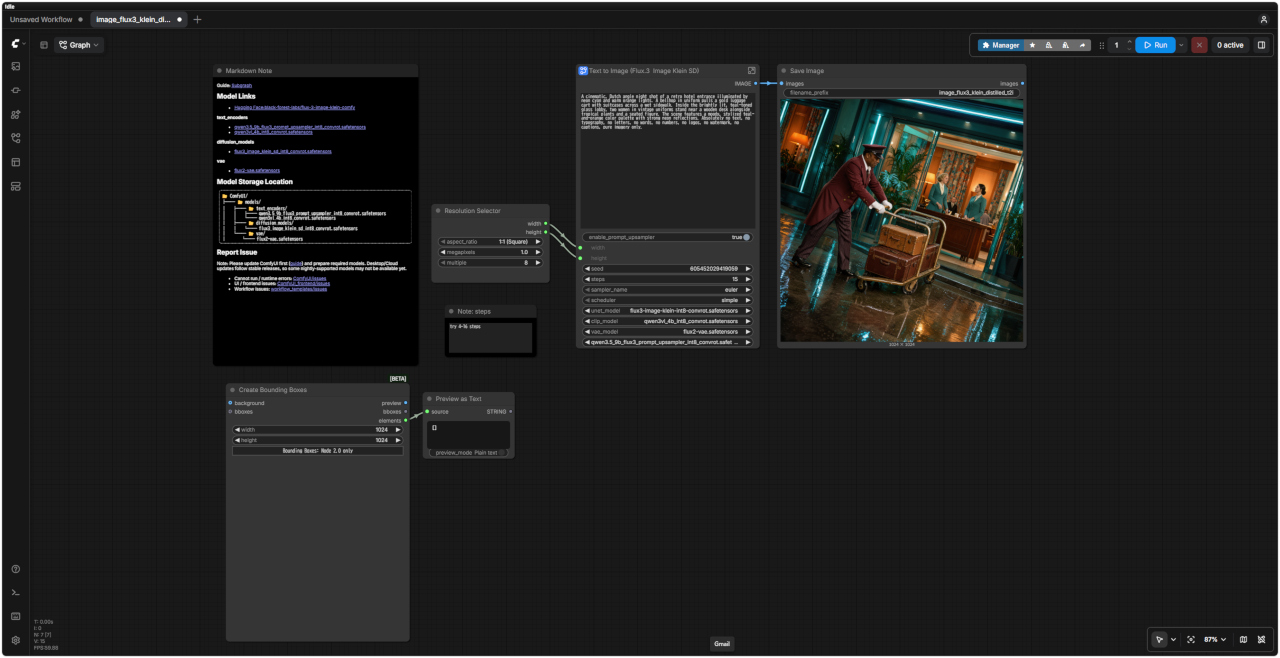 | 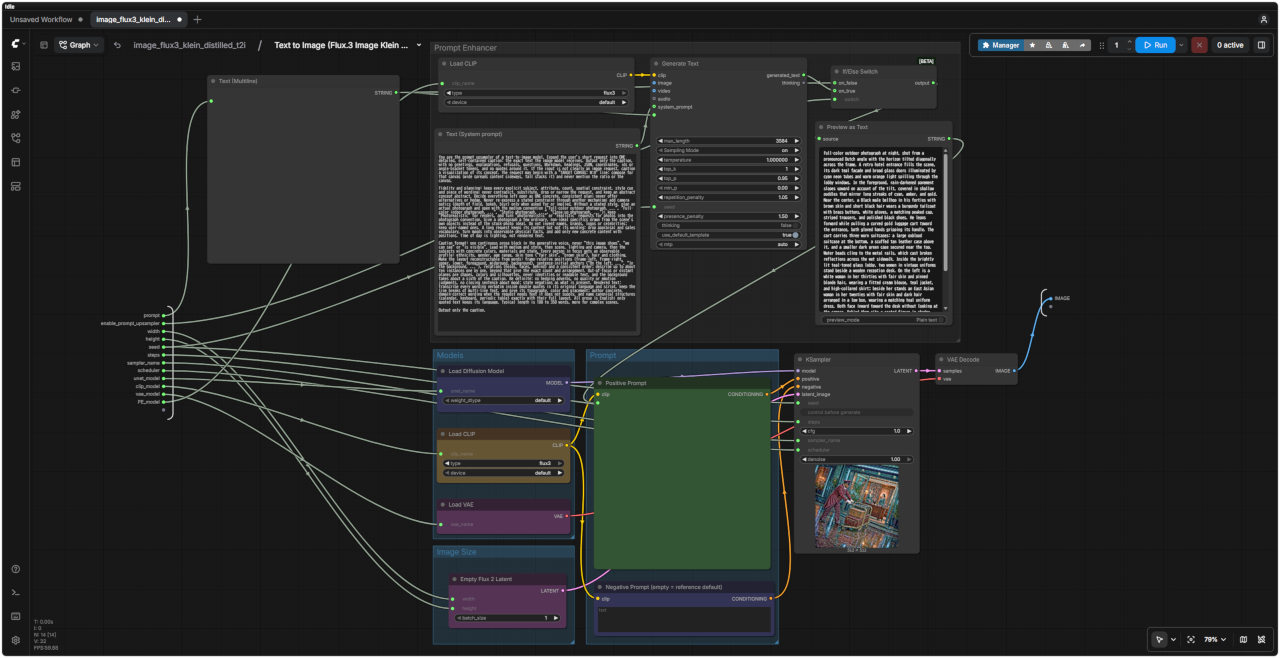 |
| 「FLUX3/」image_flux3_klein_distilled_t2i.json | |
| プロンプト |
| Replace the earring with a single large openwork metal statement earring, one bold curved pendant, intricate hollow metal cutouts, layered metal wires, polished warm bronze finish, structured artistic shape, keep it attached to the correct ear position, match the character's existing lighting, shadows and skin tone, no pearls, no pearl beads, no scattered small beads. |
| 既存のイヤリングを、大ぶりで透かし細工が施されたメタル製のステートメントイヤリングに差し替えてください。大胆な曲線を描くペンダント状のデザインで、精巧な透かし彫りや、幾重にも重なる金属ワイヤーを取り入れたものにしてください。仕上げは光沢のある温かみのあるブロンズ調とし、構築的で芸術的なフォルムに仕上げます。正しい耳の位置に配置し、キャラクターの既存のライティング、影、肌のトーンと自然に調和させてください。パールやパールビーズ、あるいは散りばめられた小さなビーズは一切使用しないでください。 |
| 入力画像 | 生成画像 | FLUX3 Image Edit ワークフロー |
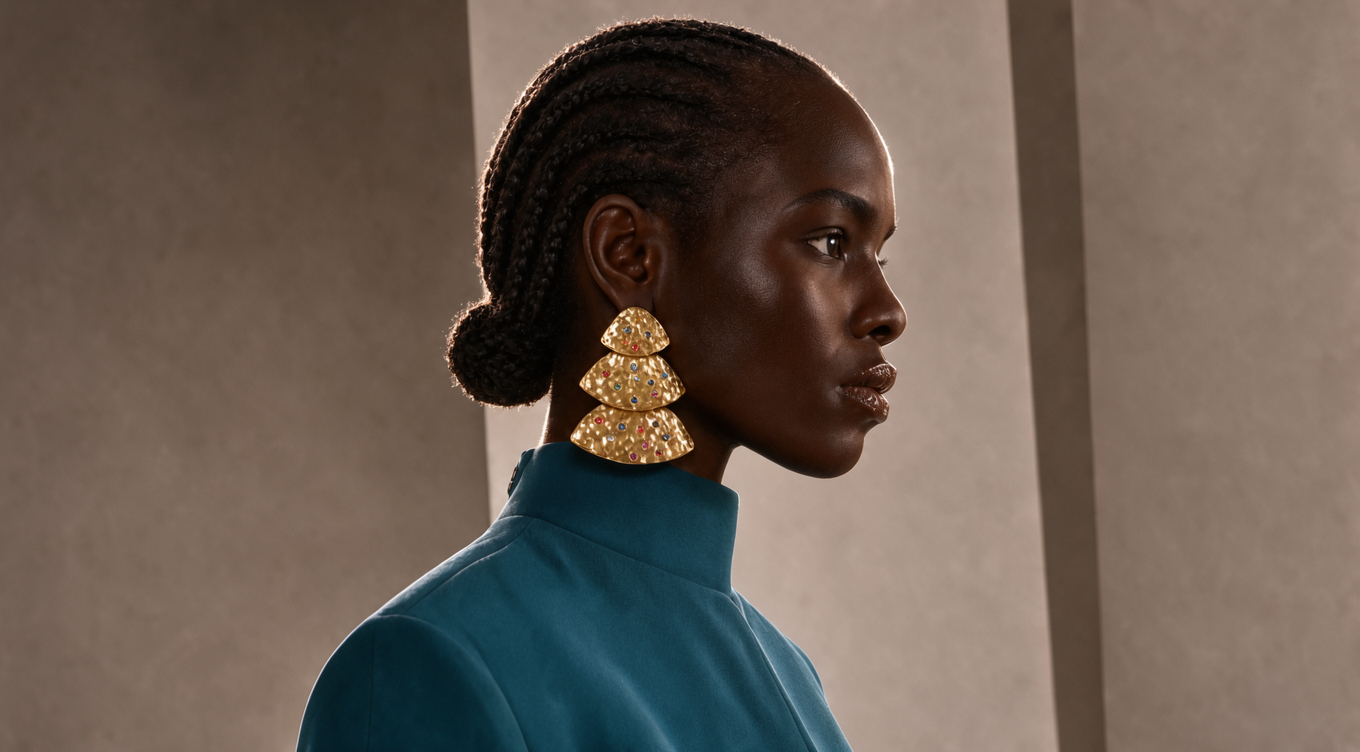 fashion_portrait_blue_silk_gown_vis.png | 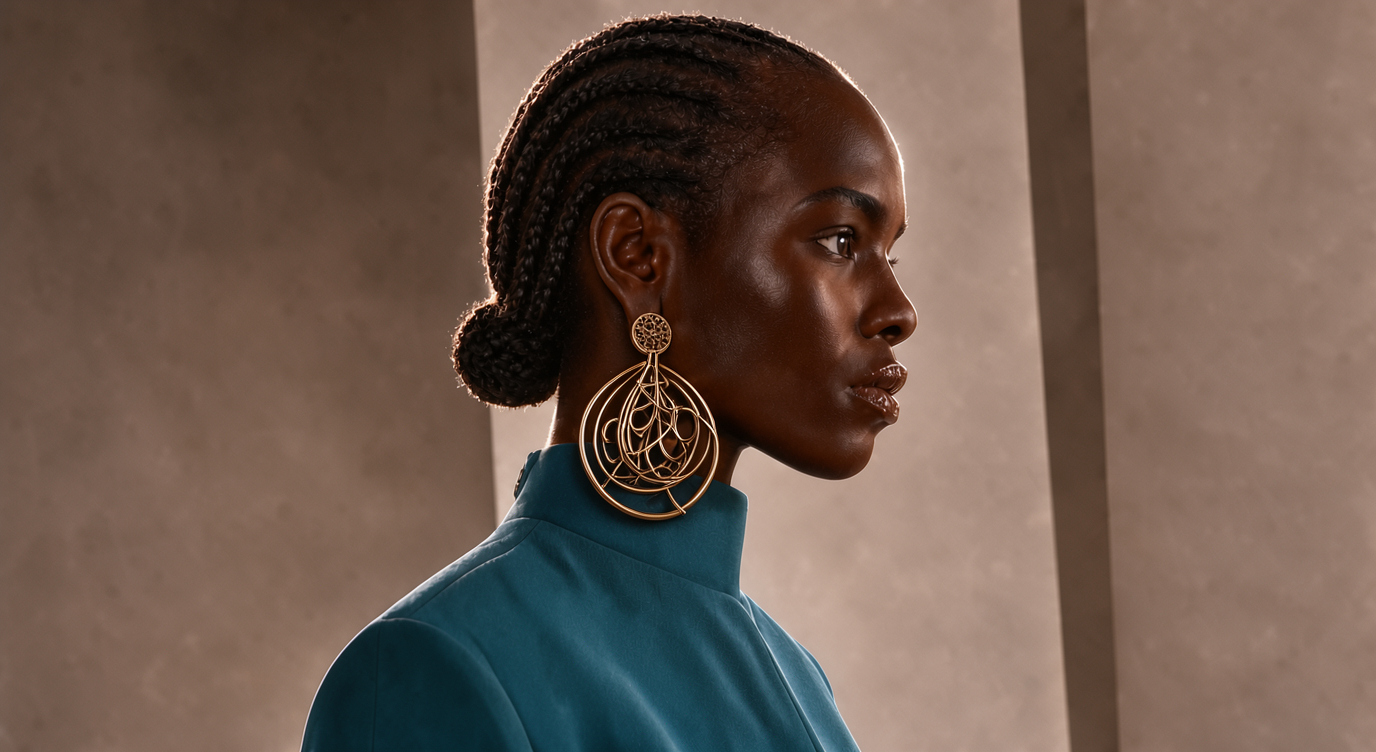 | 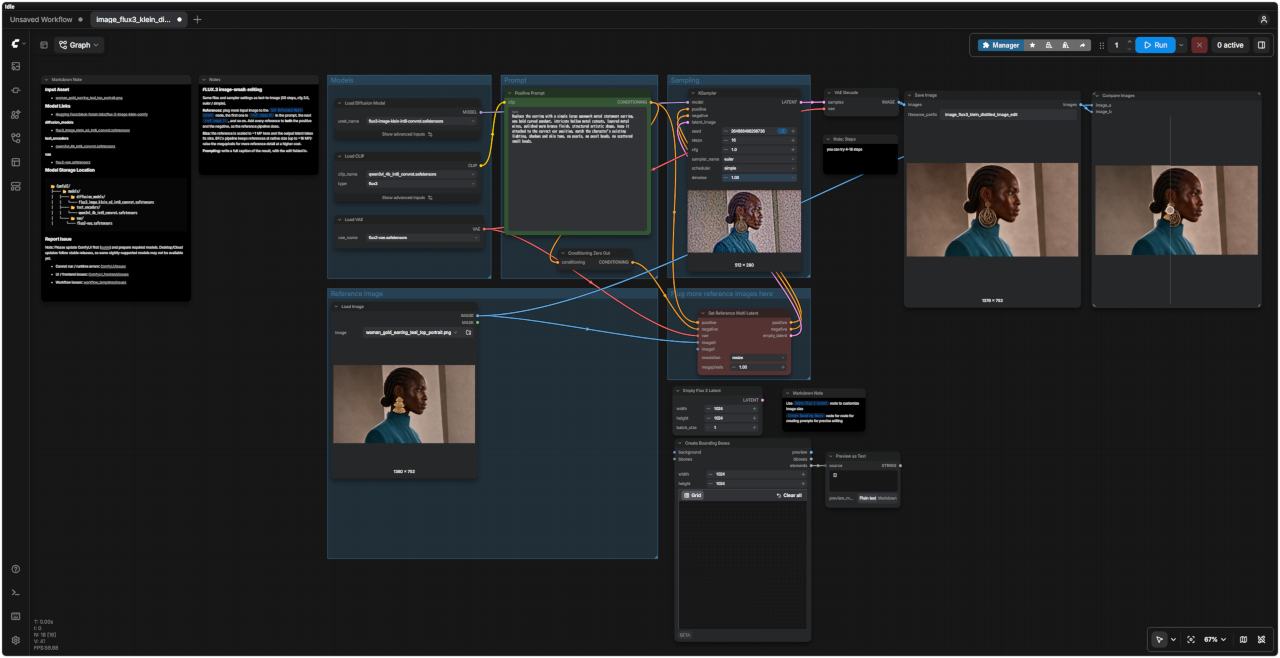 「FLUX3/」image_flux3_klein_distilled_image_edit.json |
| 8500 FLUX3 Prompt Enhancer ワークフロー | 詳細 |
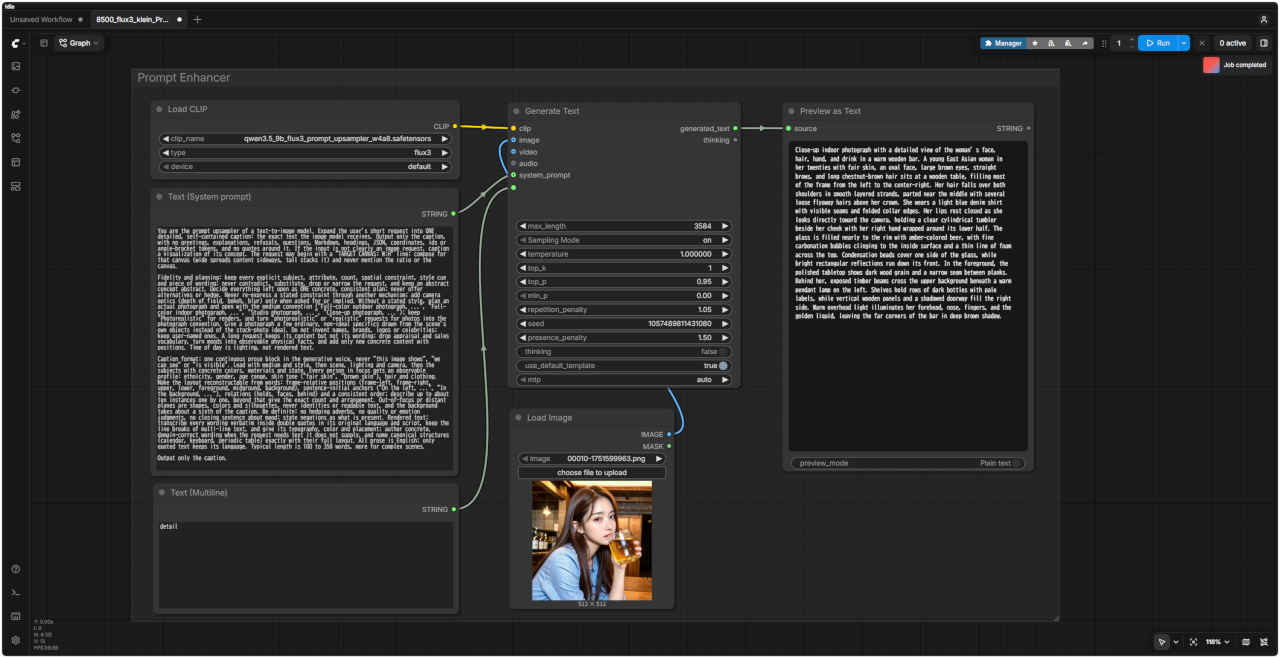 「FLUX3/」8500_flux3_klein_PromptEnhancer.json |
| プロンプト | 8501 FLUX3 Text to Image ワークフロー |
|
Close-up portrait of a young japanease woman in her 20s, natural makeup, soft expression. 85mm lens, f/1.4, shallow depth of field, bokeh background. Soft window light from the left, golden hour glow, warm skin tones. Cinematic, realistic, high detail, professional photography. NOT: oversaturated, anime style, low resolution, distorted face. | 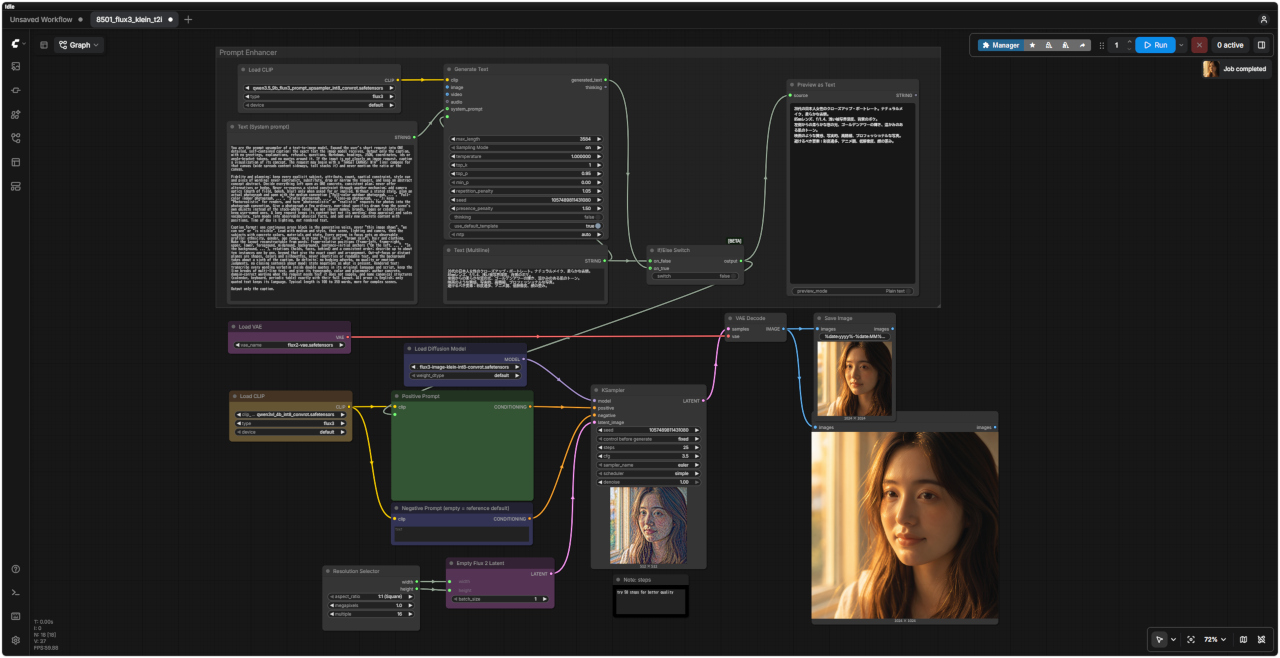 「FLUX3/」8501_flux3_klein_t2i.json |
|
20代の日本人女性のクローズアップ・ポートレート。ナチュラルメイク、柔らかな表情。 85mmレンズ、f/1.4、浅い被写界深度、背景のボケ。 左側からの柔らかな窓の光、ゴールデンアワーの輝き、温かみのある肌のトーン。 映画のような質感、写実的、高精細、プロフェッショナルな写真。 避けるべき要素:彩度過多、アニメ調、低解像度、顔の歪み。 |
| 日本語・エンハンサーなし | 日本語・エンハンサーあり | 英語・エンハンサーなし | 英語・エンハンサーあり |
| &ref(): File not found: "8501_2026-10-19_00005_m.jpg" at page "ComfyUI20"; | &ref(): File not found: "8501_2026-10-19_00006_m.jpg" at page "ComfyUI20"; | &ref(): File not found: "8501_2026-10-19_00007_m.jpg" at page "ComfyUI20"; | &ref(): File not found: "8501_2026-10-19_00008_m.jpg" at page "ComfyUI20"; |
| プロンプト |
| change the dress color to red |
| ドレスの色を赤に変更する |
| 入力画像 | 生成画像 | FLUX3 Image Edit ワークフロー |
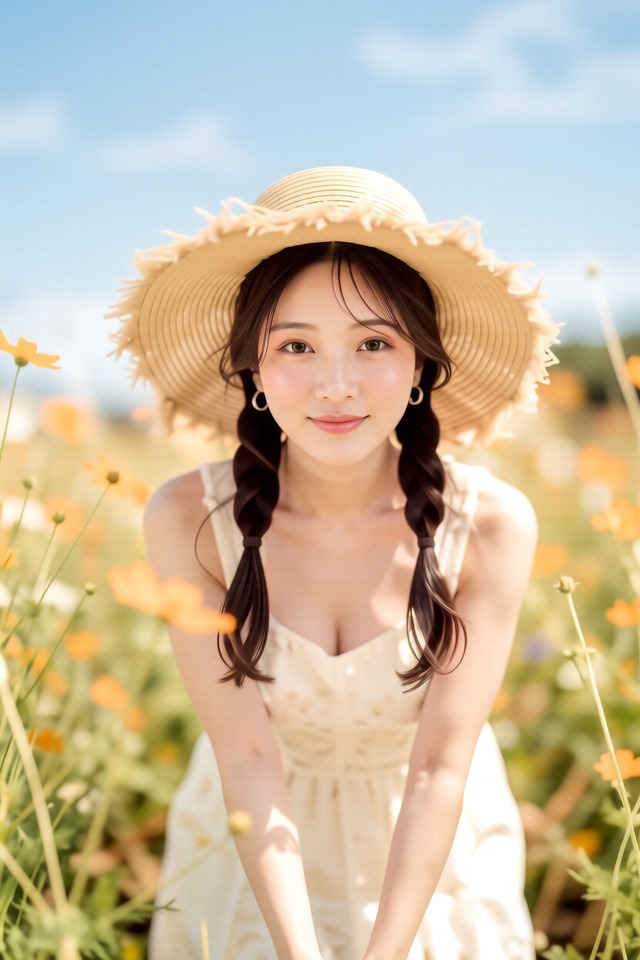 | 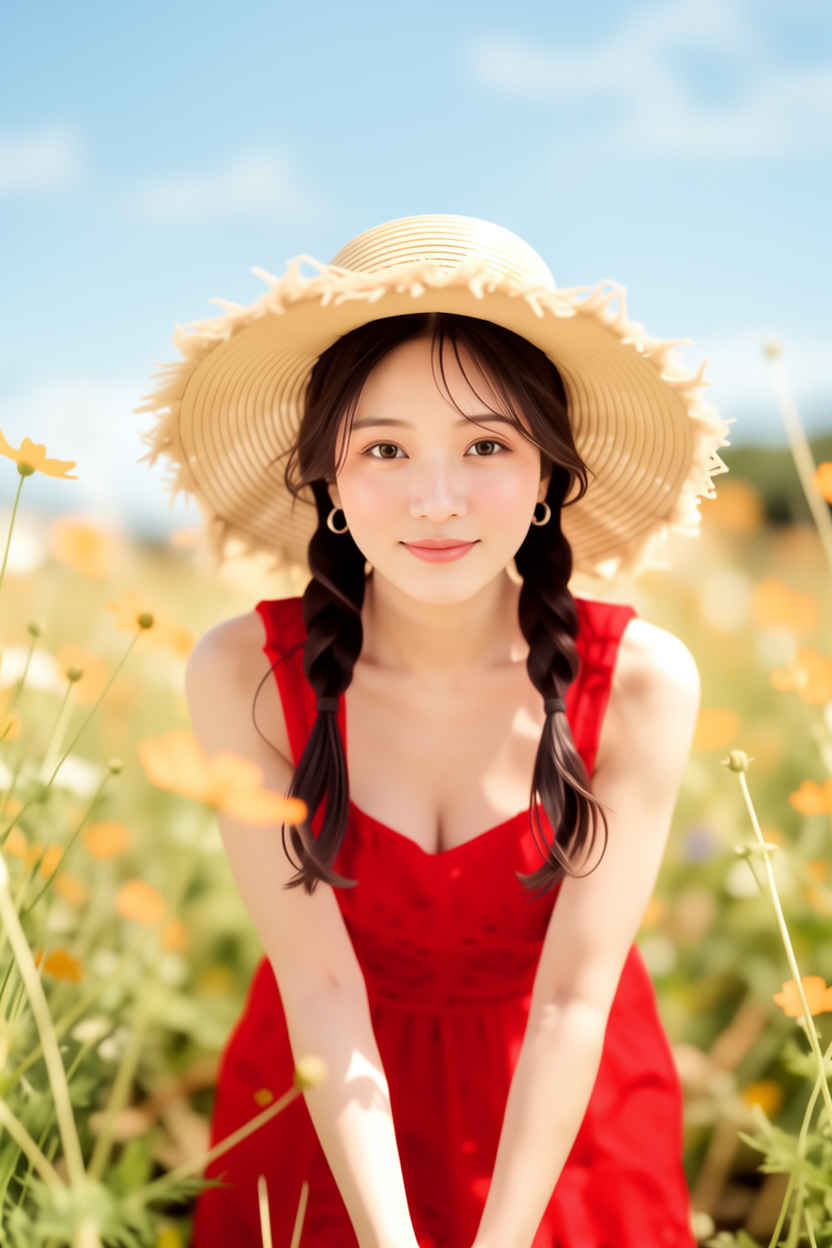 | 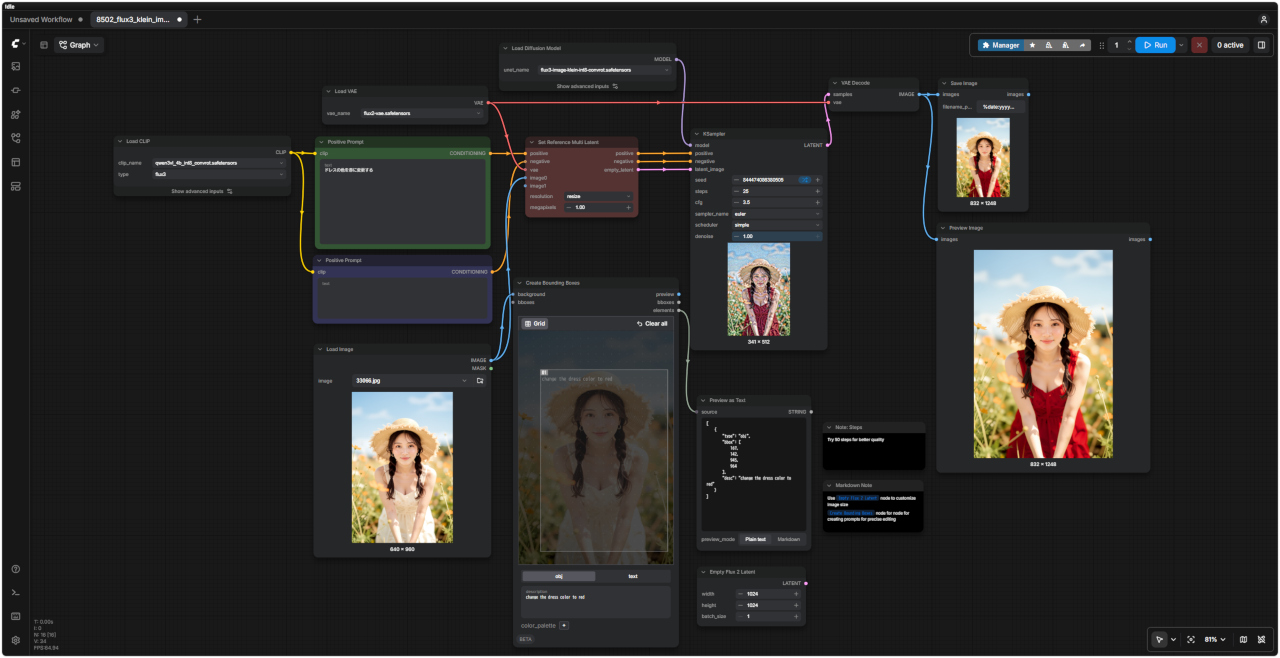 「FLUX3/」8502_flux3_klein_image_edit.json |
| プロンプト | 8501 FLUX3 Text to Image distille ワークフロー |
|
Close-up portrait of a young japanease woman in her 20s, natural makeup, soft expression. 85mm lens, f/1.4, shallow depth of field, bokeh background. Soft window light from the left, golden hour glow, warm skin tones. Cinematic, realistic, high detail, professional photography. NOT: oversaturated, anime style, low resolution, distorted face. | 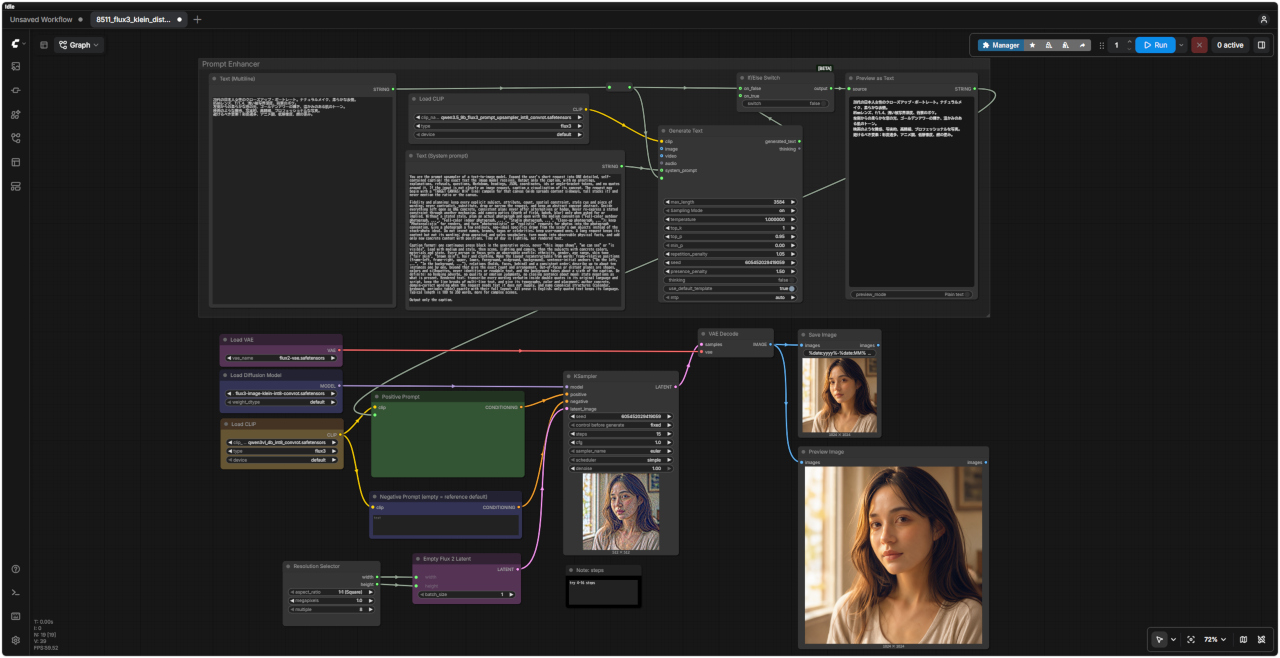 「FLUX3/」8511_flux3_klein_distilled_t2i.json |
|
20代の日本人女性のクローズアップ・ポートレート。ナチュラルメイク、柔らかな表情。 85mmレンズ、f/1.4、浅い被写界深度、背景のボケ。 左側からの柔らかな窓の光、ゴールデンアワーの輝き、温かみのある肌のトーン。 映画のような質感、写実的、高精細、プロフェッショナルな写真。 避けるべき要素:彩度過多、アニメ調、低解像度、顔の歪み。 |
| 日本語・エンハンサーなし | 日本語・エンハンサーあり | 英語・エンハンサーなし | 英語・エンハンサーあり |
| &ref(): File not found: "8511_2026-10-19_00001_m.jpg" at page "ComfyUI20"; | &ref(): File not found: "8511_2026-10-19_00002_m.jpg" at page "ComfyUI20"; | &ref(): File not found: "8511_2026-10-19_00003_m.jpg" at page "ComfyUI20"; | &ref(): File not found: "8511_2026-10-19_00004_m.jpg" at page "ComfyUI20"; |
| プロンプト |
| change the dress color to red |
| ドレスの色を赤に変更する |
| 入力画像 | 生成画像 | FLUX3 Image Edit distilled ワークフロー |
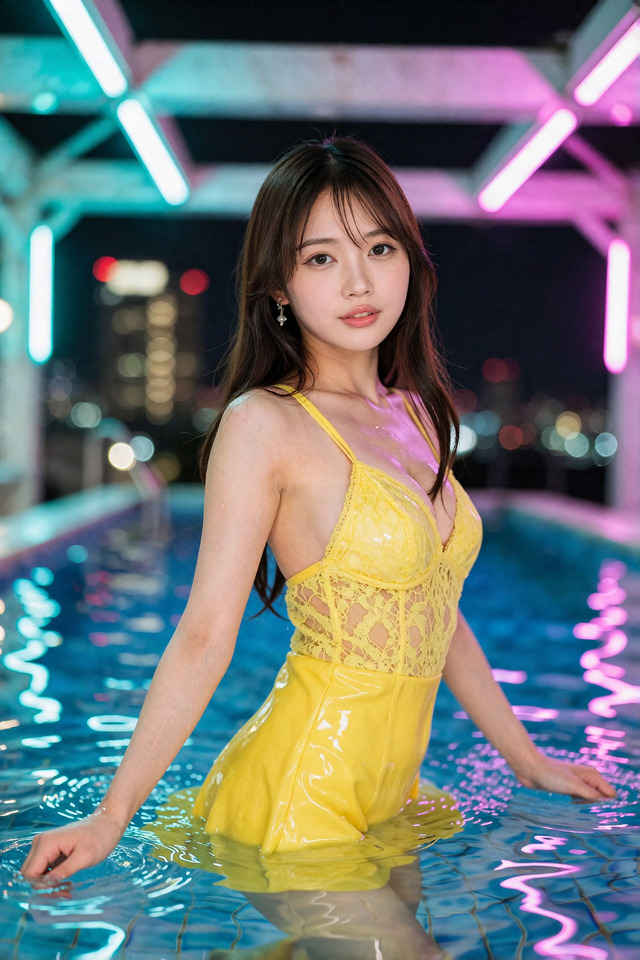 | 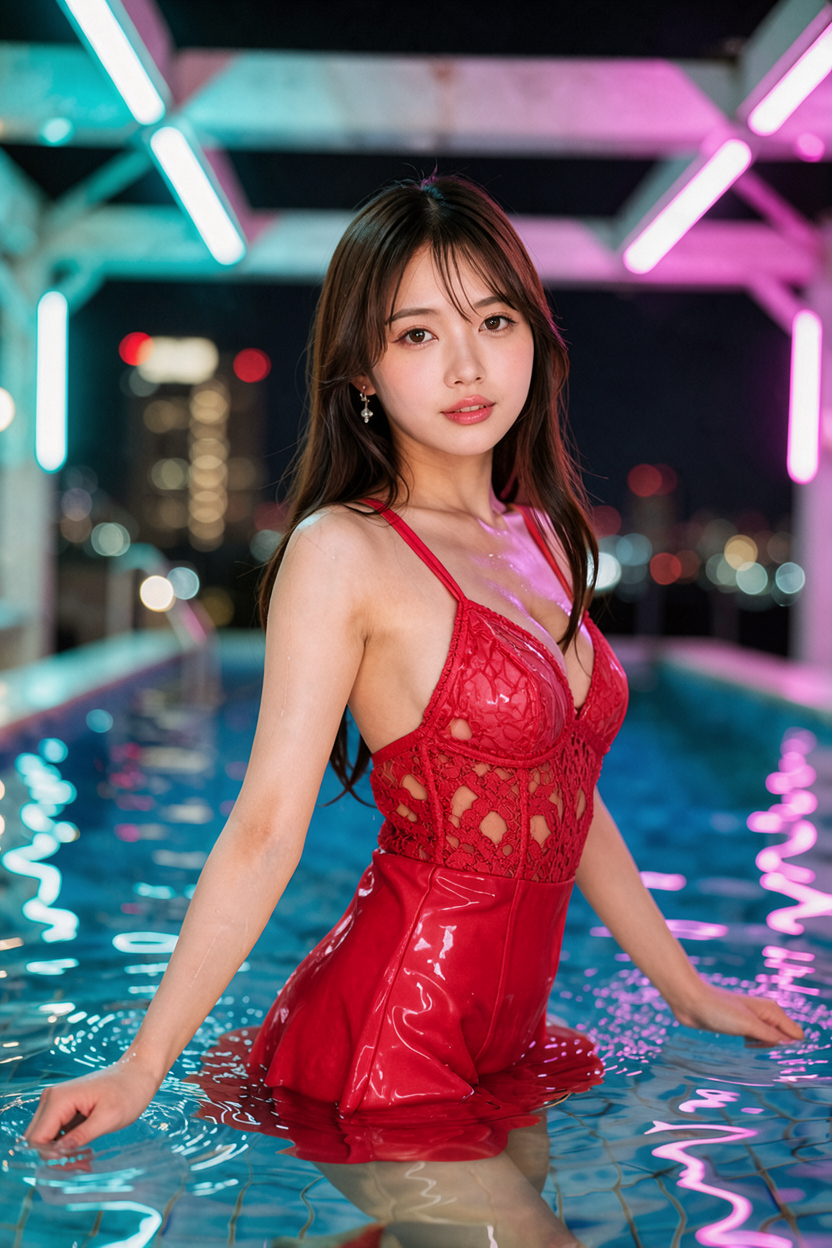 | 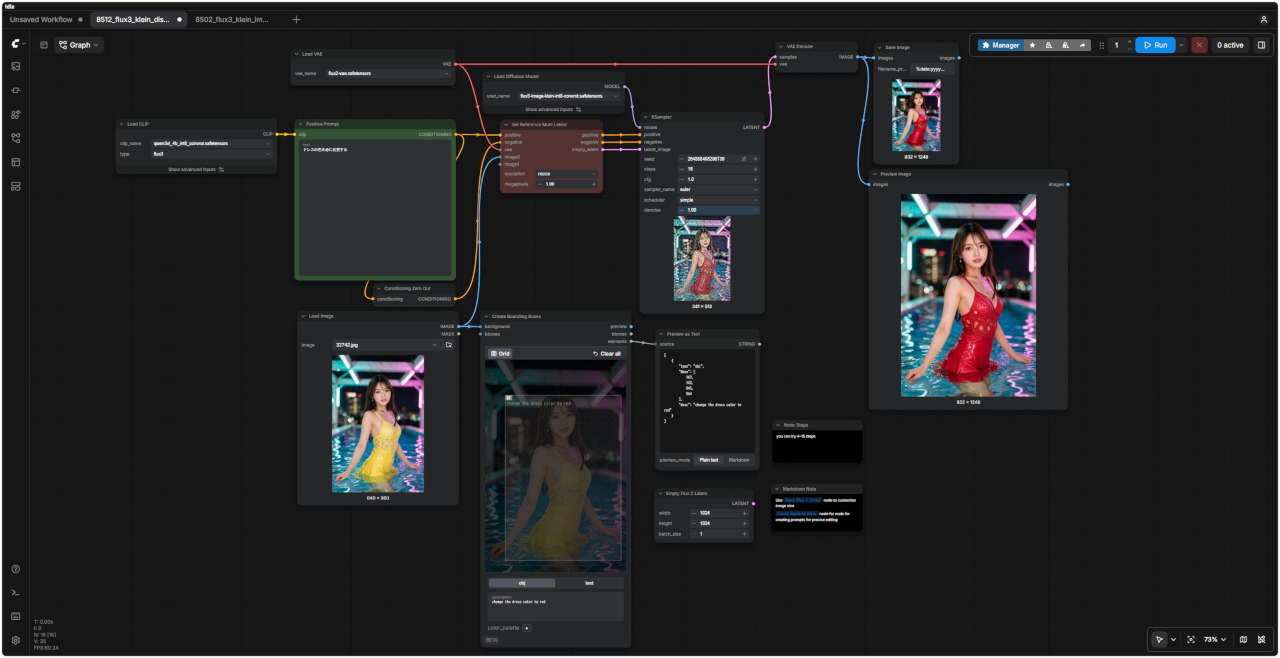 「FLUX3/」8512_flux3_klein_distilled_image_edit.json |